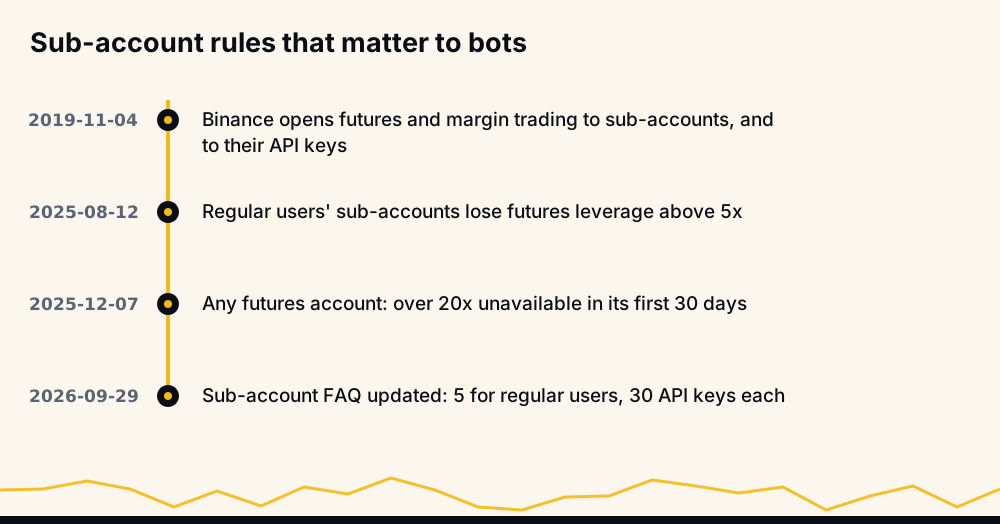
A Binance sub-account is a second account inside your own, created and funded from your main (master) account. For a trading bot it is the cleanest container: the bot's API key belongs to the sub-account, so it can reach only the money you moved there, its positions never mix with your manual trades, and transfers back are free and instant. The price is leverage: since 12 August 2025 a regular user's sub-account is capped at 5x on futures.
This guide covers what a sub-account is, how many you can open, the setup in the order that avoids errors, and what a sub-account does and does not protect. Every Binance rule quoted here comes from Binance's own pages, with their update dates, so you can check them yourself.
What is a Binance sub-account?
Binance describes the feature in its Sub-Account Functions FAQ (updated 2026-09-29). A sub-account has its own balances, its own orders and positions, and its own API keys. The master account sits above it and controls the money.
Four rules from that FAQ matter most for a bot:
- Only the master moves money out. Asked whether a sub-account can withdraw, Binance answers: "No, only the master account can manage asset transfers." Transfers to third-party accounts are not supported.
- Transfers inside the family cost nothing. "Click [Transfer] to move assets between the master account and sub-accounts instantly without any fees."
- Fees are shared. Your fee tier "will be defined by the aggregate trading volume of all sub-accounts and master accounts", so a bot's volume on a sub-account still counts toward your VIP level.
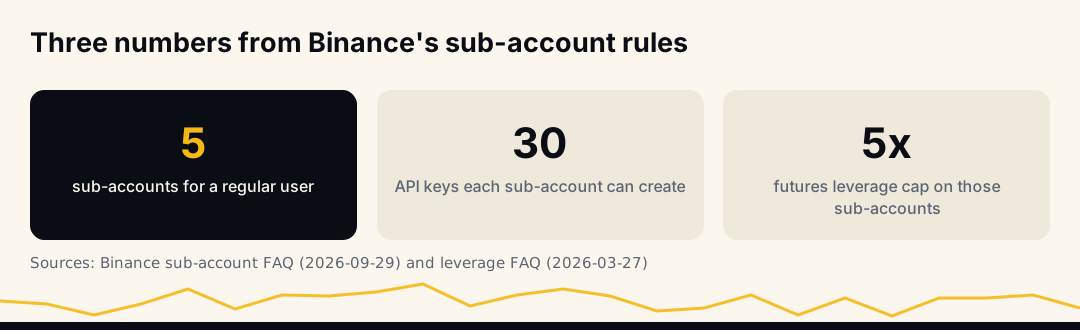
- Each sub-account has its own keys. "Each sub-account can create up to 30 API Keys."
So a sub-account is a separate wallet with a lock on the outside door. Money can only leave it through the master account, which the bot never touches.
Why run a trading bot on a sub-account?
Most people who ask about sub-accounts already have a working main account with spot holdings, manual trades or savings in it. A bot on the same account shares everything. A sub-account splits it apart, which helps in five concrete ways.
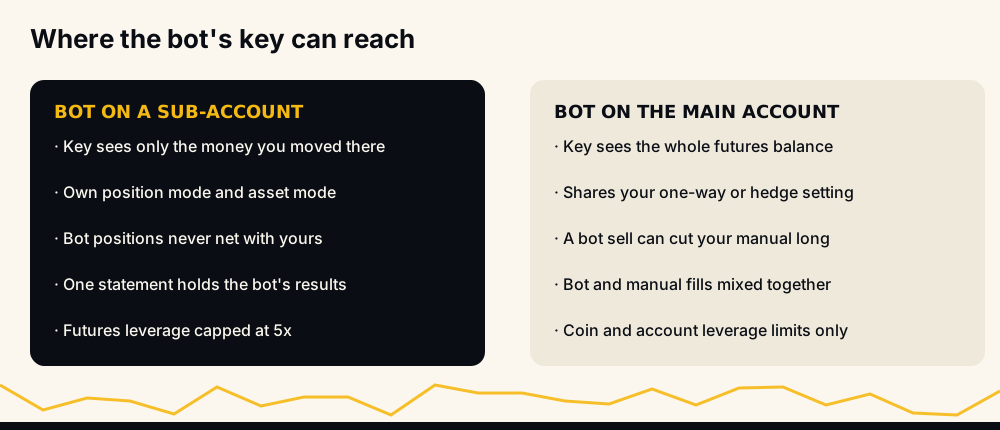
- The bot can only lose what you moved. A key on the sub-account sees only the sub-account's wallets. If you move 1,000 USDT there, a bug, a bad setting or a stolen key can reach those 1,000 USDT and nothing on the master.
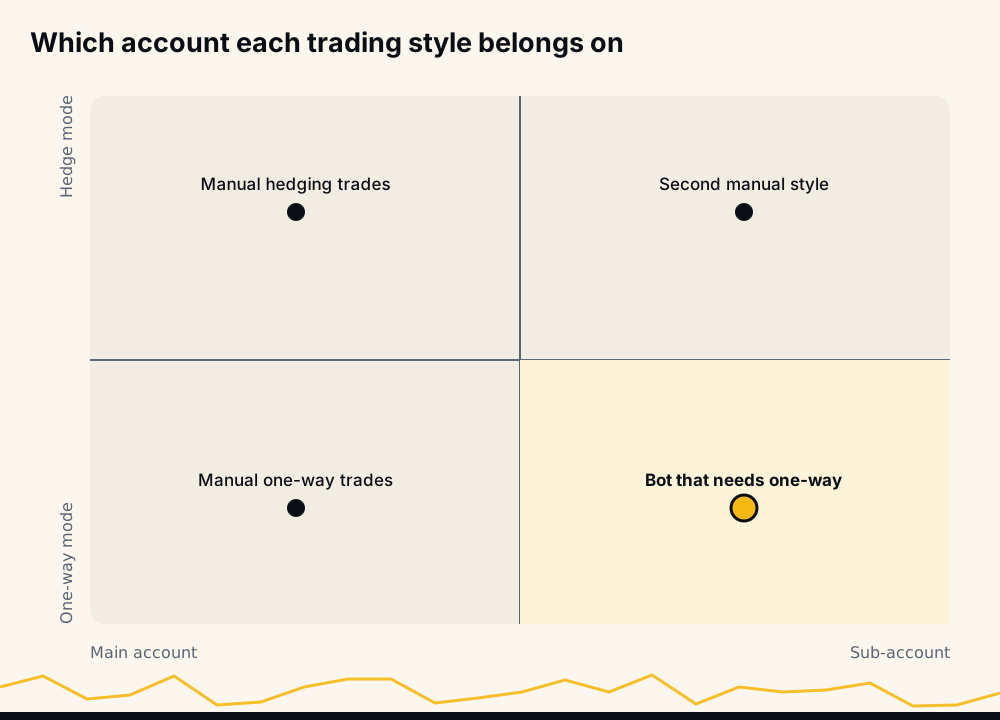
- Your manual style stays yours. Binance's position mode (one-way or hedge) and asset mode (single-asset or Multi-Assets) are account-wide settings. Many bots need one-way mode; if you like hedge mode for your own trades, two accounts let both work.
- Positions do not collide. In one-way mode an account holds one position per coin. If you are manually long BTC and the bot sells BTC, it reduces your position. On separate accounts that cannot happen.
- Results are readable. Order history, funding and fees on the sub-account belong to the bot alone, so judging it means reading one statement.
- A margin call stays local. On cross margin a losing position draws on the whole futures balance of its account. With the bot on a sub-account, the only balance it can draw on is the one you gave it.
How many sub-accounts can you have on Binance?
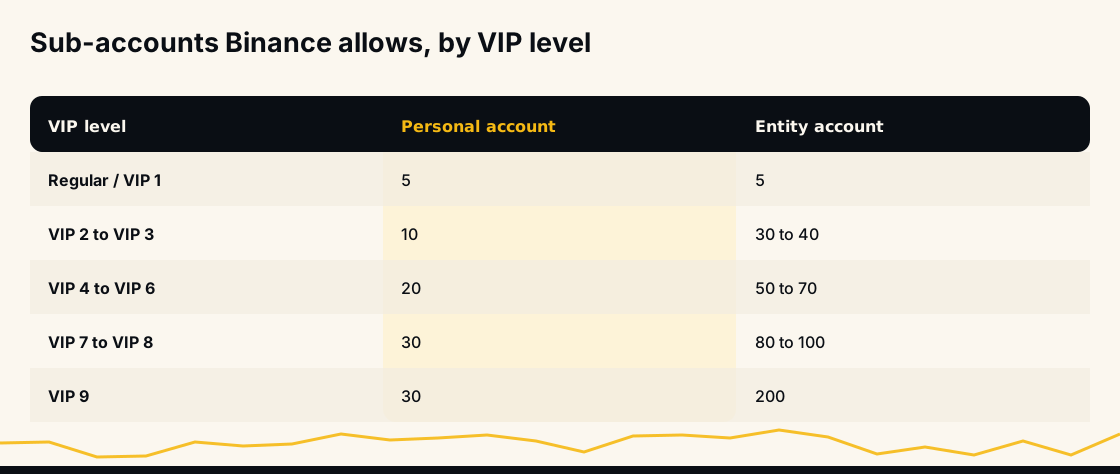
Regular users are "limited to five sub-accounts", says the FAQ; above that, the number depends on the master account's VIP level and on whether the account is an entity or a person. A personal account at VIP 2 or 3 gets 10, VIP 4 to 6 get 20, and VIP 7 to 9 get 30. Entity accounts reach 200 at VIP 9.
The same quota covers spot, margin and futures: Binance applies "the same limit" to all three. For most traders five is plenty. One for each bot, one for a manual hedge-mode style and one spare still leaves room.
Can you simply open two separate Binance accounts instead? That is the "can I have 2 Binance accounts" question in search results. Sub-accounts are Binance's own answer to it: several balances that hang off one verified account, managed from one login, with transfers between them that cost nothing.
How to create a Binance sub-account
The feature is open to "all Binance users who complete identity verification" and turn on two-factor authentication. The FAQ gives the path from the master account:
- Log in to the master account and open Profile, then Dashboard.
- Go to Sub Accounts, then Account Management, and click Create Sub Account.
- Choose how the sub-account signs in: a regular email, a virtual email, or a third-party custodian. A regular email has to be verified afterwards.
The choice in step 3 matters for a bot. Binance says "the virtual email cannot be used to log in to a sub-account" and that such accounts "can only be operated by the master account through API." That suits a fully scripted setup. If you want to open the futures screen, change position mode by hand and create the key in Binance's normal screens, a regular-email sub-account is the simpler choice. You can also let the master switch into a sub-account: by default "up to 20 sub-accounts" can be enabled for that switch login.
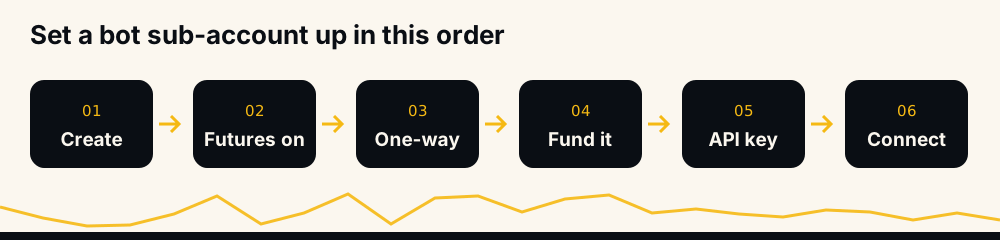
Open futures and set the account up before the key
Binance opened futures to sub-accounts in November 2019, and its announcement adds that "sub-account API keys can now also enable futures and margin trading functionality." A new sub-account still needs its own Futures account opened, so do these on the sub-account before you create its key:
- Open the Futures account. Activate USDⓈ-M Futures on the sub-account, the same one-time step as on any account. HafizeBot's key guide explains why the order matters: Binance cannot give the Futures permission to a key made before the Futures account exists.
- Choose the position mode. If your bot works in one-way mode, set it now, while the account is empty. Binance's hedge mode FAQ (updated 2026-01-21) is clear that "Position Mode cannot be adjusted while you have open positions or open orders." Hedge mode vs one-way mode explains what each does to a bot's orders.
- Choose the asset mode. Multi-Assets mode allows only cross margin. If the bot uses isolated margin, keep the sub-account in Single-Asset mode; Binance Multi-Assets mode has the detail.
Move funds into the sub-account's futures wallet
Money reaches a bot in two hops, and the second one is the one people forget.
- Master to sub-account. From the master's sub-account asset pages, use Transfer. The FAQ also lets the master deposit straight into a sub-account through the Deposit button on the Asset Management tab.
- Inside the sub-account, into USDⓈ-M Futures. Futures orders only see the USDⓈ-M Futures wallet. If the money arrived in the sub-account's spot or funding wallet, move it across. Skip this and every order fails with "Margin is insufficient", the error explained in Binance margin is insufficient (-2019).
How much to move is the real decision. Treat the amount as the most the bot may ever lose, because on cross margin it can. If you want the bot to grow with profits, leave them in; if you want a fixed budget, sweep gains back to the master from time to time.
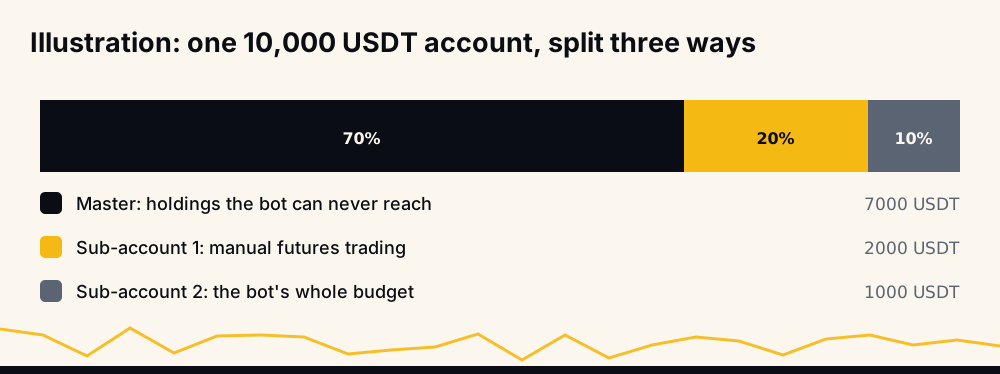
The split above is an illustration. The useful habit behind it is to size the bot's account first and only then choose its settings, so that the worst case of those settings fits inside it.
Create a futures-only API key for the sub-account
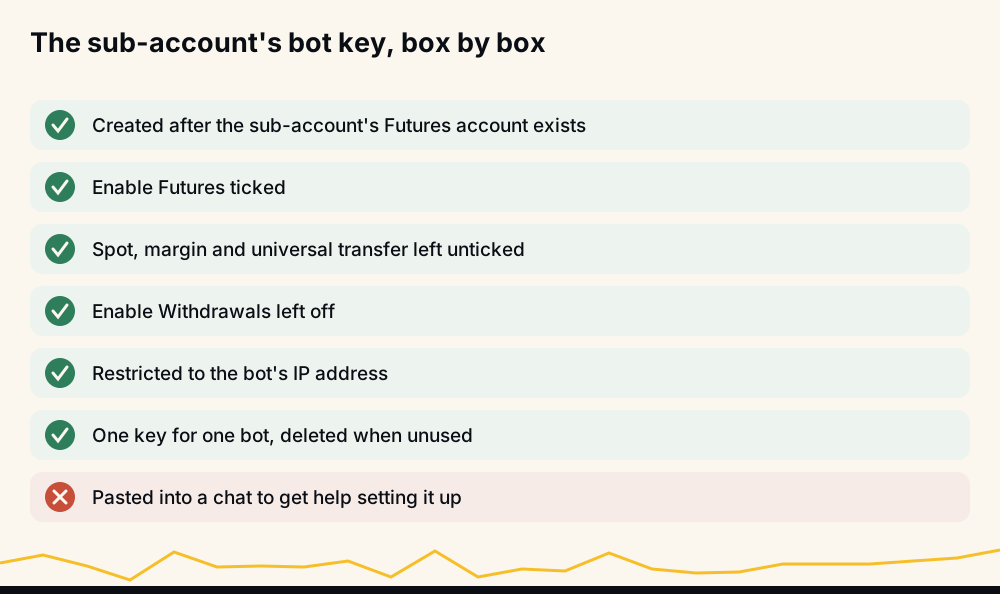
The FAQ sends you to API Management to create and edit sub-account keys. Whichever screen you use, the key should be built for one job:
- Enable Futures only. No spot, no margin, no universal transfer.
- Leave Enable Withdrawals off. A bot never needs it, and on a sub-account it cannot withdraw anyway, so ticking it adds risk for nothing.
- Restrict it to your bot's IP address. An IP-restricted key is useless to anyone who copies it from elsewhere.
- One key per bot. With 30 keys per sub-account there is no reason to share one, and a dedicated key can be deleted without breaking anything else.
How to create a Binance API key walks through the screens, and connecting a trading bot to Binance safely covers what to check before you paste a key anywhere.
The 5x leverage limit on Binance sub-accounts
This is the rule that surprises people after the setup works. Binance's leverage and margin FAQ (updated 2026-03-27) says: "Starting from 12 August 2025, leverage levels over 5x are not available to Futures Accounts created by regular users' sub-accounts."
Ask for more and Binance refuses the order with -4421, "Subaccounts are restricted from using leverage greater than 5x". The coin's own maximum does not matter here: 5x is the ceiling for every contract on that sub-account. The same FAQ adds a second, separate rule for new accounts: since 7 December 2025, leverage over 20x is not available "within the first 30 days of opening."
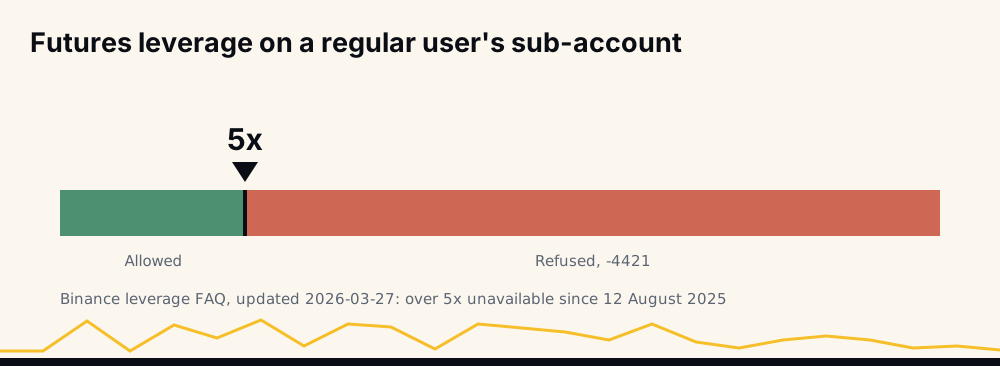
Does 5x hurt a bot? Less than it sounds, because the cap moves margin and leaves the loss at the stop where it was. A 1,000 USDT position with a 5% stop loses about 50 USDT plus fees at 5x or at 20x; at 5x it simply locks 200 USDT of margin instead of 50. The real cost is capacity: the sub-account carries fewer open positions per dollar. What leverage to use on crypto signals works through that arithmetic, and Binance futures leverage limits covers the bracket rules that can cap you even lower.
What a sub-account does not protect
A sub-account narrows what a key can reach. It does not make trading safer by itself.
- The bot can still lose the whole sub-account. On cross margin, one position without a working stop can draw down everything in that futures wallet. Isolated vs cross margin explains where each mode puts the limit.
- The master account is still the master key. Anyone who gets into the master can move money out of every sub-account. Two-factor authentication and a strong, unique password protect the master; the sub-account protects you from the bot's key.
- A leaked key with no IP restriction can still trade. It cannot withdraw, but it can open and close positions badly. Restrict the IP and delete keys you no longer use.
- Shared fee tier, shared limits. The FAQ says each sub-account's API order limits "are the same as the master account", but a fast bot can still hit its own rate limits; see Binance API rate limits.
How to get money out of a sub-account
Since a sub-account cannot withdraw, getting money out is a transfer back to the master, then a withdrawal from there if you want it off Binance. In practice:
- Close or reduce the bot's positions, or at least make sure what stays open keeps enough margin.
- In the sub-account, move USDT from USDⓈ-M Futures back to its spot wallet.
- From the master, transfer from the sub-account to the master. It is instant and free.
Closing a sub-account entirely is permanent. The FAQ says it needs no assets, no API keys and no open orders, gives the quota slot back, and the account "cannot be restored."
Using a sub-account with HafizeBot's autotrader
HafizeBot's autotrader runs on your own Binance account through a key you create, and a sub-account works the same way as a main account. Create the key on the sub-account with futures trading only and withdrawals off, then paste it on the website at hafizebot.com/app/keys, never in a chat; the step guide lists every box. The bot then trades only that sub-account's USDⓈ-M Futures wallet. Autotrading needs the account in one-way mode, which is one more reason a separate sub-account suits members who hedge by hand.
The 5x cap is handled for you. When Binance refuses a sub-account's leverage with -4421, the bot reads the cap from Binance's message, keeps it for that key, and enters later trades at that leverage instead of being refused again; the refused entry itself is not placed. Your own limits stay yours: /setLeverage, /setPositionSize, /setPositionLimit, /setStopLoss and /setMarginType decide what each trade can lose inside the sub-account.
The signals behind it are AI-generated, from a model that evaluates 240+ indicators, formulas and components. Every broadcast signal is scored on the live performance page, where September 2026 settled at 97.7% of 4,220 signals reaching target, with each missed signal counted against the rate.
Frequently asked questions
What is a Binance sub-account? It is an account created under your verified master account, with its own wallets, positions and API keys. Only the master can move money out of it, and transfers between master and sub-account are instant and free.
How many sub-accounts can I create on Binance? Regular users get five. Higher VIP levels raise the limit, up to 30 for personal accounts and 200 for entity accounts, according to Binance's sub-account FAQ.
Can a Binance sub-account withdraw? No. Binance's FAQ says only the master account can manage asset transfers. To take money out, transfer it back to the master and withdraw from there.
What is the leverage limit on a Binance sub-account? Since 12 August 2025, futures accounts created by regular users' sub-accounts cannot use more than 5x. Asking for more returns error -4421.
How do I create an API key for a Binance sub-account? Use API Management for the sub-account, after its Futures account is open. Enable futures only, leave withdrawals off, restrict the key to your bot's IP, and use one key per bot.
How do I transfer money to a Binance sub-account? From the master account, use Transfer on the sub-account asset pages. Then, inside the sub-account, move the USDT into the USDⓈ-M Futures wallet, which is the only balance futures orders can use.
A short setup order
Create the sub-account, open its Futures account, set one-way mode and Single-Asset mode while it is empty, fund its USDⓈ-M Futures wallet with the most you would let a bot lose, then create one futures-only key with withdrawals off and an IP restriction. Keep leverage at 5x or below and the setup will not be refused for it.
If you want to watch before connecting anything, the free channel posts the stronger signals (strength 3 and up) 20 minutes after VIP, and its 4,098 members (7 November 2026) can hold those posts up against /performance. The free trial at hafizebot.com/trial gives 3 days of VIP Tier 1, with autotrading capped at 10 USDT of margin per entry and 3 open positions, so a new sub-account can be tested at small size. Plans are 50, 100 or 200 USDT a month through /join in @hafizebot.
This is not investment advice; futures can lose your whole margin, so trade only what you can afford to lose.