Isolated margin gives each Binance Futures position its own margin, so a liquidation can take only that amount. Cross margin backs every cross position with your whole futures balance, so a losing trade survives a deeper move but can drain the account. Neither is better for everyone: isolated caps each position's loss, cross needs a stop you trust.
The choice changes how far price can move before liquidation and how much a single bad trade can cost. It does not change the loss when a stop fills. Below are both modes worked on the same 1,000 USDT account, what liquidation looks like in each, how to switch, and the account settings that force one or the other.
What is isolated and cross margin on Binance?
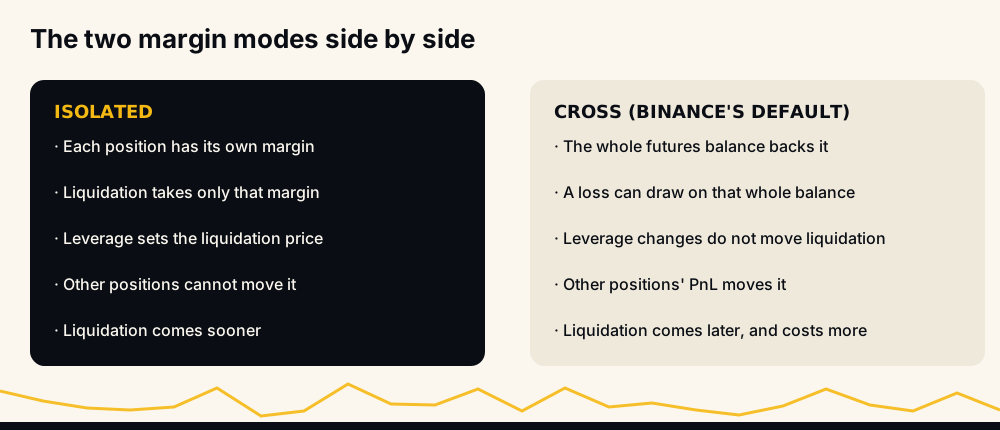
Binance's FAQ on switching margin modes (updated 2 January 2026) says "Cross Margin Mode shares your margin balance across all open positions." Isolated margin is the other option: "It's the margin balance allocated to an individual position," as Binance's futures blog Three Misconceptions About Liquidations (23 December 2022) puts it.
Three rules from the same FAQ shape everything else:
- The mode is set per contract, so BTCUSDT can be cross while SOLUSDT is isolated.
- Every contract starts on cross margin.
- You cannot change the mode while that contract has open orders or a position.
Fees do not depend on the mode. Binance charges maker and taker fees on the notional of each fill, as Binance futures fees explained shows, so the same trade costs the same commission either way.
A worked example: one position, 1,000 USDT
Take a 1,000 USDT futures wallet and one long of 20 units at 100, a 2,000 USDT position at 10x. Use an illustrative 0.5% maintenance margin rate and ignore fees. Binance's liquidation price formula gives:
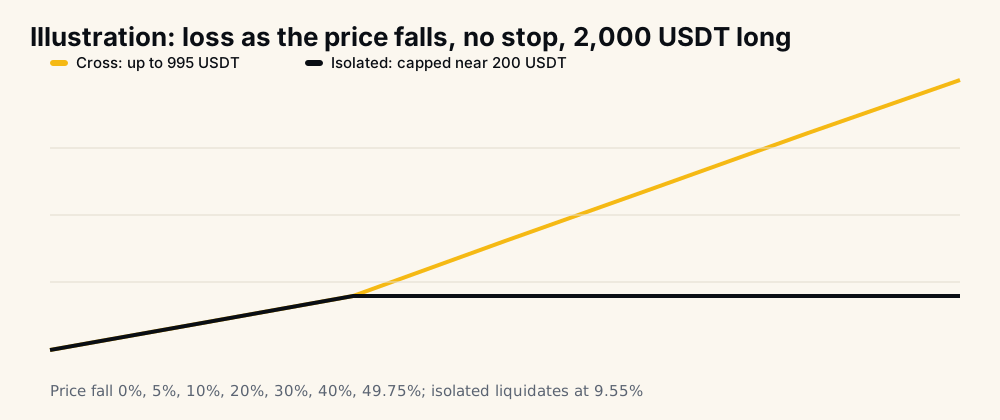
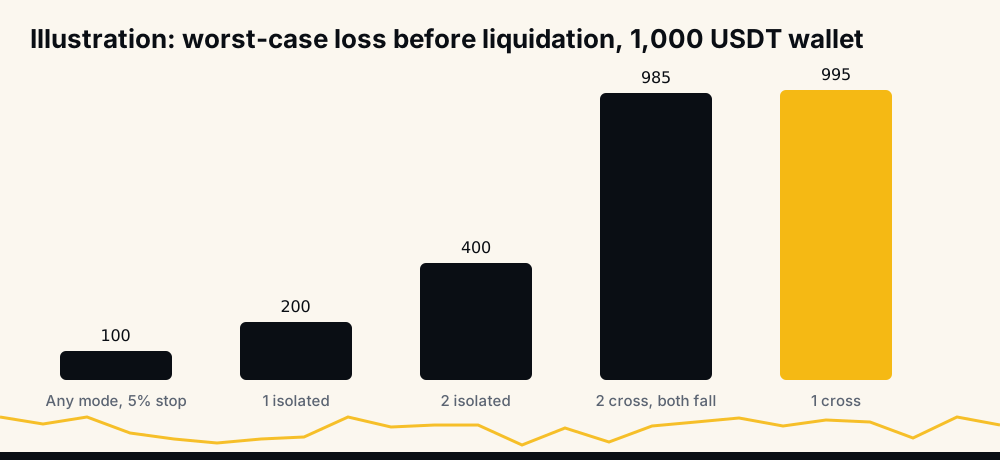
- Isolated: 200 USDT of margin goes into the position. Liquidation = (200 − 2,000) ÷ (0.1 − 20) = 90.45, a 9.55% fall. The most it can lose is about the 200 USDT; the other 800 stay untouched.
- Cross: the whole 1,000 USDT backs it. Liquidation = (1,000 − 2,000) ÷ (0.1 − 20) = 50.25, a 49.75% fall. At that price the position has lost 995 USDT.
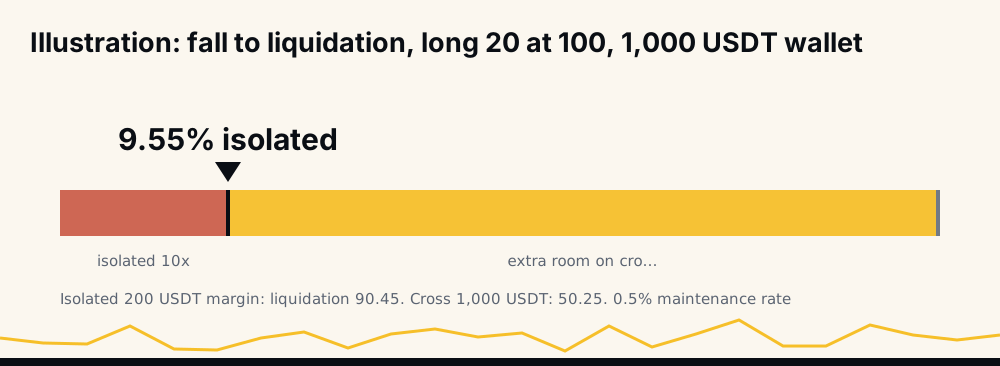
Notice what the 10x did on cross. It set how much initial margin the trade reserved, but the liquidation price came from the whole wallet. Binance's blog confirms that in cross mode "changing the leverage will not impact the liquidation price of a contract." On isolated, the leverage decides the margin and so the liquidation price.
Two positions: where cross helps and where it hurts
Add a second long, also 20 units at 100, with the same 1,000 USDT wallet.
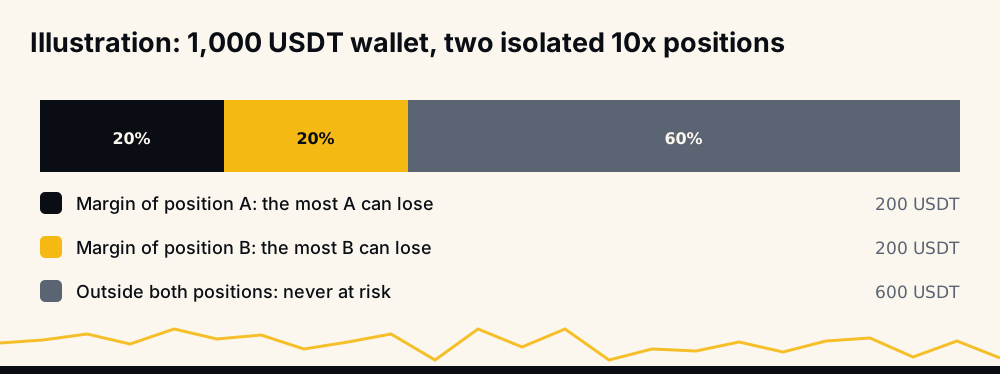
On isolated, each gets 200 USDT of margin and each liquidates at 90.45 on its own. The worst case is losing 400 USDT, and 600 USDT is never at risk.
On cross, the result depends on what the second position does:
- The second one is flat at 100. The first one's liquidation is (1,000 − 10 − 2,000) ÷ −19.9 = 50.75, where 10 is the second position's maintenance margin.
- The second one is up 200 USDT. Its profit backs the first, pushing liquidation down to about 40.75. This is the case cross margin is good at.
- Both fall together. The account liquidates when 1,000 + 40 × (price − 100) drops to the maintenance margin of 0.2 × price, at about 75.38. By then the account has lost about 985 USDT.
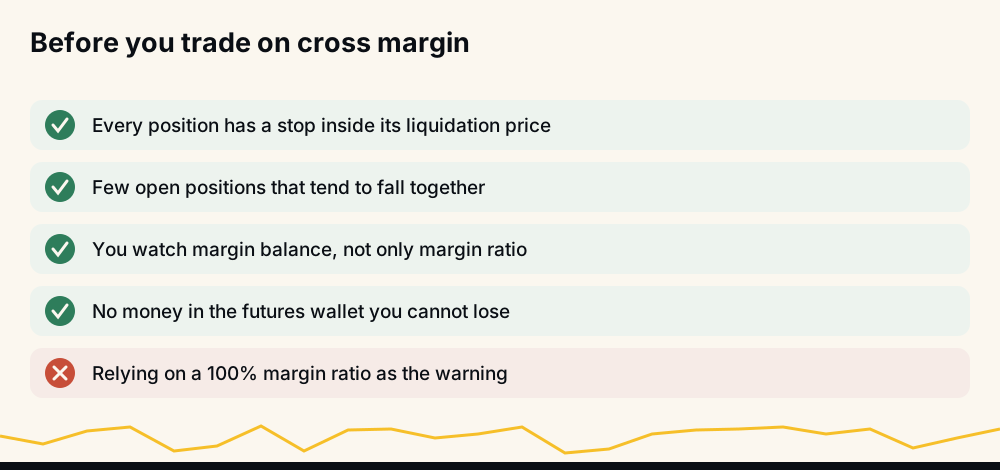
Crypto coins tend to fall together on a bad day, and that third case is the one that empties accounts. Binance's blog says cross margin is "usually harder to manage and puts all your wallet funds at risk."
What happens at liquidation in each mode
Binance's liquidation protocols (updated 4 January 2026) say "liquidation occurs when the Mark Price hits the liquidation price of a position." The system first tries "to reduce the trader's margin deficit without fully liquidating the position", and what margin is left pays a liquidation clearance fee.
The difference is what that margin is. On isolated it is the position's own allocation, and the rest of the wallet is outside the event. On cross it is the shared balance, and Binance's blog defines the trigger for the account: liquidation comes when the maintenance margin exceeds the margin balance, where "Margin Balance = Wallet balance + Unrealized PnL." A loss anywhere in cross counts against every cross position.
Why mark price and not the last trade decides it is covered in mark price vs last price on Binance.
Margin ratio: the number to watch on cross
On cross, Binance shows a margin ratio: maintenance margin ÷ margin balance. Its blog says "when the Margin Ratio reaches 100%, it means that some of your positions may be liquidated."
It is a late warning. Follow the two-position cross account as both longs fall:
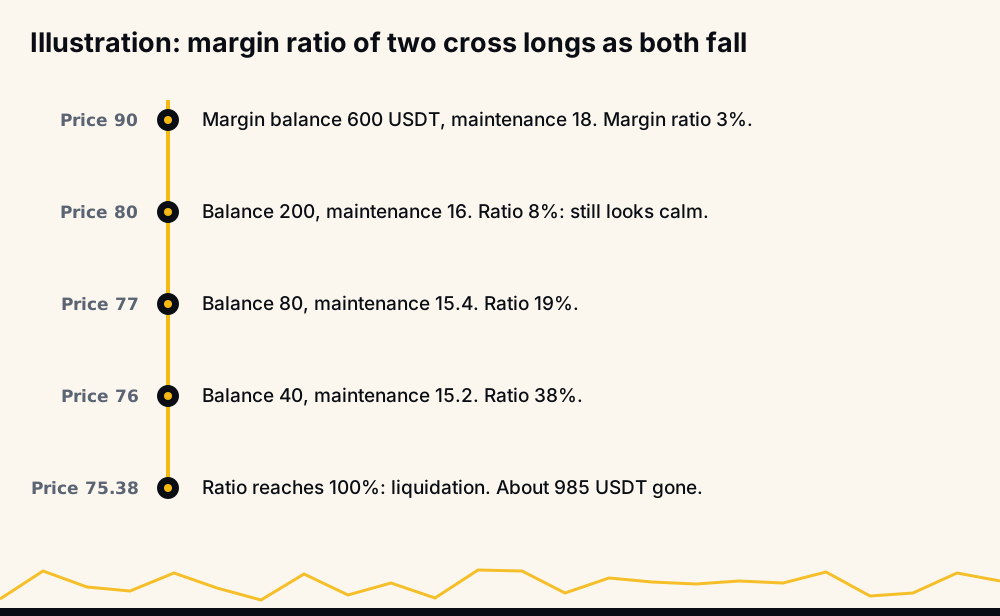
From 100 down to 80 the ratio barely moves, because the maintenance margin is small next to the balance. Then the last few points of price take it from 8% to 100%. A ratio check that waits for a scary number gets very little time to act. Watching the margin balance itself, or the liquidation price, gives earlier notice; why your liquidation price changes lists everything that moves it on cross.
With a stop-loss, margin mode changes less than you think
Put a stop 5% below entry on the single long, at 95, and let it fill. The loss is 20 × 5 = 100 USDT plus fees, on isolated and on cross alike. The mode only matters when the stop does not do its job:
- the stop sits beyond the liquidation price and can never fire, which on isolated at high leverage is easy to do;
- the market gaps through a stop-market order, or a stop-limit order does not fill;
- the stop was never placed, was refused, or was cancelled.
In those cases isolated limits the damage to the position's margin, and cross lets it run into the rest of the wallet. Liquidated before your stop-loss lists the ways a stop fails in practice, and how to set a stop-loss in crypto covers where to put one.
Is isolated or cross margin better?
It depends on what you need the margin to do.
Isolated suits traders who open several unrelated positions, run a bot, trade without a stop on some coins, or simply want each trade's worst case written down before it opens. If a trade needs more room, you add margin to it yourself with the edit icon in the Positions tab. Adding 100 USDT to the example's isolated long moves its liquidation from 90.45 to (300 − 2,000) ÷ −19.9 = 85.43, and the most it can lose rises to 300 USDT with it. Every step of that trade-off is yours to choose, and most people pick isolated margin for exactly that control.
Cross suits traders who hold offsetting positions, such as a long and a short meant to balance each other, or who manage one position at a time with a stop they watch. It also avoids liquidation on a deep wick that an isolated position at the same leverage would not survive.
A simple test: if the money in your futures wallet would hurt to lose in one trade, isolated keeps a trade from reaching it. A separate futures sub-account does the same job at account level.
How to switch between cross and isolated margin on Binance
Binance's FAQ gives the web steps: open the futures trading screen, click the Cross button at the top right, choose the mode you want and click Confirm. Repeat to switch back.
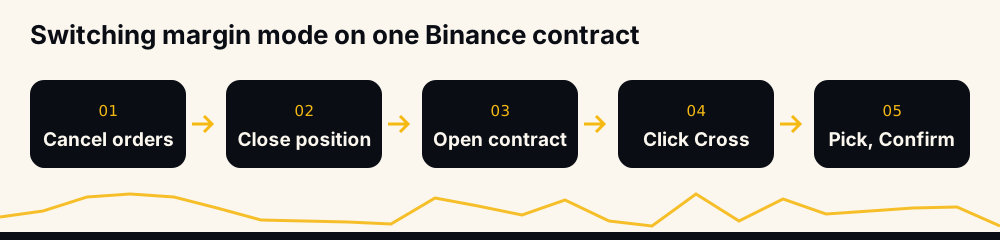
If the button refuses, the contract still has an open order or a position. Cancel the orders, close the position, then switch. Each contract keeps its own mode, so check the one you are about to trade rather than assuming the last one carries over.
Multi-Assets mode, Hedge mode and the API
Two account settings interact with margin type:
- Multi-Assets mode allows cross margin only. An isolated order is refused with -4168, and turning the mode on requires every symbol to be on cross (-4167 otherwise). Binance Multi-Assets mode covers both errors.
- Hedge Mode. On cross, Binance says both long and short positions of the same symbol "share the same liquidation price"; on isolated, they have "two different liquidation prices depending on the margin allocated". Hedge mode vs one-way mode explains the position modes.
Through the API the switch is POST /fapi/v1/marginType with marginType=ISOLATED or CROSSED, per symbol.
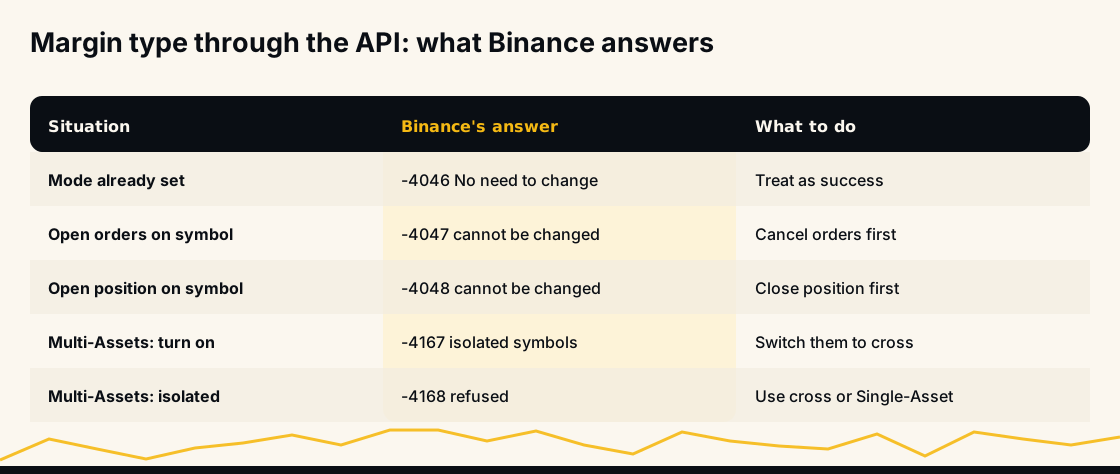
A bot should set the mode before its first order on a symbol, and treat -4046 ("No need to change margin type") as success rather than an error. Binance futures error codes lists the rest.
How HafizeBot's autotrader uses margin type
HafizeBot trades on the member's own Binance account, and the member chooses the margin type with /setMarginType ISOLATED or /setMarginType CROSSED. New accounts start on isolated, at 2x, with 5 USDT of margin per position and a 10% stop, as the default settings page lists.
The stop rules follow the mode. On isolated the bot refuses a stop it can never reach and tells you the largest one that works, about 70% of the liquidation distance (35% at 2x, 14% at 5x). On cross a wider stop is saved with a warning, because the loss can then draw on the whole futures balance. If the account is in Multi-Assets mode, isolated entries are refused by Binance, so the bot enters on cross and tells you which entries it placed that way.
The key needs futures trading only; use one with withdrawals off and paste it on the keys page, never in a chat. The signals are AI-generated, built from 240+ indicators, formulas and components. Live performance counts every missed signal against the target-hit rate: September 2026 reads 97.7% of 4,220 signals. The rate describes signals reaching their targets; what a member's account makes depends on their own size, leverage, stop and margin type.
Frequently asked questions
What is the difference between cross and isolated margin? Isolated margin gives each position its own fixed margin, so a liquidation loses only that amount. Cross margin shares your whole futures balance across all cross positions, so each can survive a bigger move, but a loss can take the whole balance.
Is isolated or cross margin better for beginners? Isolated is easier to reason about: each trade's worst case is the margin you put in, and other positions cannot pull it under. Cross can work well, but only with a stop you trust and few positions that move together.
Does cross margin reduce liquidation risk? It moves liquidation further away, because the whole balance backs the position. The cost is that the liquidation, when it comes, can take most of the balance instead of one position's margin.
Can I switch from cross to isolated with an open position? No. Binance does not allow a margin mode change while the contract has open orders or a position; the API returns -4047 or -4048. Cancel the orders and close the position first.
Does leverage matter on cross margin? On cross, leverage sets how much initial margin a trade reserves, but Binance says changing it does not move the liquidation price. On isolated, leverage decides the position's margin and so its liquidation price directly.
Are fees different for cross and isolated margin? No. Futures fees are charged on the notional value of each fill at your maker or taker rate, whichever margin mode the position uses.
Summary and sources
Isolated puts a ceiling on each position's loss and brings liquidation closer; cross pushes liquidation away and removes the ceiling. With a stop that fills, both lose the same. Sources: Binance's margin mode, liquidation price and liquidation protocol FAQs, its futures blog on liquidations, and the USDⓈ-M API documentation.
To let a bot trade signals with the margin type you choose, start 3 days of VIP Tier 1 free at hafizebot.com/trial or with /trial in @hafizebot; trial autotrading is capped at 10 USDT of margin per entry and 3 open positions. The free channel t.me/getbinancefutures posts the stronger signals (strength 3 and up) 20 minutes after VIP.
This is not investment advice; on cross margin one position can lose your whole futures balance, so trade only what you can afford to lose.