If you were liquidated before your stop-loss on Binance Futures, one of eight things happened: the stop sat beyond the liquidation price for your leverage, it watched last price while liquidation runs on mark price, one fast move crossed both levels, a stop-limit never filled, cross margin let other positions eat the buffer, an add moved the liquidation price, the stop was never live, or the position's size raised its maintenance margin. Your order history tells you which.
Below, each cause comes with arithmetic you can redo, then where to look in your own Binance history and how to prevent it. It is written from running an autotrader on Binance USDⓈ-M Futures, where every stop is a real order on a member's own account.
Why a stop-loss does not always beat liquidation
Your stop is an order you placed. Liquidation is Binance's own process, and it does not wait for your order. Binance's stop-loss guide says it directly: "liquidation may happen before the stop-loss order and cause the stop-loss order to expire." Its futures blog adds: "Stop orders are not a foolproof measure against liquidation."
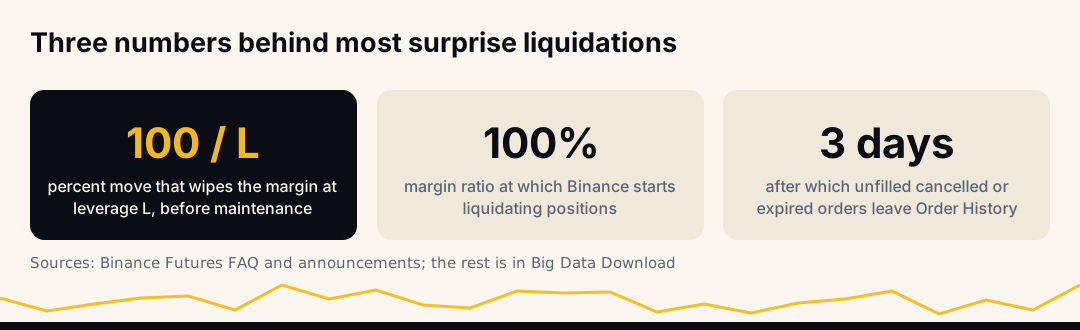
Binance's liquidation rules say "liquidation occurs when the Mark Price hits the liquidation price of a position," and its risk FAQ says that when your margin ratio reaches 100%, "some, if not all, of your positions will be liquidated." At that moment Binance cancels your open orders: all of them in cross margin, those on the same token in isolated margin. Your stop is one of them.
So the real question is why the liquidation price arrived before the stop could do its job. There are eight answers.
Cause 1: the stop sat beyond the liquidation price
The most common one, and pure arithmetic. With isolated margin, a position loses its whole margin on a move of about 100% ÷ leverage. Binance liquidates a little before that, because the position must keep its maintenance margin back. The real distance is roughly 100% ÷ leverage, minus the maintenance share.
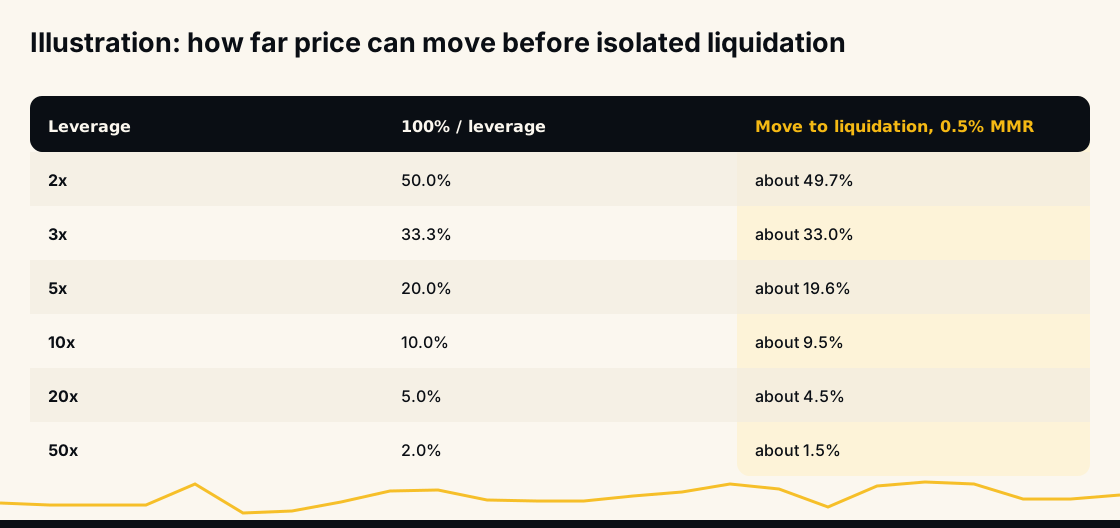
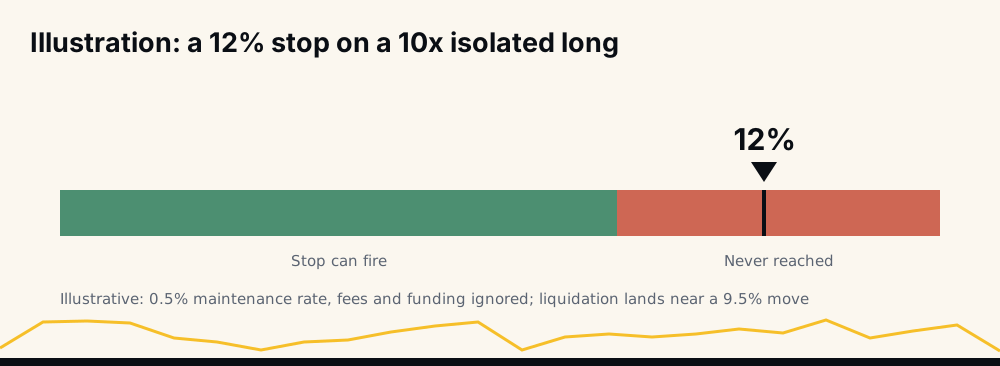
A worked example with illustrative numbers: long 10 units at 100 USDT, 10x isolated, so a 1,000 USDT position on 100 USDT of margin. Assume a 0.5% maintenance rate and ignore fees and funding. Liquidation lands near 90.45, a move of about 9.5%. A stop 12% below entry, at 88, can never fire. The liquidation engine closes you at 90.45 and the stop expires with the position.
Your coin's real figure depends on its maintenance brackets. Our free liquidation price calculator uses each coin's Binance brackets and checks whether your stop closes the position first. Binance itself advises against a stop "close to the estimated liquidation price". See how to set a stop-loss in crypto for where a stop belongs, and how leverage trading works in crypto for why leverage shrinks this distance.
Cause 2: last price triggered the stop, mark price triggered liquidation
Every Binance futures contract has two prices. Last price is the latest trade on Binance's own book. Mark price comes from a price index "based on the weighted average spot price of the asset across multiple crypto exchanges", which Binance uses "to prevent unnecessary liquidations and discourage market manipulations". Liquidation is measured on mark price; your stop can watch either.
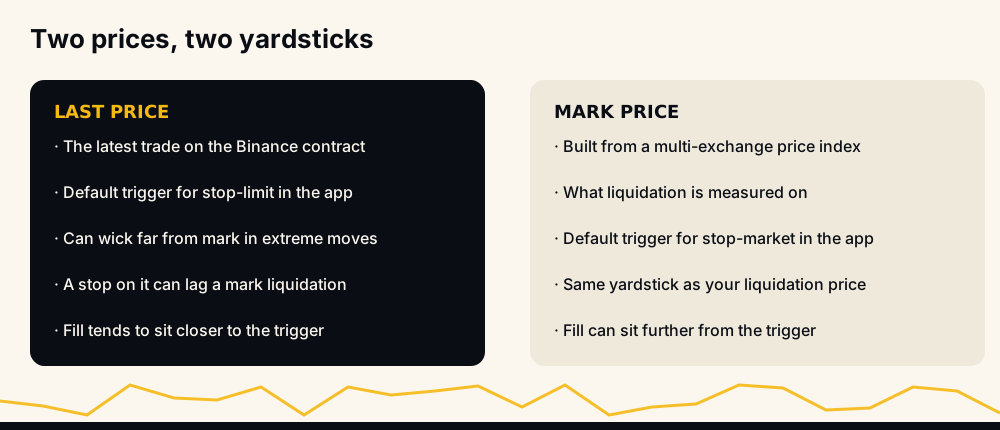
If your stop watches last price and mark price reaches liquidation first, liquidation wins. Binance warns that "the last price might deviate dramatically and significantly from the mark price during extreme price movements."
Two details catch people. In Binance's app a stop-limit triggers on last price by default and a stop-market on mark price, so the order type may have picked the trigger for you. Through the API, workingType defaults to CONTRACT_PRICE (last price), so a script that never sets MARK_PRICE triggers on last price. The full comparison is in mark price vs last price on Binance.
A third trap is price protection. When it is on and the two prices drift apart past the symbol's threshold, Binance says "the Price Protection function will prevent the stop order from being triggered", and the order expires. That spares you a bad fill on a spike, and in the same spike can leave the position to the liquidation engine.
Cause 3: one fast move crossed both levels at once
A stop that sits correctly inside liquidation can still lose if the two are close. A stop-market becomes a market order at trigger, and Binance notes that "due to extreme market movements, the executed price of market order may be lower/higher than the last traded price." In a gap or a cascade, price can jump from above your stop to beyond liquidation in one step.
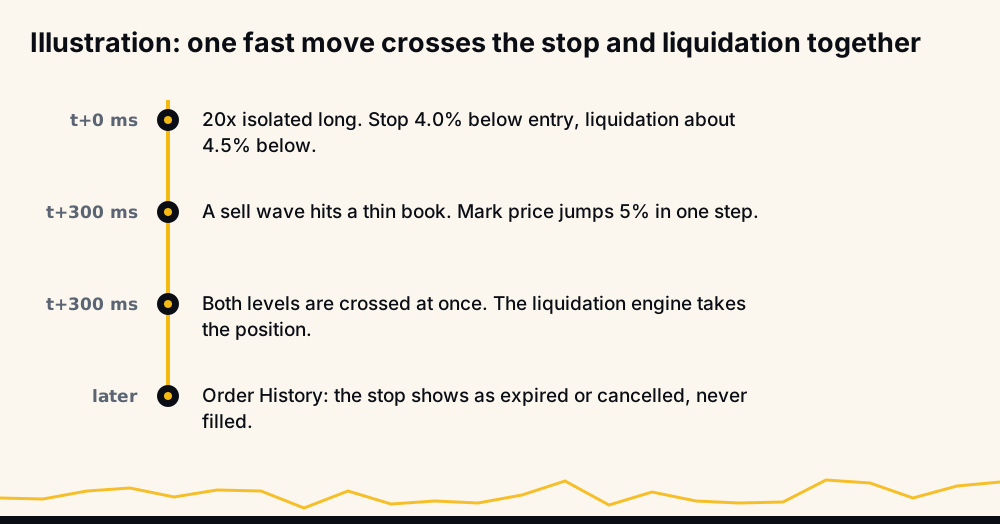
At 20x the corridor between a sensible stop and liquidation might be half a percent, and one sell wave into a thin book covers that in a moment. Slippage alone does not liquidate you once the stop has filled; the danger is a stop so close to liquidation that one move reaches both.
Cause 4: a stop-limit that never filled
A stop-limit does not close your position at the trigger. It places a limit order that fills only at your price or better. Binance's futures blog warns that "your order may not be executed at all," especially in high volatility, and that if "the limit price or a better price is unavailable in the order book, the order will expire."
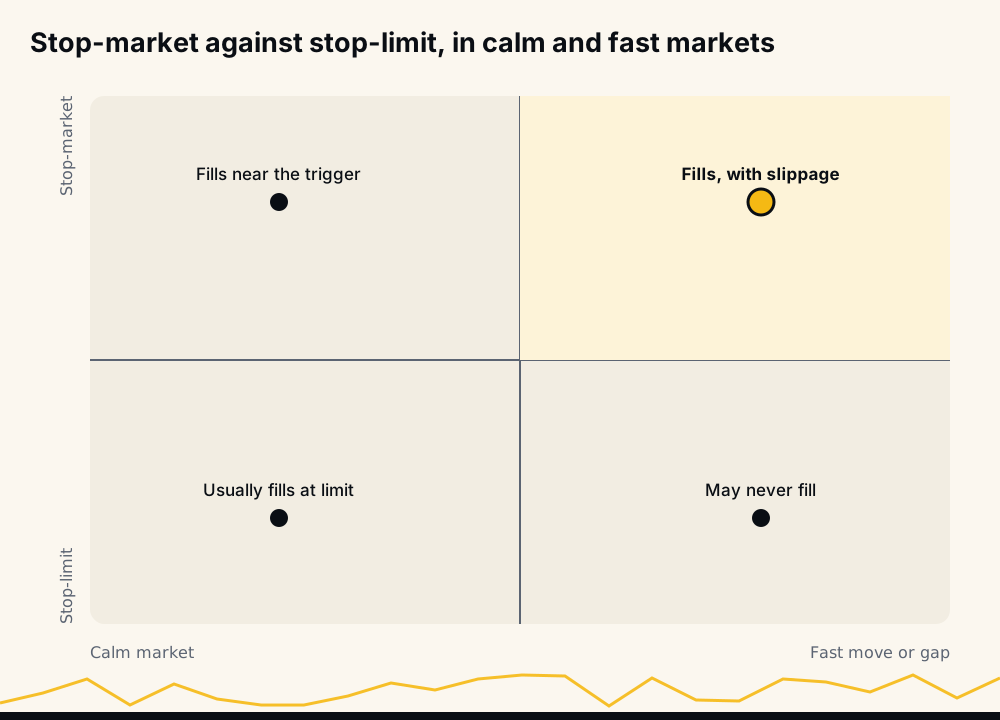
Price falls through your trigger, the limit order lands, price keeps falling past it, and the order rests unfilled while the position runs on to liquidation. Stop-limits are fine in calm conditions. For the stop that keeps you away from liquidation, a stop-market is the order that actually leaves.
Cause 5: cross margin let other positions drain the buffer
Cross margin "shares your margin balance across all open positions on the same type of assets." Binance's cross-mode liquidation formula includes the maintenance margin and unrealized PnL of every other contract you hold; for an isolated position both are zero. Its blog says that in cross mode "the liquidation price constantly changes in accordance with the performance of your positions", while in isolated mode it "remains unchanged".
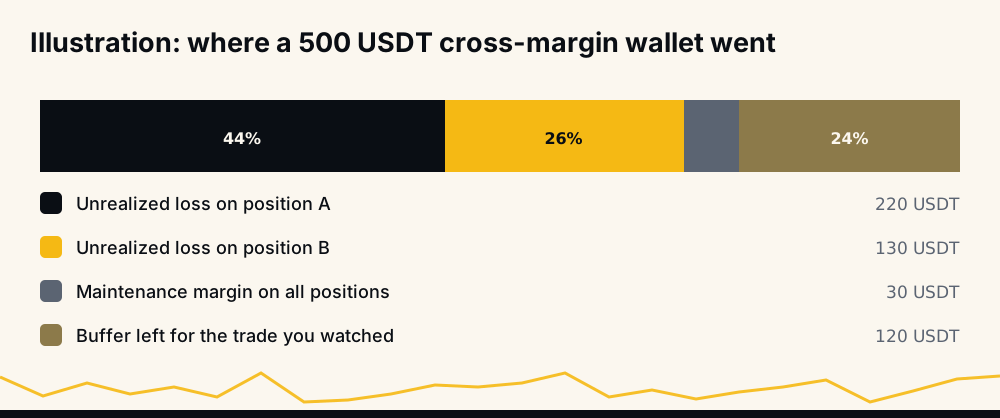
You can watch one trade carefully and still be liquidated because two other positions lost money and pulled the shared liquidation level up to meet it. Cross liquidation then cancels all your open orders. Funding matters too: it "is either added to or subtracted from the wallet balance, changing the liquidation price."
Cause 6: adding to the position moved the liquidation price
Binance's guide puts it in one line: "adding more contracts to a losing position will increase your liquidation price of the entire position." For a long, that means closer to the current price. Your stop stayed put; liquidation moved up to it.
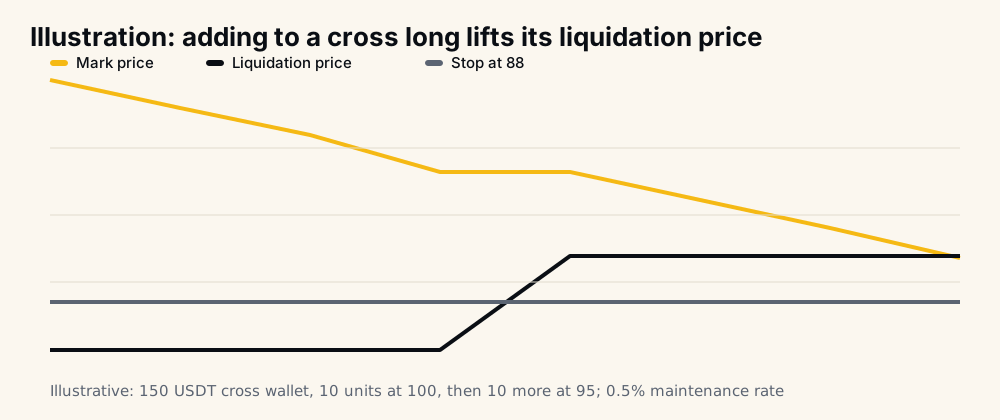
Illustrative numbers: a 150 USDT cross wallet, long 10 units at 100. Liquidation sits near 85.4 and a stop at 88 is safely inside it. Price drops to 95 and you add 10 units. The wallet has not grown, the position has doubled, and liquidation jumps to about 90.5, above your stop. Price slides to 90.4 and you are liquidated with the stop untouched.
There is a second trap: a stop with a fixed quantity, placed for the first 10 units, does not cover the 10 you added. Whenever the position changes size, re-read both the stop and the liquidation price.
Cause 7: the stop was cancelled, expired or never placed
Sometimes no stop was on the book when it mattered. Common reasons, in Binance's own wording:
- Rejected at placement.
-2021"Order would immediately trigger." means the trigger was already on the wrong side of price.-4045"Reach max stop order limit." means the symbol had too many stop orders. - Reduce-only conflict.
-2022"ReduceOnly Order is rejected.", which Binance says means the order "conflicts with existing open orders". See reduce-only order failures. - Close-position rules. A
closePositionstop closes the whole position and cannot carry a quantity (-4137). - Wrong endpoint. Binance answers some conditional orders sent to the regular order endpoint with
-4120, "Please use the Algo Order API endpoints instead." A script that ignores it runs with no stop. - Cancelled. A cancel-all button or a tool cleaning up orders can remove a stop you thought was there.
If you dismissed an error, the position ran naked. The Binance Futures error codes guide lists the rest, and margin is insufficient (-2019) covers the refusal people hit when adding margin in a hurry.
Cause 8: a bigger position means a higher maintenance margin
Binance calculates maintenance margin "based on your positions at different notional value tiers", and "the larger the position, the higher the Maintenance Margin rate." For USDⓈ-M contracts it is notional times the tier's rate, minus the tier's maintenance amount, which smooths the step between tiers. The share held back still grows with size.
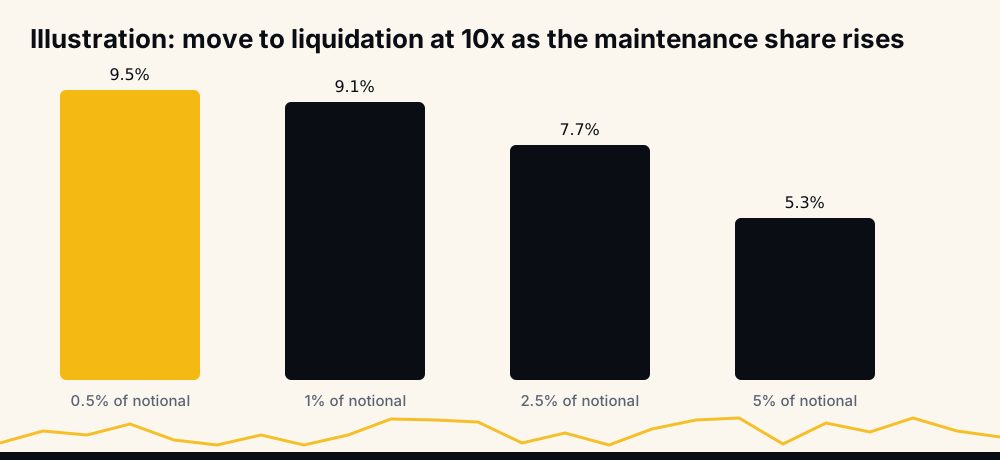
At fixed leverage that means a shorter runway: illustratively, a 10x position reaches liquidation after about 9.5% at 0.5% of notional, 7.7% at 2.5%, and 5.3% at 5%. A stop that fits a small position can sit past liquidation on a large one. Binance can also change a coin's tiers, and may apply changes under 0.5% to a tier's rate without an announcement. Tiers are also why maximum leverage drops as size grows; see Binance Futures leverage limits.
How to read your Binance history to find which one it was
Work through it in order; each step rules causes in or out.
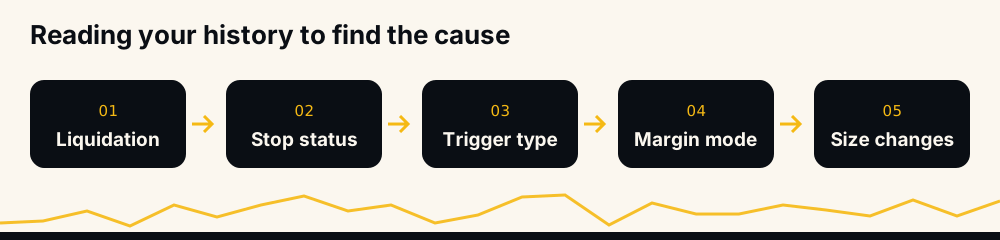
- Confirm the liquidation. In Futures Transaction History, the Liquidation Clearance entry shows the fee Binance took. API users can query the "User's Force Orders" endpoint, which lists liquidation and auto-deleveraging orders.
- Find the stop's status in Orders → Order History. Filled means it worked and something later did not. Expired or cancelled at the liquidation time points to causes 1 to 4. No stop points to cause 7. Unfilled cancelled or expired orders older than three days leave the default view; Binance says to use Export → Big Data Download.
- Check the trigger. Last Price or Mark Price? A last-price stop against a mark-price liquidation is cause 2.
- Check the margin mode. Cross with other positions open is cause 5.
- Check size changes. An add before the liquidation is cause 6, and possibly cause 8.
Then redo the arithmetic: if the stop sat past 100% ÷ leverage, it was cause 1 whatever else happened.
How to prevent each cause
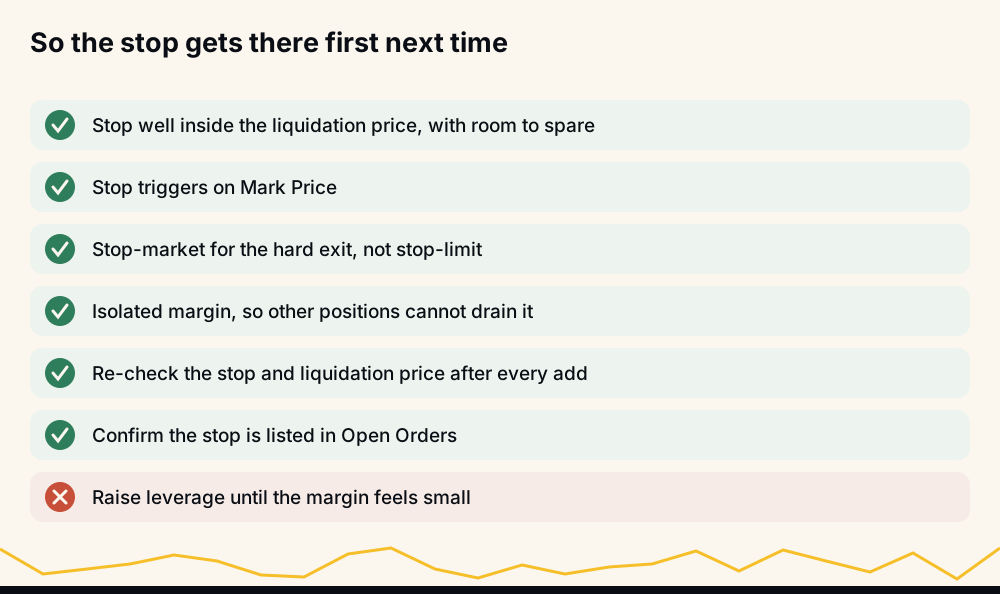
- Cause 1: keep the stop well inside liquidation; check it in the liquidation calculator before the trade.
- Cause 2: trigger stops on Mark Price, the yardstick liquidation uses, and know whether price protection is on.
- Cause 3: lower leverage, so the corridor survives a jump.
- Cause 4: use a stop-market for the protective exit.
- Cause 5: use isolated margin per position.
- Cause 6: after every add, re-read liquidation and resize the stop.
- Cause 7: confirm the stop is listed in Open Orders; never dismiss an error on it.
- Cause 8: recheck the distance when the position grows.
What the liquidation itself cost you
A liquidation costs more than the stop you meant to have. Binance takes a liquidation clearance fee, calculated from the position's notional value and the contract's clearance fee rate, deducted from the margin behind the position and "paid to Binance". If the market cannot absorb the position, the remainder closes at the bankruptcy price, which Binance says "may be less favourable than the liquidation price."
In isolated margin you lose that position's margin, the fee included; in cross margin the loss can reach the shared balance. A stop that fires, even late, is almost always cheaper.
How HafizeBot's autotrader handles your stop
In HafizeBot's autotrader you set your own stop-loss and leverage. Because cause 1 is pure arithmetic, the bot checks them together: if a leverage change would put your stop past where Binance liquidates, it refuses and says why. At 3x isolated with a 40% stop, the reply reads: "At 3x with isolated margin, Binance liquidates a position after a move of about 33.3%, so your 40% stop would never be reached. Lower the stop to 23.3% or less first (/setStopLoss), then raise the leverage."
Autotrading runs on your own Binance account. The key needs futures trading only; use a key with withdrawals off, because HafizeBot never withdraws or transfers funds. If the bot goes offline, see what happens to open positions if the bot stops.
The signals are AI-generated, from a model that evaluates 240+ indicators, formulas and components across 523 Binance USDⓈ-M pairs. Broadcast signals carry a target and a maximum hold, not a stop, so the stop on your account is yours to set. The live performance page, regenerated hourly since June 2026, shows wins, missed and open signals, with every missed signal counted against the target-hit rate; the monthly reports hold the 2021 to 2024 archive.
Frequently asked questions
Why did my stop loss not trigger before liquidation? Usually the stop sat beyond the liquidation price for your leverage, or it watched last price while liquidation ran on mark price. A fast move, an unfilled stop-limit, cross margin or an add can also put liquidation first. Check the stop's status and trigger in Order History.
Does leverage affect liquidation price? Yes. With isolated margin a position loses its whole margin on a move of about 100% ÷ leverage, and Binance liquidates slightly before that: under 10% at 10x, under 5% at 20x.
Why does my liquidation price change? In cross margin it moves with your other positions' profit and loss and your wallet balance. In either mode, adding to the position, adding or removing margin, and funding payments move it.
How do I avoid liquidation on Binance Futures? Use lower leverage, keep the stop well inside liquidation, trigger it on mark price, and use a stop-market. Isolated margin stops other positions draining the buffer. Re-check liquidation after every change.
Where can I see my liquidation history on Binance? Futures Transaction History has a Liquidation Clearance filter with the fee for each liquidation, and order history shows the stop's status. Unfilled cancelled or expired orders older than three days come through Big Data Download.
Is stop limit the same as stop loss? No. A stop-loss is the job; stop-limit and stop-market are two ways to do it. A stop-limit may not fill in a fast market, while a stop-market fills, with possible slippage.
The short version
Liquidation runs on mark price and does not wait for your order, so your stop has to get there first: inside liquidation, on the same price, as an order that will fill. When it fails, Order History and Transaction History tell you which cause it was. Every Binance rule above comes from Binance's Futures FAQ, its liquidation protocols, its futures blog and its USDⓈ-M API documentation.
To let a bot place entries under your own stop and leverage, try 3 days of VIP Tier 1 free with /trial in @hafizebot; trial autotrading is capped at 10 USDT of margin per entry and 3 open positions. VIP is 50, 100 or 200 USDT a month via /join. The free channel t.me/getbinancefutures posts the stronger signals (strength 3 and up) 20 minutes after VIP.
This is not investment advice; leveraged futures can lose your whole margin, so trade only what you can afford to lose.