"Margin is insufficient" (error -2019) means Binance Futures priced your order, added the margin it needs to the losses it would open with, and found that number larger than the balance it is allowed to use for new orders. It is a refusal, not a liquidation: nothing was opened and nothing was lost. The fix is to find which of seven things shrank that balance or grew the order's cost, and the order below is the fastest way to check them.
What error -2019 actually means
Binance's API documentation lists the error as -2019 MARGIN_NOT_SUFFICIEN with a single line of text: "Margin is insufficient." The app shows the same refusal in plain words. The message is short because the check behind it is simple: cost of the new order > available balance for orders. Everything else in this article is about the two sides of that comparison.
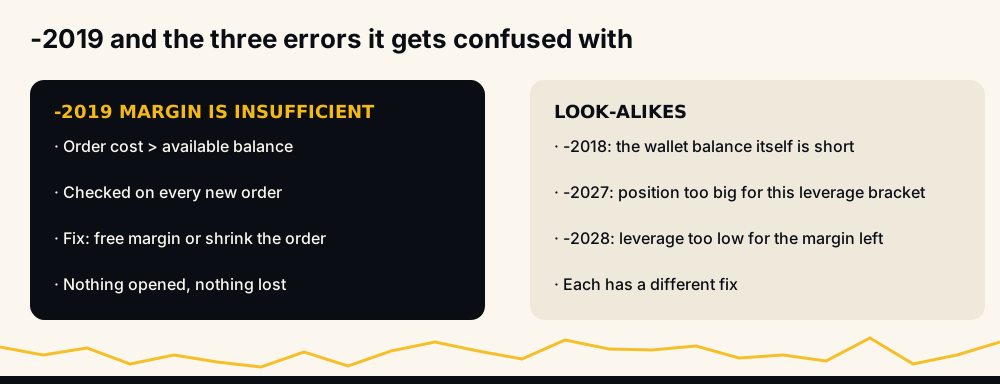
It helps to know what the error is not. It is not -2018 ("Balance is insufficient"), which concerns the wallet itself. It is not -2027 ("Exceeded the maximum allowable position at current leverage"), which is a size ceiling per leverage bracket. And it is not -2028 ("Leverage is smaller than permitted"), which appears when you try to lower leverage on a position the remaining margin cannot support. All four can show up on the same afternoon, and the fixes are different.
What an order costs before it opens
Most people check margin as notional divided by leverage. Binance checks a slightly larger number. Its own FAQ puts it as cost = initial margin + open loss, where:
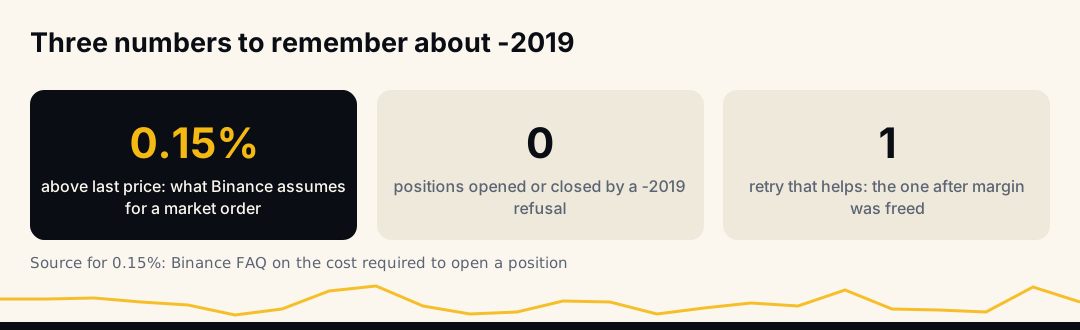
- Initial margin = position value ÷ leverage, with the position value taken at an assumed price. For a market order, Binance assumes last price × (1 + 0.15%), for longs and shorts alike.
- Open loss is the loss the position would carry the moment it opens, measured against the mark price. A long assumed above the mark price starts with one; so does a short limit order placed below it.
Binance includes the open loss "to prevent forced liquidation when traders place an order", in its words. The practical effect is that an order sized to use exactly your available balance will be refused.
A worked example you can redo
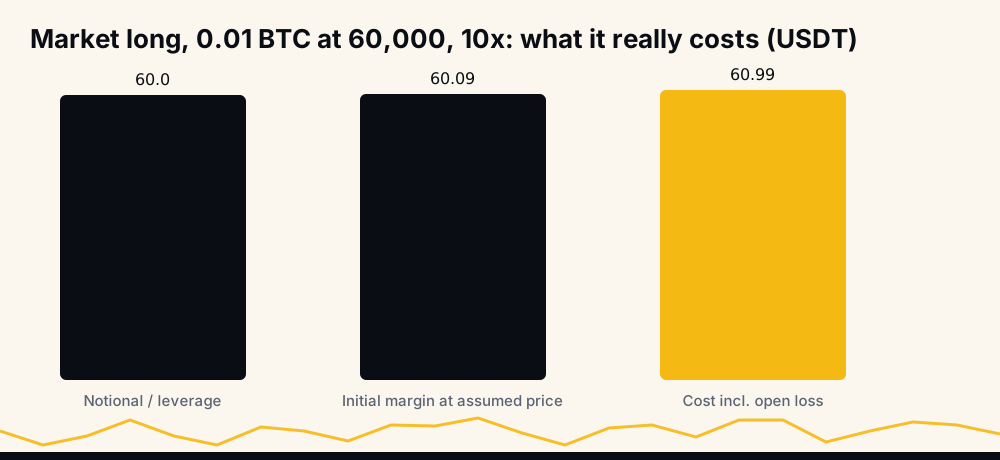
Take a market long of 0.01 BTC at 10× leverage, with the last price and the mark price both at 60,000 USDT.
- Assumed price = 60,000 × 1.0015 = 60,090.
- Initial margin = 60,090 × 0.01 ÷ 10 = 60.09 USDT.
- Open loss = 0.01 × (60,090 − 60,000) = 0.90 USDT, because the assumed price sits above the mark.
- Cost = 60.09 + 0.90 = 60.99 USDT.
The naive estimate was 60.00. With exactly 60.00 USDT available, this order fails with -2019. The same market order as a short costs 60.09, because a short assumed above the mark price carries no open loss. On a small account that 1–2% gap is the whole story behind many "but I had enough" reports.
The balance Binance checks against
The other side of the comparison is not your wallet balance. Binance's API exposes it as the available balance, and for orders it works out as the cross wallet balance, plus the unrealized profit or loss of your cross positions, minus the initial margin already committed to cross positions and to open orders.
Three consequences follow, and each one is a cause in the next section:
- A resting limit order you forgot about still reserves margin.
- An unrealized loss on any cross position shrinks what a new order can use, even on an unrelated coin.
- Margin moved into an isolated position has left the cross wallet and is not available to anything else.
The seven causes, in the order to check them
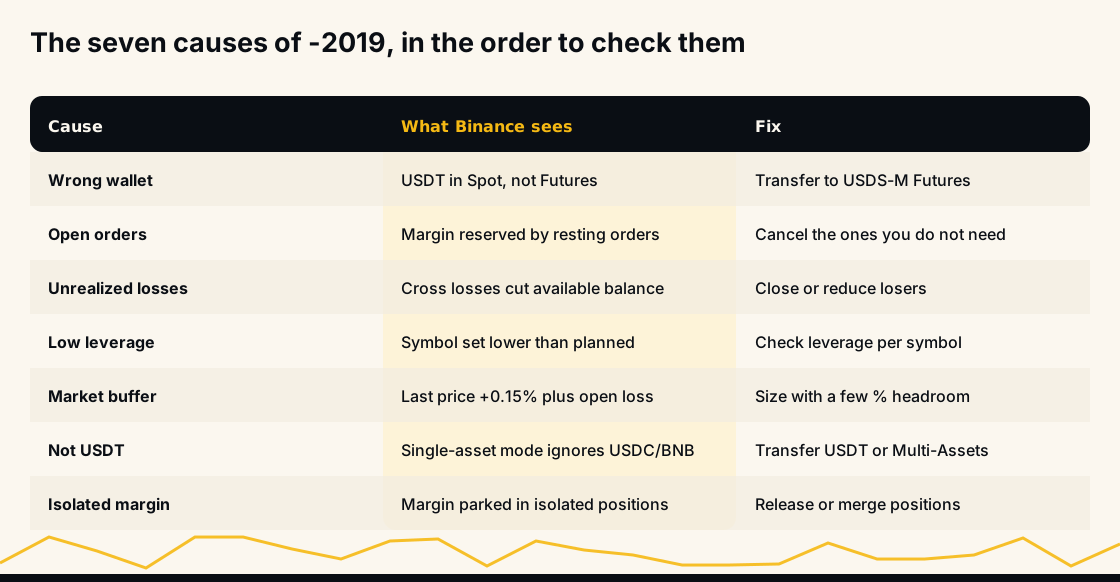
Work down this list; most cases end in the first three.
- The money is in the wrong wallet. Spot, Funding, USDⓈ-M Futures and COIN-M Futures are separate wallets. USDT sitting in Spot does nothing for a futures order until you transfer it to USDⓈ-M Futures.
- Open orders are holding margin. Old limit orders, especially ones a bot or a copy-trading tool left behind, reserve their initial margin until they fill or are cancelled.
- Unrealized losses on other positions. In cross margin, a position that is down eats into the balance every new order is checked against.
- Leverage is lower than you think. Leverage is set per symbol. If the coin you are trading sits at 3× while you sized the order for 10×, it needs more than three times the margin you planned for.
- The market-order buffer and open loss. The 0.15% assumed price and the open loss add a little to every market order, and the gap between last price and mark price adds more when the market is moving fast.
- Your margin is not in USDT. In single-asset mode, only USDT counts toward USDT-margined contracts. USDC or BNB in the same wallet does not help unless Multi-Assets mode is on.
- Margin is locked in isolated positions. Each isolated position keeps its own margin. Several of them can leave the cross wallet nearly empty while the total balance looks healthy.
Why "I have enough balance" is usually true and still not enough
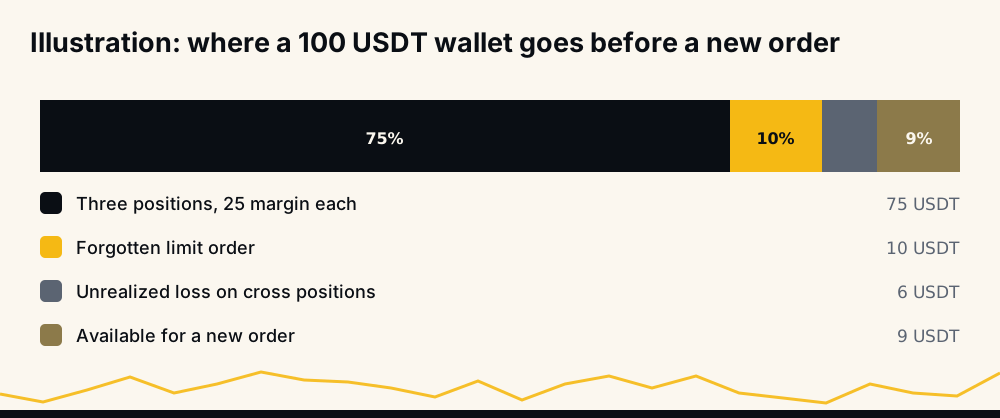
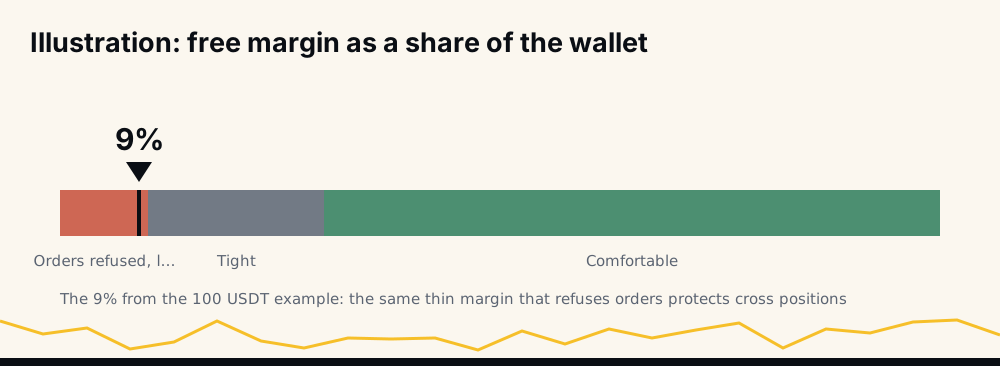
The number most people look at is the total or wallet balance at the top of the futures screen. The number Binance uses is the available balance, and on an active account the two can be far apart. A trader with 100 USDT in the wallet, three positions of 25 USDT margin each, a forgotten limit order holding 10 USDT and an unrealized loss of 6 USDT has 9 USDT available. A 10 USDT order fails, although the wallet still says 100.
That is the illustration in the diagram above, and the pattern is common on accounts that run several positions at once. The fix is rarely more money; it is usually fewer things competing for the same balance.
How to fix it in the Binance app
Before you add funds, run through these in the app:
- Open the Orders tab and cancel any open order you no longer want; each one releases its margin straight away.
- Check Positions for unrealized losses on cross positions; they are reducing your available balance right now.
- Confirm the leverage shown on this symbol's order panel is the one you sized for.
- Check the margin mode (Cross or Isolated) for this symbol, and how much margin is parked in isolated positions.
- If your balance is in USDC or another asset, either transfer USDT into USDⓈ-M Futures or turn on Multi-Assets mode, knowing it does not allow isolated margin.
- Reduce the order size by a few percent and try again; if that works, the buffer was the cause.
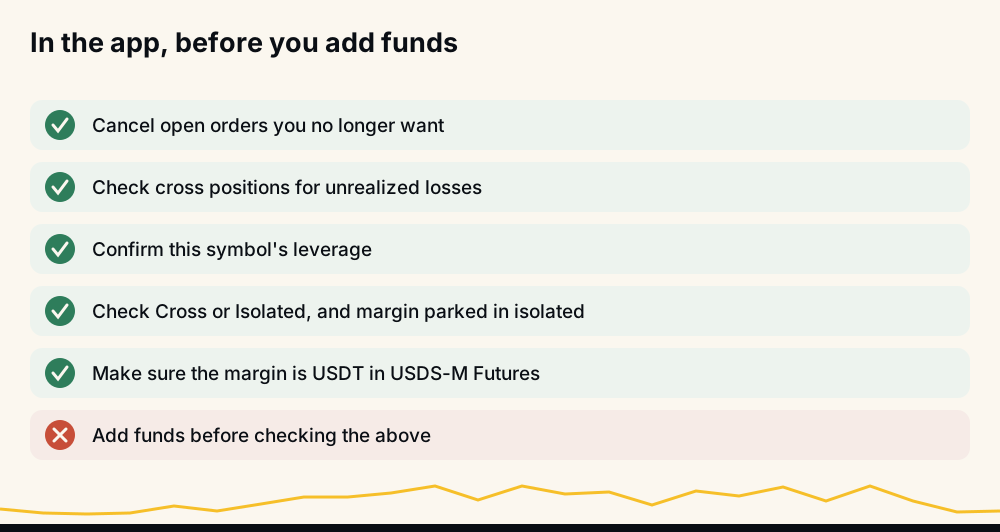
Adding funds is the right answer only when all of these check out and the account is simply smaller than the plan.
How to fix it in a bot or API script
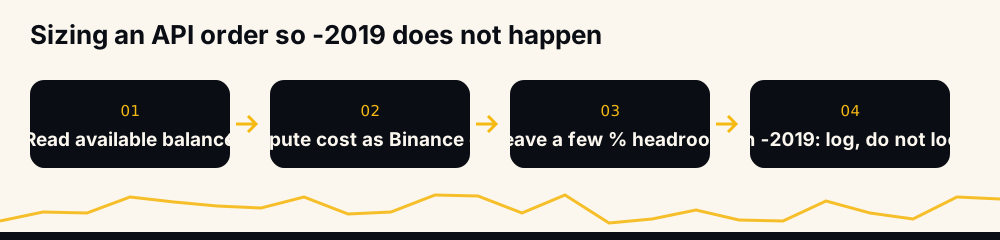
For code, the rule is to size the order from the balance Binance will check, not from the wallet:
- Read the available balance from the account endpoint right before you place the order, not from a cached value.
- Compute the cost the way Binance does: assumed price, initial margin, open loss.
- Leave headroom of a few percent, more on volatile coins, for the gap between your read and the fill.
- Place the order, and on -2019 do not retry the same order in a loop. Record the refusal, tell whoever owns the account, and move on.
If your bot also places exits, the related refusal for those is a different error; our guide to reduce-only order failures covers it. Order bursts can also hit rate limits before they hit margin limits, which is its own problem, explained in Binance API rate limits that break trading bots.
Why retrying the same order does not help
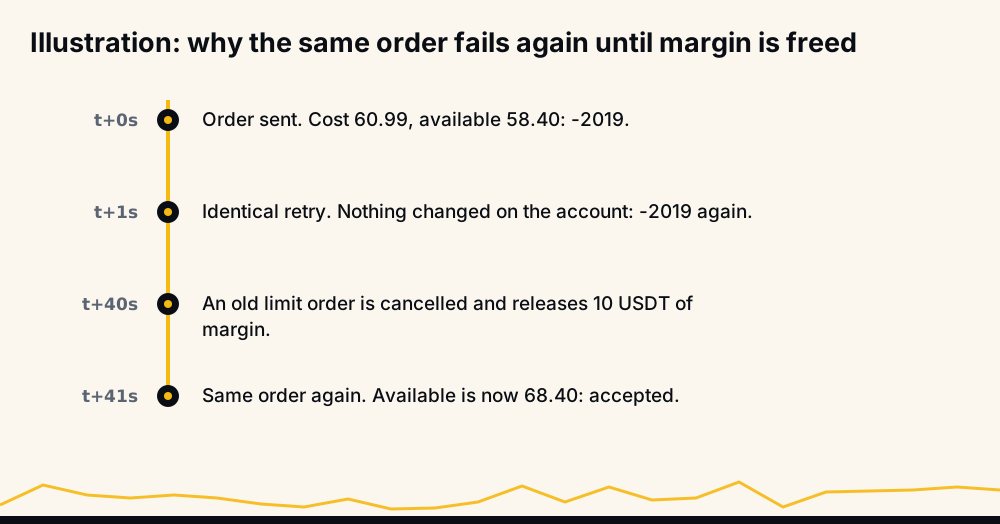
A refused order changes nothing on the account: no margin is released, no position closes, and the cost of the order is the same a second later. Retrying in a tight loop only spends request weight and can push the account into a rate limit. The order can succeed later for one of three reasons: an open order was cancelled, a position closed and released its margin, or price moved enough to change the cost. None of those happens because you asked again.
How HafizeBot members avoid it
On members' auto-trading accounts, "Margin is insufficient" is the Binance refusal we see most often, and almost always for the same reason: more signals arrived than the account had margin for. The settings that prevent it are the ones each member controls:
- Position size: how much each trade uses. Smaller sizes leave room for more positions and for unrealized swings.
- Maximum open positions: a cap, so a burst of signals cannot try to open more trades than the balance supports. We strongly recommend setting one.
- Leverage: the multiplier per trade. Raising it lowers the margin each order needs, but it also brings the liquidation price closer; how leverage trading works explains the trade-off.
When a member's order is refused, the bot records Binance's reason and the member can read it in plain words with /lastsignals. If you are new to sizing a futures account, how much money you need to start crypto futures is the place to begin, and how to connect a trading bot to Binance safely covers the API key, which should never have withdrawal rights.
Is "margin is insufficient" dangerous?
The refusal itself is harmless: Binance declined to open something, and your positions are exactly as they were. What it tells you can matter, though. An account that keeps hitting -2019 is an account with very little free margin, and free margin is also the cushion that keeps cross positions away from liquidation. If unrealized losses are the cause, the same losses are moving those positions toward their liquidation prices.
Treat repeated -2019s as a signal to look at the whole account, not just the order that failed.
Frequently asked questions
What does "margin is insufficient" mean on Binance? It means the cost of your new order, which is initial margin plus any open loss, is larger than the balance Binance lets new orders use. Nothing was opened. Free up margin by cancelling open orders or closing positions, lower the size, or move USDT into the USDⓈ-M Futures wallet.
What is code -2019 in the Binance API?
-2019 MARGIN_NOT_SUFFICIEN is the USDⓈ-M Futures API error for an order whose cost exceeds the account's available balance. Read the available balance from the account endpoint just before ordering and size the order with a few percent of headroom.
Why do I get margin is insufficient when I have enough balance? Because the wallet balance is not what Binance checks. Open orders, unrealized losses on cross positions and margin locked in isolated positions all reduce the available balance, and market orders cost about 0.15% more than notional divided by leverage.
Does margin is insufficient mean I will be liquidated? No. It is a refusal to open a new order, not an action on your positions. It does mean free margin is low, which also means less cushion for any cross position that is losing.
How much margin do I need for a 600 USDT position at 10x? About 60 USDT at notional divided by leverage, but a market long needs a little more: in the example above, 60.99 USDT with the price at 60,000. Keep a few percent extra so a small move does not push the order over.
What does "margin is insufficient" mean in Turkish? "Teminat yetersiz": the margin available is not enough for the order. The causes and fixes are the same as above.
The short version
Error -2019 compares two numbers: what the order costs, including Binance's buffer, and what the account has free for new orders. Find what is using the free margin (open orders, losing positions, isolated margin, the wrong wallet or asset) before adding money, and size every order with some headroom.
Every signal HafizeBot sends is published with its result on the performance page, misses included, and the same signals reach the free Telegram channel 20 minutes after VIP. This is information, not investment advice: futures can lose more than you expect, so trade only what you can afford to lose.