To connect a trading bot to Binance safely, follow five rules: create a dedicated API key for that one bot, enable only Reading and Futures, leave Enable Withdrawals unchecked, restrict the key to the bot's IP addresses, and delete the key the moment you stop using the service. Set up that way, the worst a rogue bot can ever do is trade badly — it cannot move a single coin off your account.
That's the whole recipe. The rest of this guide is the reasoning behind it: what each permission actually authorizes, what an attacker could and couldn't do with your key at each level, and the rotation habits that keep a long-running bot connection safe. The permission model is the part of Binance that barely changes between redesigns, so this is the layer worth understanding once, properly.
Is a Binance API key free?
Yes. Creating a Binance API key costs nothing — there is no fee to generate one, no monthly charge to keep it, and no cost per request within normal rate limits. You pay only the standard trading fees on orders the key places, exactly as if you had clicked those trades yourself.
That fact is also a safety filter: anyone selling "Binance API keys" or charging you for "API access" is running a scam. The key comes from your own Binance account settings, and from nowhere else.
What a Binance API key actually is — and why bots need one
An API key is a pair of credentials: the API key itself (an identifier, like a username) and the secret key (a scoped password that signs your requests). Together they let software act on your account without ever knowing your login, password, or 2FA codes. If the concept is new, start with what an API is and why it's used — the short version is that it's a controlled doorway with a permission list stapled to it.
A trading bot uses that doorway for exactly three things: reading market data, reading your balances and positions, and placing or closing orders. Nothing a bot legitimately does requires access to your funds' exit routes. That is why the permission checkboxes deserve more attention than every other part of the setup combined.
Binance API key permissions: the switches that matter
Menu labels shift with each redesign, but the permission model has been stable for years. When you create or edit a key, you'll find toggles that map to these capabilities:
- Enable Reading — see balances, positions, and order history. On by default; every bot needs it.
- Enable Futures — place and manage futures orders. The one switch a USDT-M futures bot genuinely needs.
- Enable Spot & Margin Trading — spot orders. A futures-only bot doesn't need it; leave it off.
- Enable Withdrawals — move funds off your account. Never enable this for a bot.
- Transfer permissions — shuffle funds between your own Binance wallets. Off, unless the bot documents a specific need.
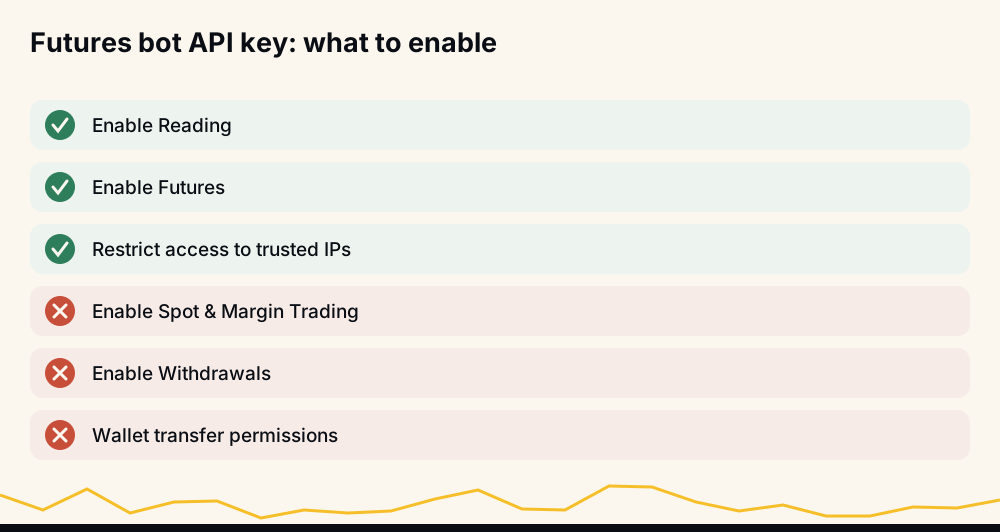
The principle behind the checklist is least privilege: every unchecked box is an entire category of attack that becomes impossible, no matter what happens to the key later.
Never enable withdrawals — no exceptions
Run the worst-case analysis on each configuration. A key with Reading and Futures enabled caps your downside at bad trades — painful, visible in your order history, and stoppable the moment you notice. A key with withdrawals enabled caps your downside at your entire balance, sent to an attacker's address, irreversibly, in minutes.
No legitimate bot needs withdrawal rights. Trading happens entirely inside your account; there is no bot feature — payouts, fee collection, "rebalancing" — that requires an exit route for funds. HafizeBot's autotrading, for example, never needs withdrawal permission and never calls a withdrawal or transfer: your funds stay on your own Binance account the whole time, and you can cut access yourself at any moment.
So treat the request itself as the verdict. A service that asks you to enable withdrawals has told you everything you need to know about it. Walk away.
How to get a Binance futures API key for your bot
The click-by-click basics — finding API Management, passing 2FA, naming the key — are covered in our step-by-step guide to creating a Binance API key, so we won't duplicate them here. The futures- and bot-specific layer on top:
- Open a futures account first. The futures permission only becomes available on a key once your account has futures enabled.
- Label the key with the bot's name. You want to know at a glance which key belongs to which service.
- Enable Reading and Futures, nothing else, and set the IP restriction before you paste the key anywhere.
- Copy the secret key immediately. Binance shows it once, at creation. If you lose it, you don't recover it — you delete the key and create a new one.
- One key per bot, always. Reusing a key across services means you can't revoke one without breaking the others, and you can't tell whose requests are whose.
IP whitelisting: the strongest control most people skip
When you create a key, Binance lets you choose between unrestricted access and restricting the key to trusted IP addresses. Choose the restriction, every time. With a whitelist in place, requests signed with your key are rejected unless they come from the listed servers — so a key that leaks through a phishing page, a pasted screenshot, or a compromised laptop is close to useless to whoever holds it.
A reputable bot service can tell you exactly which static IP addresses it trades from; that's what you whitelist. If a service can't or won't tell you its IPs, treat that as a warning sign in itself. Binance also applies tighter default limits and shorter lifetimes to unrestricted keys — the platform is nudging you toward the whitelist for a reason. It costs two minutes and removes an entire class of theft.
What a malicious bot could do at each permission level
Assume the worst: the key leaks, or the bot itself turns out to be hostile. What actually happens depends entirely on the boxes you checked:
- Reading only. The attacker sees your balances and trade history. A privacy loss and useful targeting information — but no orders, no fund movement.
- Trading enabled, withdrawals off. The attacker can lose your money the slow way: opening bad positions, or trading illiquid pairs against you as the counterparty. Real damage is possible — which is why position-size limits matter — but every action lands in your order history, is capped by your futures wallet balance, and dies the second you delete the key.
- Withdrawals enabled. Your balance leaves for an address you don't control. No trading skill required, no warning, no undo.
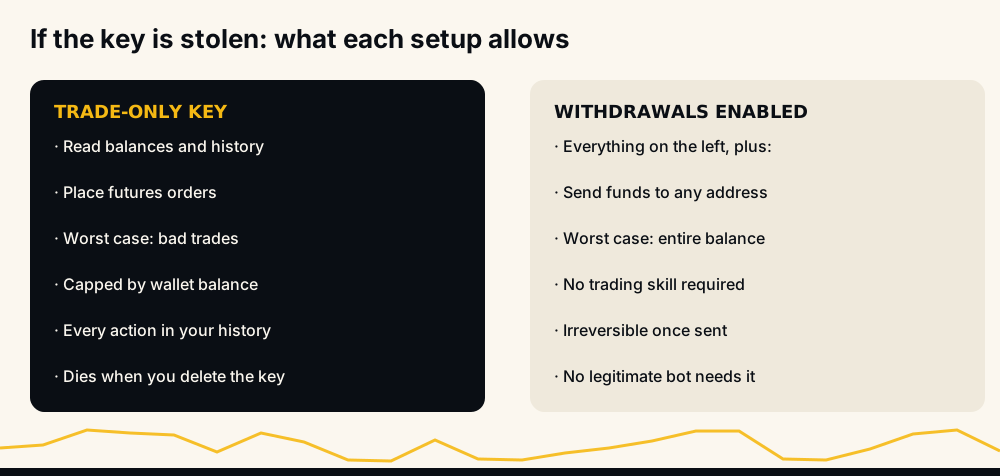
That's the entire argument for the permission model in one picture: the difference between "worst case: losses you can stop" and "worst case: everything, instantly".
Key rotation, revocation, and the exit plan
Revocation is your unilateral right, and it's instant: delete the key in API Management and the bot's access dies mid-request. You never need the bot service's permission or cooperation to disconnect it. That asymmetry is the quiet reason API-key trading is the safest way to use any bot — you hold the kill switch.
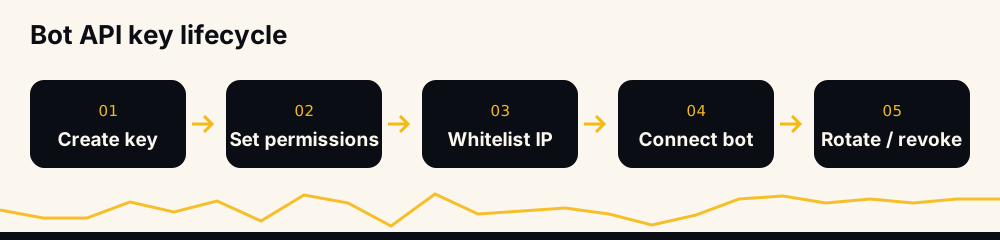
Habits that keep a long-running connection safe:
- Rotate on a schedule — delete the old key, issue a fresh one, update the bot. Quarterly is a reasonable default.
- Rotate immediately after anything suspicious: orders you don't recognize, login alerts, or news that the bot service was breached.
- Delete keys for bots you've stopped using. A dormant key is pure risk with zero benefit.
- Audit your key list monthly. If you can't say what a key is for, delete it.
Note that Binance disables API keys automatically after certain security events, such as a password change. That's a feature — after any account scare, your bots disconnect until you deliberately reconnect them.
Practice on the testnet before risking real funds
Binance runs a separate futures testnet with paper balances and its own API keys — the queries for "binance testnet api key" exist for good reason. If you're writing your own trading code, develop against the testnet first; mainnet keys and testnet keys are entirely separate credentials.
Hosted bots usually don't offer testnet connections, but the same principle applies: start in observation mode before any key exists. Watch the bot's signals without connecting anything, and when you do connect, begin with the smallest position size the bot allows.
A safe key doesn't make it a good bot
Everything above protects you from theft. It does not protect you from the ordinary way bots lose money: a model that doesn't work. A perfectly configured, non-withdrawal, IP-locked key connected to a bad bot will still bleed via losing trades — so vet the record with the same rigor you applied to the permissions. Our guides on whether AI crypto trading bots actually work and whether trading bots are worth it cover how to read a track record skeptically.
The short version: demand the full ledger, not screenshots. HafizeBot publishes both its history — 33 monthly spreadsheet reports covering 33,694 signals from June 2021 to February 2024 — and a live performance page regenerated hourly from the trade database, where expired signals count against the hit rate and losing months appear when they happen. Autotrading then runs inside limits you set yourself: minimum signal strength, position size, maximum simultaneous positions, and coin filters — through a key that needs no withdrawal permission.
And whatever bot you choose: futures trading is high-risk, none of this is investment advice, and you should only ever trade money you can afford to lose.
FAQ
Is the Binance API key free? Yes — creating and using API keys is free, with no subscription and no per-request charge at normal usage levels. You only pay regular trading fees on orders the key places. Anyone charging you for a "Binance API key" is a scammer.
Can a trading bot withdraw my funds with an API key? Only if you enable the withdrawal permission — which you should never do for a bot. With withdrawals off, a bot can read data and trade, but funds physically cannot leave your account through that key.
Do I need a separate API key for Binance futures? No — it's the same key with the futures permission enabled. The one prerequisite is that your account must have a futures account opened first, or the futures toggle won't be available. Testnet keys, however, are separate credentials from a separate site.
Where do I find my API key on the Binance app? Under your profile or account settings, in the API Management section — the same place on mobile and desktop. Note that you can only view the secret key once, at creation; if you didn't save it, delete the key and create a new one.
What's the difference between the API key and the secret key? The API key identifies your account, like a username; the secret key signs each request, like a password. Anyone holding both can use every permission the key grants — which is exactly why the permissions, not the secrecy, are your real safety net.
How do I disconnect a bot from my Binance account? Delete its API key in API Management. Access ends instantly, you don't need the bot's cooperation, and nothing else on your account is affected.
Want to see what a published record looks like before you connect anything? Check the live performance page or download the historical reports — then watch the signals for a few weeks before any API key exists at all.