A reduce-only order fails on Binance Futures (error -2022, "ReduceOnly Order is rejected.") for one reason with six faces: the order would do something other than shrink or close an existing position. No position on that symbol, the wrong side, a quantity larger than what you hold, a position that a stop already closed, an account in hedge mode, or a duplicate exit that already covers it. Each one makes the flag's promise impossible to keep, and Binance rejects rather than guesses. The fix is almost always to look at the position first and the order second.
This is written from operating an autotrader that places a reduce-only exit for every position it opens across 500+ USDT-M pairs. The rejection is one of the most common support questions, and it is also one of the few Binance errors that is doing you a favour.
What the reduce-only flag actually promises
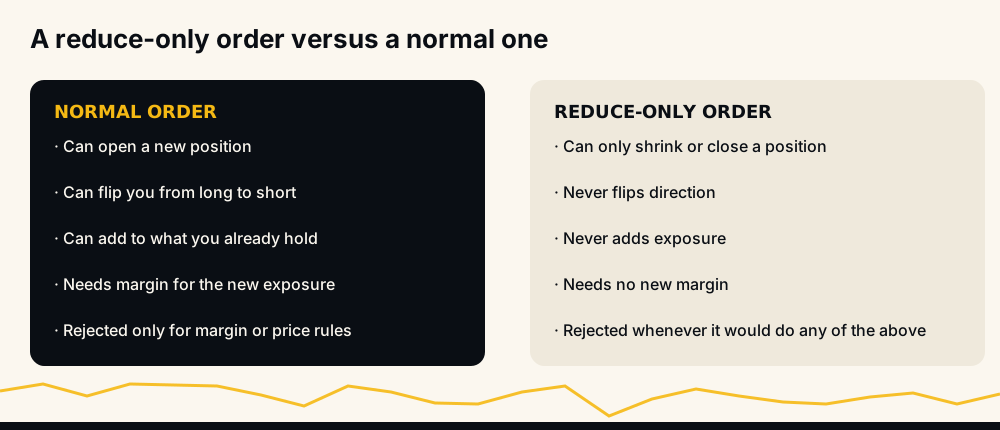
A normal order can do anything: open a position, add to one, or flip you from long to short. It needs margin for whatever new exposure it creates.
A reduce-only order can only move your position toward flat. It cannot open, cannot add, cannot flip, and needs no new margin because it creates no new exposure. That is the entire contract, and it is why a bot uses it for every exit: whatever goes wrong elsewhere, a reduce-only order cannot make the position bigger.
The rejection follows directly. If the order as submitted would violate that contract, Binance refuses it. It does not trim the order to fit. It does not fill the part that would reduce and drop the rest. It says no.
The six causes, in the order to check them
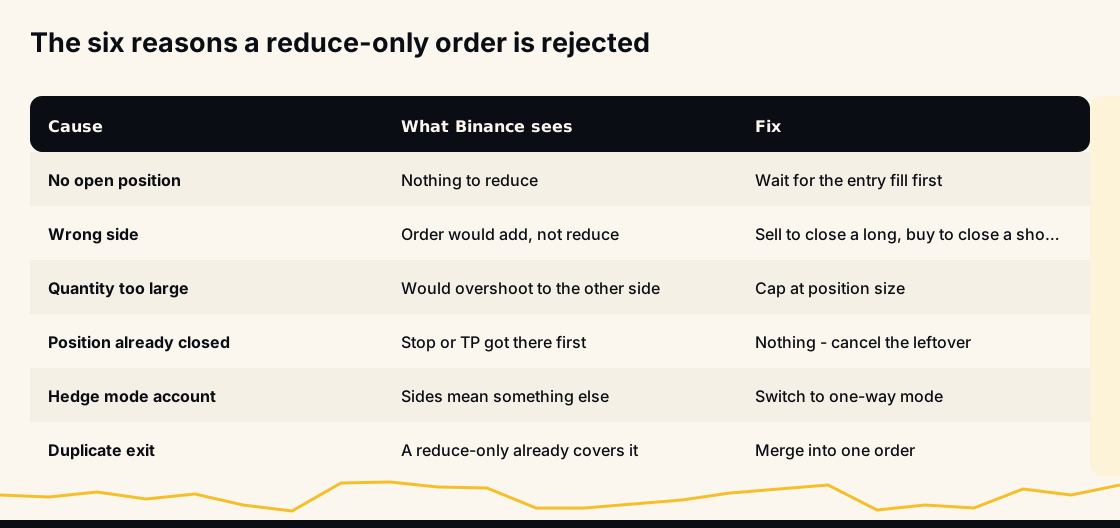
1. There is no open position. The most common cause by far. You cannot reduce nothing. This happens when an exit is sent before the entry has filled, or after the position has already closed.
2. Wrong side. A reduce-only order must be on the opposite side of the position: sell to close a long, buy to close a short. Same side as the position would add to it, which the flag forbids.
3. Quantity too large. If you hold 1.0 and submit a reduce-only for 1.5, the extra 0.5 would open a position the other way. Binance rejects it in full; nothing partially fills.
4. The position already closed. A stop or another take-profit got there first. The reduce-only you are looking at is now an exit for a position that does not exist. This is the case that looks like a bug and isn't.
5. Hedge mode. In hedge mode a symbol can hold a long and a short at once, and "opposite side" means something different. The bot supports one-way mode only; hedge-mode accounts must switch before any of this behaves predictably.
6. A duplicate exit already covers it. Two reduce-only orders whose combined quantity exceeds the position will see the second rejected, or worse, both accepted and one later refused at fill time.
How the bot builds an exit so the rejection cannot happen
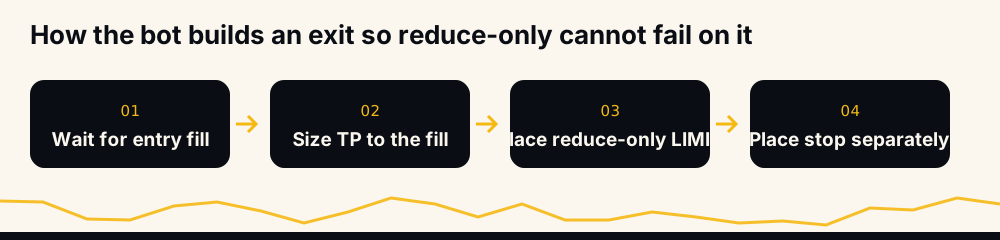
The sequence is the whole fix. The bot enters with a MARKET order, then waits for the fill. Only then does it size the take-profit, using the quantity that actually filled rather than the quantity it asked for, because the two differ after rounding to the symbol's step size. It places the take-profit as a reduce-only LIMIT at the signal's target. The stop-loss goes on separately as a STOP_MARKET, and only if the user has one configured.
Cause 1 is eliminated by waiting for the fill. Cause 2 is eliminated by deriving the close side from the signal's direction. Cause 3 is eliminated by sizing to the fill. Cause 5 is eliminated by refusing to run in hedge mode at all. That leaves causes 4 and 6, which are about what happens after placement. Those are handled by merging and by orphan cleanup.
Why two take-profits become one
This is the part specific to running a signal bot. A second signal can arrive on a symbol you already hold. The bot adds to the position, and now there are two targets, one per signal.
Two separate reduce-only orders would risk cause 6. So the bot merges them into a single order at a quantity-weighted price and cancels the originals.
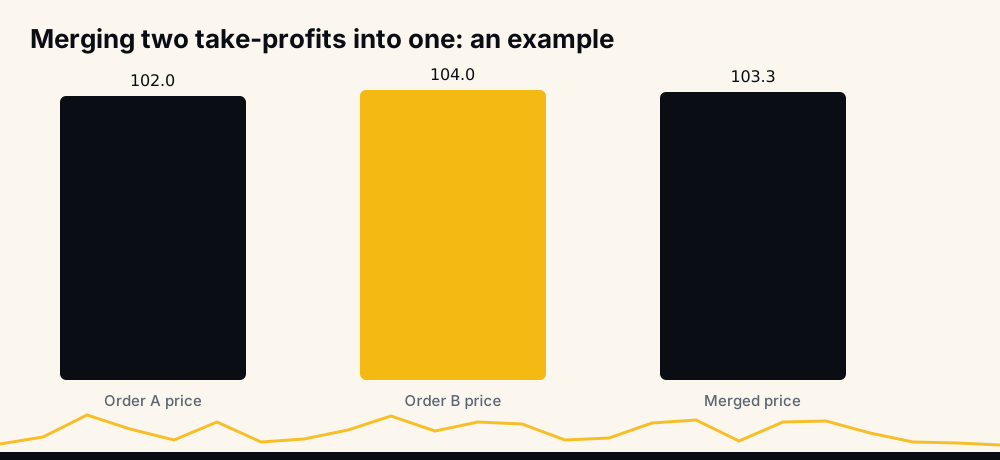
The arithmetic is exactly what you would do by hand. Suppose an existing exit is 1 unit at 102 and the new one is 2 units at 104. The merged order is 3 units at (1×10² + 2×10⁴) ÷ 3 = 103.33, rounded to the symbol's tick size.
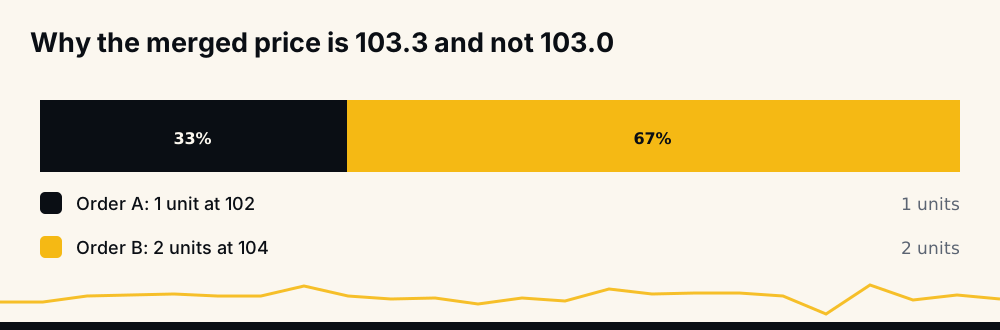
The price is weighted by quantity, which is why the result sits nearer 104 than 103. The bot keeps exactly one merged take-profit per position, however many signals arrive on it. If the open-order rows it reads back have no usable quantity, price or order ID, it skips them rather than merging garbage.
The race between a take-profit and a stop
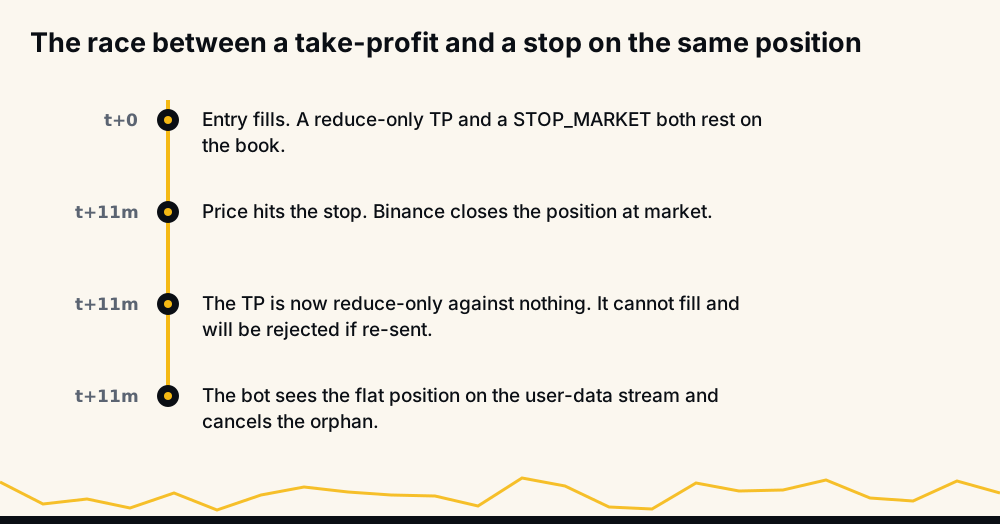
Cause 4 deserves its own section because it is the one people file as a bug. Every bot-opened position carries a reduce-only take-profit and, if configured, a stop. They are a race. Whichever price reaches first fills, and the position is gone.
The loser of the race is now an order for a position that no longer exists. A resting LIMIT will simply never fill; if it were resubmitted, Binance would reject it as reduce-only against nothing. The bot handles this on the user-data stream: the moment the position amount reads zero, it cancels the leftover exit orders for that symbol. The window in which a leftover exists is the time between the fill and that cancel, normally well under a second.
If you see "reduce-only order failed" in a log right after a stop-out, that is what happened, and nothing needs fixing.
Order side against position state
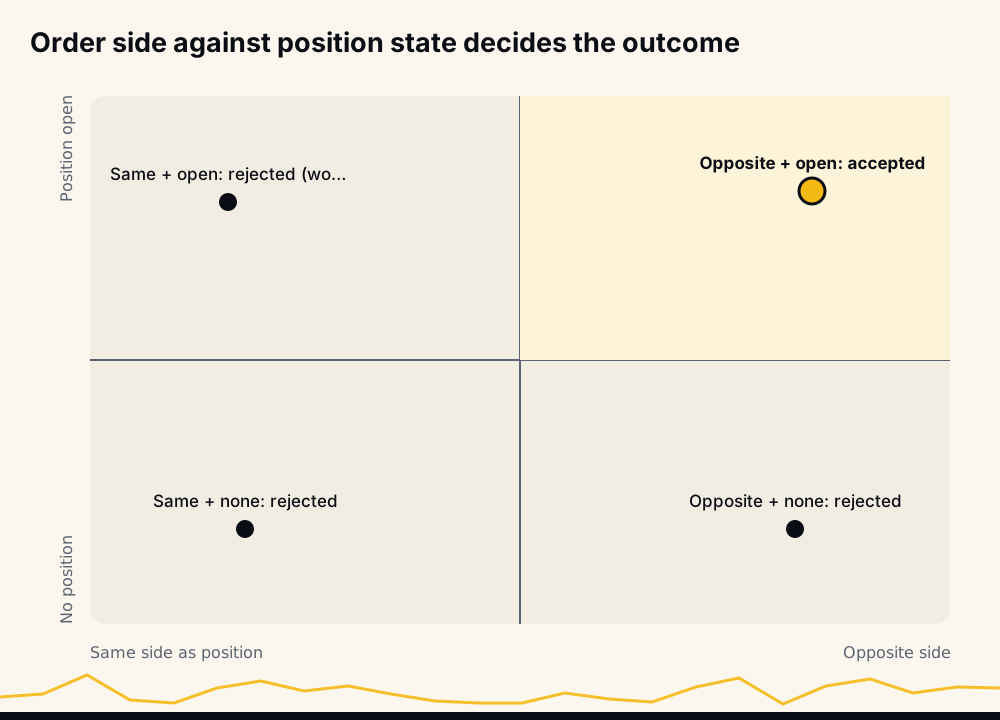
There is exactly one accepted combination: a position is open, and the order is on the opposite side, with quantity at or below the position. Every other cell in the matrix is a rejection. When debugging, find which cell you are in before touching the order.
Before you place a reduce-only order by hand
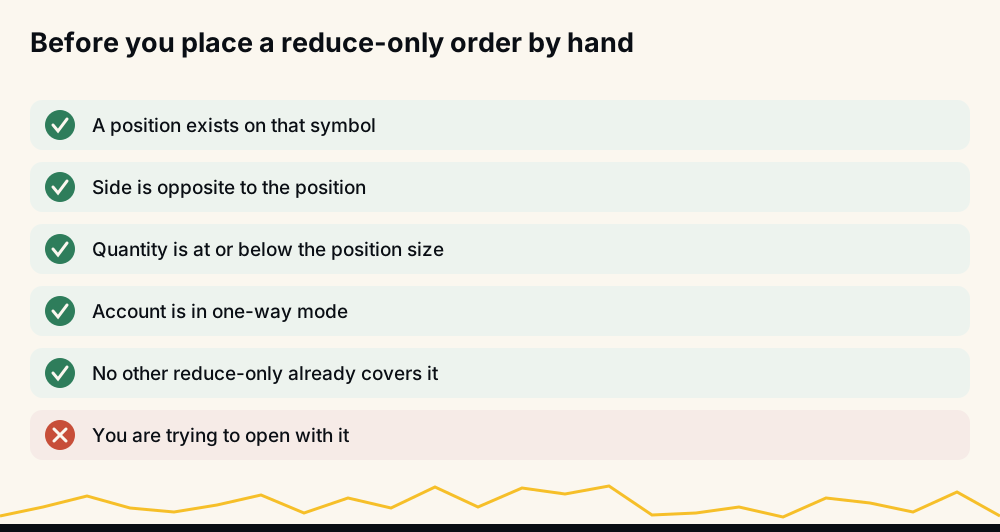
Manual intervention is allowed at any time, and closing part of a bot-opened position by hand is a reasonable thing to do. Before you do:
- Confirm a position exists on that symbol, in the Positions tab.
- Choose the opposite side.
- Keep quantity at or below the position size.
- Confirm the account is in one-way mode.
- Check whether a reduce-only exit already covers the quantity you are about to add. If so, you'll either be rejected or leave a leftover.
One warning: if the bot is running and you close part of a position manually, the bot's stop may still be sized to the original quantity. With "combine" stops on it sizes against the whole position; otherwise only against its own. The article on how to set a stop-loss in crypto explains the sizing, and what happens to open positions if the bot stops explains what the bot does about leftovers.
The hard ceiling
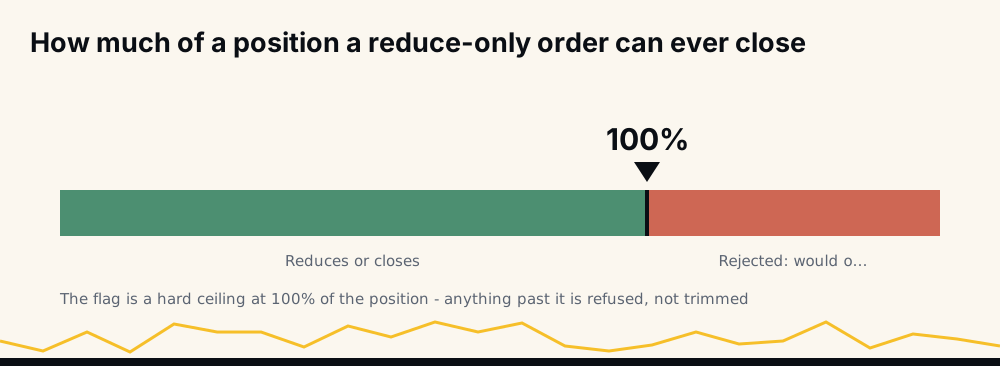
A reduce-only order can close at most 100% of the position. Past that, Binance does not trim the order to 100% and fill it. It refuses the whole thing. That behaviour surprises people who expect "reduce as much as you can". The exchange chose strictness because a trimmed fill would leave you unsure what actually happened; a rejection is unambiguous.
Why the rejection is a safety feature
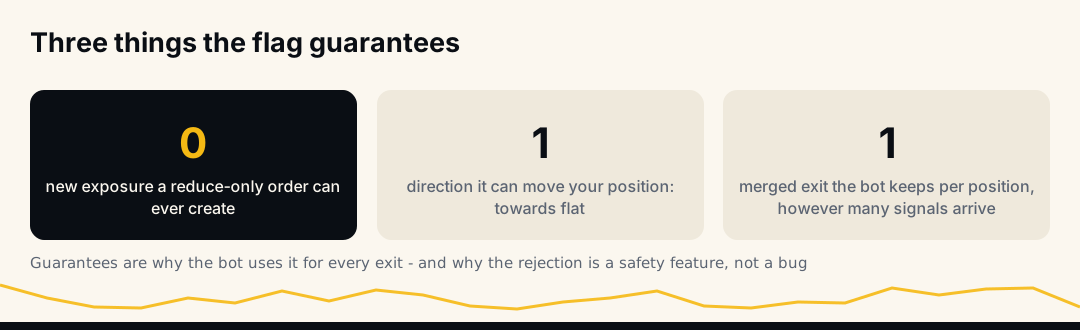
Consider what the alternative would be. If Binance accepted an oversized reduce-only and simply flipped you into the opposite position, a mis-sized exit would silently become a new trade with leverage you did not choose. If it accepted a same-side reduce-only, an "exit" would add exposure. The rejection is the flag doing what you asked: never make this bigger.
That is why a bot should use it for every exit and why, when you see the error, the right reaction is relief rather than alarm: something tried to change your position in a way the flag exists to prevent.
Reduce-only versus closePosition
Binance offers a second way to guarantee an exit never opens anything: the closePosition flag on a STOP_MARKET or TAKE_PROFIT_MARKET order. Set it and the order closes the entire position at trigger, whatever size that is by then. It cannot be combined with a quantity or with reduce-only; it is a different contract.
The bot does not use it, and the reason is the "combine" setting. A closePosition stop would flatten everything on the symbol, including a position you opened by hand alongside the bot's. With combine off, the bot sizes its stop to its own quantity precisely so that your manual position is left alone. With combine on, it sizes against the whole position because you asked it to. Either way the stop carries an explicit quantity, which is why it is a reduce-only-style exit and why cause 3 (quantity larger than the position) is something the bot has to get right rather than something the flag does for it.
If you place your own closePosition stop as a backstop, know that it will close the bot's position too. That is not wrong, but it will leave the bot's take-profit as a leftover, and you will see the rejection described above the next time anything touches it.
If you find a leftover exit on your account
Open Orders on Binance Futures lists every resting order. A reduce-only LIMIT with no matching row in Positions is a leftover, and there are only two sensible things to do with it.
Cancel it. It can never fill, since there's nothing to reduce, and if the bot is running it will cancel it itself the next time the account update arrives. Cancelling by hand does no harm and removes the confusion.
Or leave it, if the bot is running, and watch it disappear within seconds. If it does not, the bot is not receiving account updates, which is a different problem from a reduce-only rejection and worth reporting.
What you should not do is resubmit it, resize it, or flip its side to "make it work". Every one of those turns an exit for nothing into an order that might open something. The leftover is harmless precisely because Binance will keep refusing it; changing it until Binance accepts it is how a stale exit becomes a live position.
Where leverage fits in
None of the above changes with leverage. Leverage sets how much margin backs a position; reduce-only is about the position's quantity and direction. A 10× and a 2× position of the same size are reduced by the same reduce-only order. If leverage is new to you, how leverage trading works in crypto covers it, and crypto futures trading for beginners starts from the beginning.
Whether any of this mechanism translates into outcomes is a separate question, and only the record can answer it. The live performance page is regenerated hourly from the trade database, counting expired signals against the hit rate. If exits routinely failed, it would show. Questions about the autotrader go to the bot itself at t.me/hafizebot.
Frequently asked questions
Why does Binance say my reduce-only order would not reduce the position? Because as submitted it would do something else: open, add, flip, or exceed what you hold. Check that a position exists, that the order is on the opposite side, and that the quantity is at or below the position size.
Can a reduce-only order partially fill if it is too large? No. Binance rejects an oversized reduce-only order in full rather than filling the part that fits. Size it to the position and resubmit.
My take-profit was rejected right after my stop triggered. Is that a bug? No. The stop closed the position, so the take-profit became an exit for nothing. The bot cancels these leftovers automatically when it sees the position go flat.
Does reduce-only work in hedge mode? The bot supports one-way mode only. In hedge mode a symbol can hold both directions and the meaning of "opposite side" changes, so switch to one-way mode before expecting any of this to behave.
Why does the bot merge my take-profits into one order? Because two reduce-only exits on the same position risk exceeding it. The bot combines them into a single order at a quantity-weighted price and cancels the originals, so there is always exactly one exit.
Does leverage affect whether a reduce-only order is accepted? No. Reduce-only looks at quantity and direction; margin doesn't come into it. The same order reduces a 2× and a 10× position identically.
Closing note
The error is the flag keeping its promise. Find which of the six cases you are in, fix the position-side of the equation, and the order will go through.
None of this is investment advice. Cryptocurrency futures carry a high risk of loss; trade only with money you can afford to lose.