Hedge mode on Binance Futures lets one contract hold a long and a short at the same time, each with its own entry and margin; one-way mode, the default, keeps a single net position, so an opposite order reduces or flips it. You switch in the futures settings under Position Mode, and only with no open positions or orders. Most bots and signal autotraders need one-way mode.
Below: what each mode does to your orders, margin, liquidation price and costs, and what breaks when a bot meets the wrong mode. It is written from running an autotrader on Binance USDⓈ-M Futures that works only on one-way accounts.
What hedge mode and one-way mode actually change
Binance's own definitions, from its FAQ "What Is Hedge Mode and How to Use It?" (updated 2026-01-21): "In One-way Mode, you can only hold positions in one direction under one Futures contract." And: "In Hedge Mode, you can simultaneously hold positions in both long and short directions under the same Futures contract." Binance's futures blog adds that "by default, the position mode is set to one-way mode."
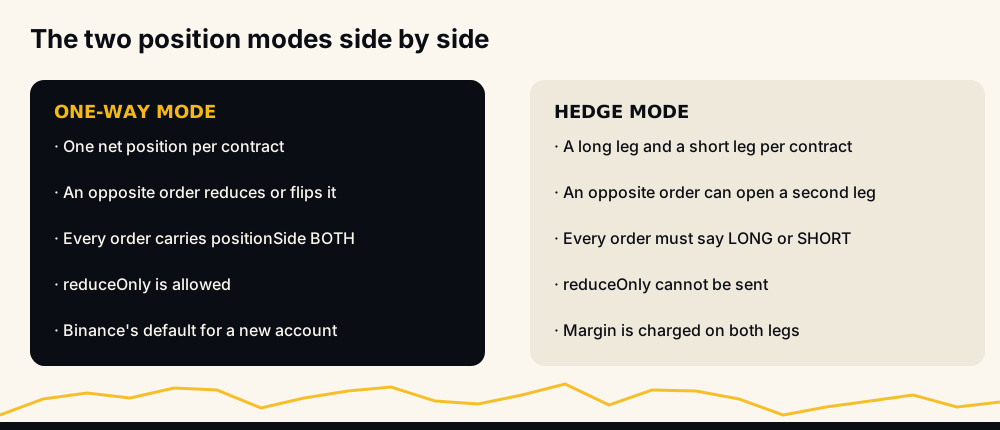
The difference is what an order in the opposite direction does.
- One-way mode: you are long 1 BTC and you sell 1 BTC. The position is closed. Sell 1.5 BTC and you are now short 0.5 BTC: the position flipped, it did not split.
- Hedge mode: you are long 1 BTC and you sell 1 BTC tagged as a short. You now hold two positions, a 1 BTC long and a 1 BTC short, each with its own entry price, its own margin and its own profit and loss.
Fees, funding, leverage brackets and mark price work as before; the mode only decides whether opposite orders net out or sit side by side.
How positionSide works: BOTH, LONG and SHORT
On the API, the mode shows up in one order field, positionSide. Binance's New Order reference states it plainly: "Default BOTH for One-way Mode; LONG or SHORT for Hedge Mode. It must be sent in Hedge Mode."
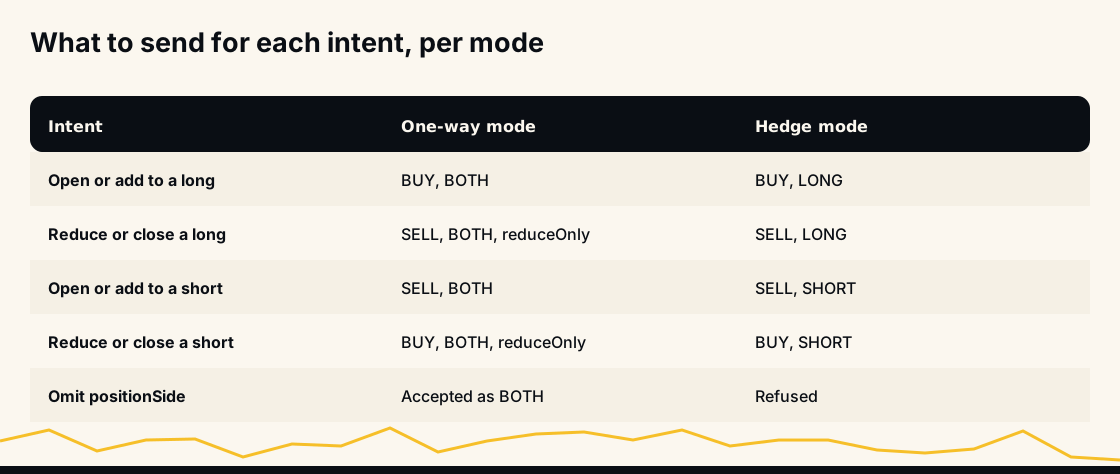
In one-way mode the value BOTH does not mean "both directions". It means "this order applies to the single position on this contract, whichever way it faces". The side (BUY or SELL) alone decides whether you add, reduce or flip.
In hedge mode, side and position side together say what you mean:
- BUY + LONG opens or adds to the long leg; SELL + LONG reduces or closes it.
- SELL + SHORT opens or adds to the short leg; BUY + SHORT reduces or closes it.
Two flags change too. The reference says reduceOnly "cannot be sent in Hedge Mode", because side plus position side already says whether you are closing, and a closePosition stop cannot be a BUY on the LONG side or a SELL on the SHORT side. For what positionSide means inside HafizeBot, where a separate bot setting also filters direction, see what positionSide means.
How to enable hedge mode on Binance, or switch back to one-way
The switch lives on the futures trading screen. Binance's FAQ lists the web steps: click USDⓈ-M (or COIN-M) on the top bar, click the settings icon at the top right, then Position Mode (the FAQ labels the menu Features; Binance's announcement and futures blog call it Preference), and choose One-way Mode or Hedge Mode.
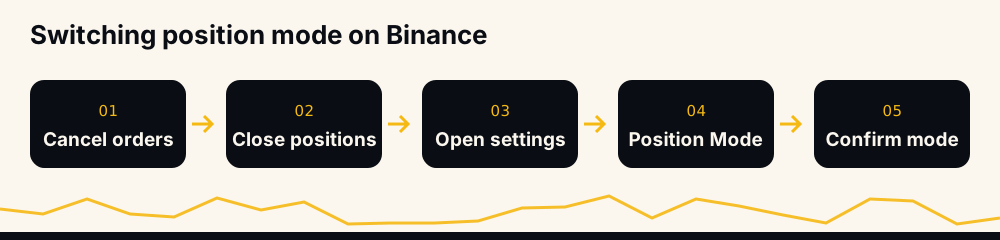
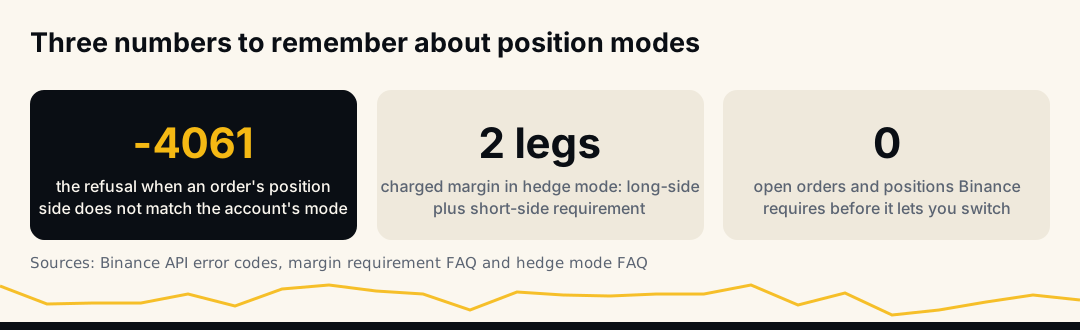
The same FAQ is firm: "Position Mode cannot be adjusted while you have open positions or open orders." That includes stops and take-profits left over from positions you already closed. So cancel every order, close every position, switch, then re-open the screen to confirm the mode shown.
On the mobile app the path is the same idea: open the futures screen, choose USDⓈ-M, tap the settings icon and go to Preference, then Position Mode. HafizeBot's bot gives exactly that instruction to members whose account is in hedge mode: "switch it on Binance first: USDⓈ-M, the settings icon, Preference → Position Mode. Binance only allows the switch with no open orders or positions."
One setting covers every symbol, and COIN-M too
Binance's API reference for Change Position Mode says it changes "user's position mode (Hedge Mode or One-way Mode) on EVERY symbol." You cannot run BTCUSDT in hedge mode and the rest in one-way. The same reference notes: "After CM migration, UM and CM share the same dualSidePosition setting. Calling this endpoint flips both UM and CM at once." So a forgotten COIN-M order or position can block the switch as surely as a USDⓈ-M one. Older Binance help pages still say the two are set separately; the API documentation is the newer statement.
If you trade both styles, the clean answer is two accounts. HafizeBot's one-way mode help page suggests exactly that: keep manual hedge-mode trading on a separate Binance sub-account and auto-trading on the one-way account.
How to check which mode you are in, including by API
In the app or on the web, the Position Mode screen shows which mode is active. For scripts, two endpoints exist:
GET /fapi/v1/positionSide/dualreturns{"dualSidePosition": true}for hedge mode andfalsefor one-way mode. Binance lists its request weight as 30, so read it once at start-up and cache it rather than calling it before every order.POST /fapi/v1/positionSide/dualwithdualSidePosition=trueorfalsechanges it, under the same "no open orders or positions" rule.
Margin in hedge mode: both legs are charged
This is the part people miss when they treat a hedge as free protection. Binance's FAQ "How to Calculate the Margin Requirement on Binance Futures Trading" (updated 2026-01-02) gives the hedge-mode formula as Margin Requirement = Long-Side Margin Requirement + Short-Side Margin Requirement. The two legs do not offset each other for margin.
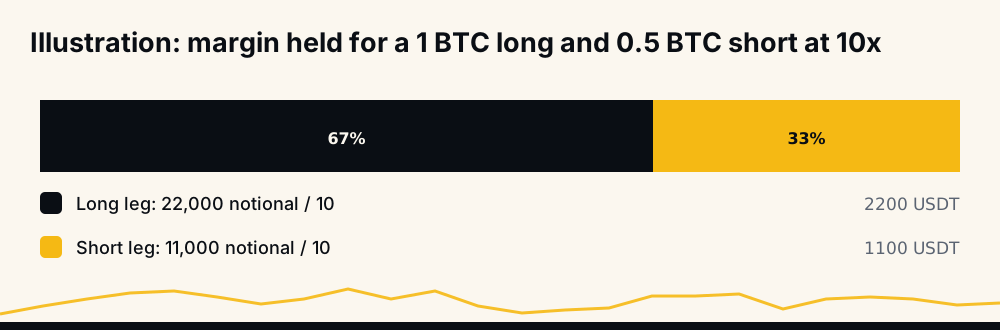
An illustration you can redo: BTC at 22,000 USDT, 10x leverage, ignoring open orders. A 1 BTC long has a notional of 22,000 and needs about 2,200 USDT of margin. A 0.5 BTC short beside it adds 11,000 notional and about 1,100 USDT more, so 3,300 in all. In one-way mode the same net exposure, 0.5 BTC long, would be a single 11,000 position needing about 1,100.
The market exposure is the same; hedge mode ties up three times the margin to hold it.
Liquidation in hedge mode: one shared price or two
Binance's "Liquidation Protocols" FAQ (updated 2026-01-04) is direct about it. In cross margin, "both long and short positions of the same symbol share the same liquidation price." In isolated margin, "the positions will have two different liquidation prices depending on the margin allocated to the positions."
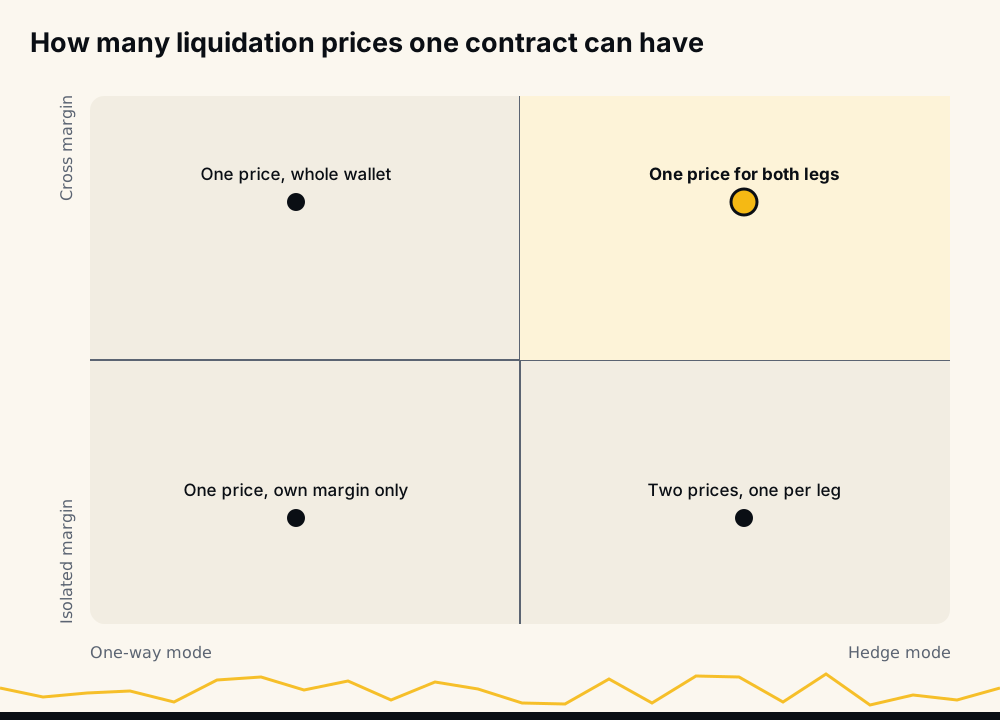
What that means in practice:
- Hedge mode, cross margin: the long and short are judged together, against the whole cross wallet, so one liquidation price covers both legs. Binance's formula carries maintenance terms for each leg, so both count toward it even when they partly cancel in price.
- Hedge mode, isolated margin: each leg stands alone. Binance's launch post from 2020 described this as "precise margin control", and said liquidating one open position "will not impact the other open positions". The flip side is that a strong move can liquidate the losing leg while the winning leg stays open, and you are left unhedged at the worst moment.
Either way, liquidation is measured on mark price: "Liquidation occurs when the Mark Price hits the liquidation price of a position." For the mechanics of why that price moves as you trade, see why your liquidation price moves, and for what happens to a stop sitting near it, liquidated before your stop-loss.
What a hedge costs: fees on every fill, funding on both legs
Binance charges a commission on every executed order, maker or taker. Opening a long, opening a short against it, then closing both is four fills where a single trade would have been two.
Funding is subtler. Binance's funding FAQ (updated 2026-03-06) gives "Funding Amount = Nominal Value of Positions * Funding Rate", with notional at mark price; with a positive rate longs pay shorts, with a negative rate shorts pay longs.
In hedge mode you hold both directions, so you pay on one leg and receive on the other. With equal quantities the two amounts are the same and cancel. With unequal legs only the difference is net: in the 1 BTC long and 0.5 BTC short above, with a positive rate, you pay on 1 BTC and receive on 0.5 BTC. The fee side is covered in more depth in Binance Futures fees explained.
Binance's own hedge example, worked through
Binance's hedge mode FAQ includes an example, explicitly not financial advice: a trader holds a 1 BTC long and a 0.5 BTC short on BTCUSDT, both opened at 22,000 USDT.
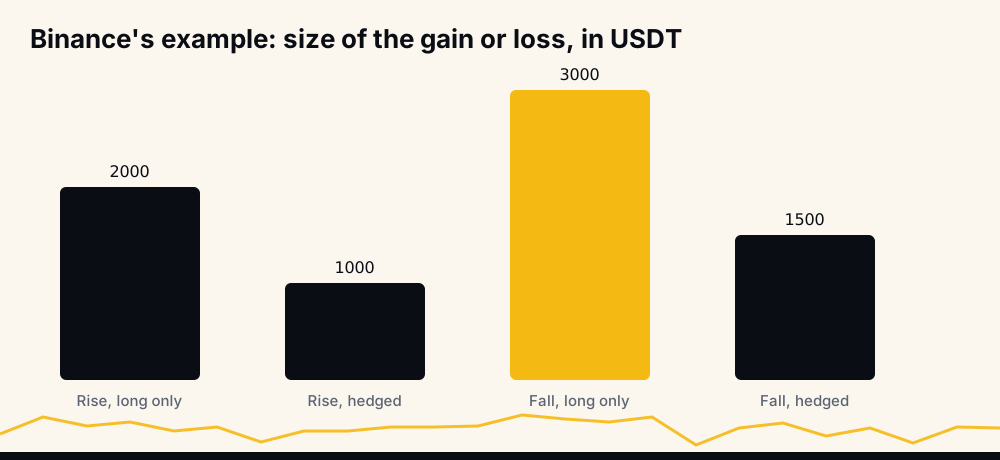
- Price rises to 24,000: the long gains 2,000, the short loses 1,000, net +1,000. A long-only position would have made 2,000.
- Price falls to 19,000: the long loses 3,000, the short gains 1,500, net −1,500. A long-only position would have lost 3,000.
Notice that the hedged result is exactly what a 0.5 BTC long would have produced on its own. The hedge halves both the gain and the loss because the net exposure is half. What hedge mode adds is the ability to keep two positions with separate entries, not a different payoff.
When hedge mode is worth it, and when it is not
Binance's 2020 launch post names the main use: "traders can maintain long-term positions while participating in short-term movements." That is the honest case for hedge mode:
- Two strategies on one contract. A long-term long and a short-term short, each with its own entry and exit, without one closing the other.
- Freezing a position's profit and loss without closing it, so the original entry stays on the books.
For most people, closing or reducing the position gives the same exposure with one fill instead of two, a single liquidation price and less margin tied up. If the reason for a hedge is "I don't want to realise this loss", the loss is already there either way; the hedge only adds fees and margin.
Why bots and signal autotraders want one-way mode
A trading bot has to answer, for every order, "will this add to, reduce or open a position?" In one-way mode the answer comes from one number per symbol, the signed position size. That makes two things simple:
- Exits cannot flip you. A stop or take-profit can be flagged
reduceOnly, so it never opens a position the wrong way. That flag cannot be sent in hedge mode. - Positions are unambiguous. One symbol, one position, one entry, one liquidation price to keep stops inside.
Supporting both modes would double every order path. Plenty of bots, HafizeBot's autotrader among them, pick one-way mode and ask the account to match. HafizeBot's auto-trading needs the Binance futures account in One-way mode; it does not switch the mode for you, because that is your account's setting, made on Binance.
The rest of the setup stays in your hands as well. The key needs futures trading only, so use a key with withdrawals off (how to connect a trading bot safely walks through it); funds stay on your own Binance account; and you set your own leverage, size, maximum positions and stop-loss.
Errors when an order meets the wrong mode
When bot and account disagree, Binance refuses the order. The messages below are from its USDⓈ-M error code reference.
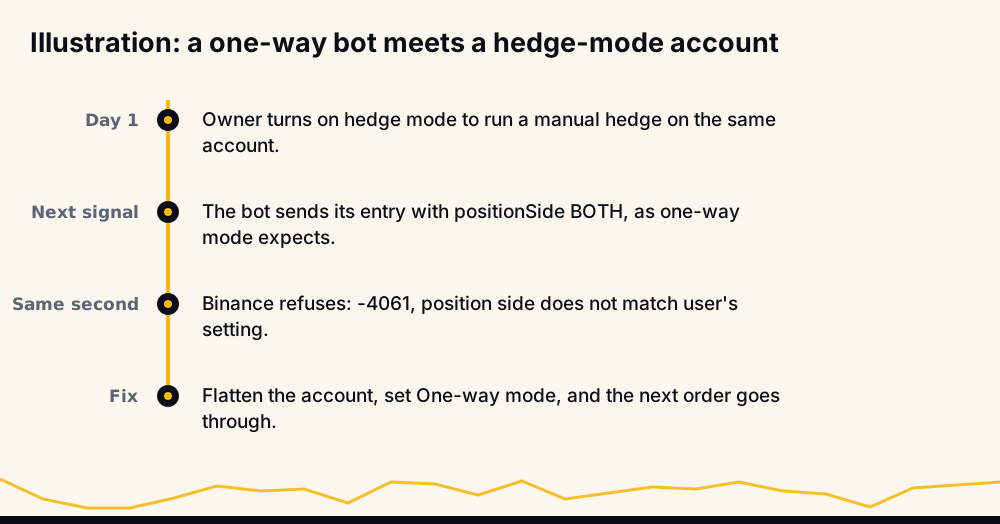
- -4061, "Order's position side does not match user's setting." The order's
positionSidedoes not fit the account's mode. The usual case is a one-way bot that sendsBOTH(or nothing) to an account switched to hedge mode. - -4060, "Invalid position side." A value Binance does not accept in that field.
- reduceOnly sent in hedge mode. The reference says it "cannot be sent in Hedge Mode". Binance's generic code for a parameter that should not be there is -1106, "A parameter was sent when not required"; client libraries report this case that way.
- -4067, "Position side cannot be changed if there exists open orders" and -4068, "... if there exists position." You tried to switch modes without flattening first.
- -4059, "No need to change position side." You asked for the mode you are already in. Harmless.
A related refusal, -2022 "ReduceOnly Order is rejected", has its own causes, covered in why a reduce-only order failed. The full list is in Binance Futures error codes. When HafizeBot's orders are refused for -4061, the bot tells the member the account is in hedge mode and links the help page.
Switching a bot account to one-way mode, safely
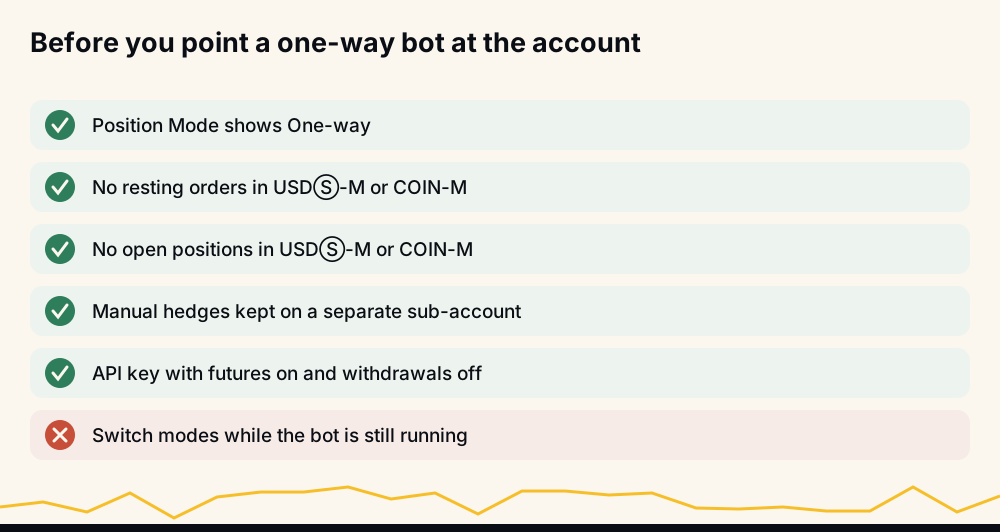
- Pause the bot, so it opens nothing while you flatten.
- Close and cancel everything in USDⓈ-M and COIN-M.
- Switch to One-way and re-open the screen to confirm it.
- Check the setting beside it. Multi-Assets mode is separate and has its own rules for isolated margin (Binance Multi-Assets mode).
- Turn the bot back on and watch the first order go through.
FAQ
What is hedge mode in Binance? Hedge mode is a Binance Futures position mode that lets one contract hold a long and a short at the same time, each with its own entry price, margin and profit and loss. Every order must say whether it belongs to the LONG or the SHORT leg. The default is one-way mode, where opposite orders net into a single position.
How do I enable hedge mode on Binance? On the futures screen choose USDⓈ-M, open the settings icon, then Position Mode, and select Hedge Mode. Binance allows it only with no open positions and no open orders, stops included. The setting covers every symbol and, per Binance's API reference, COIN-M as well.
How do I enable hedge mode on Binance mobile? In the app, open Futures, choose USDⓈ-M, tap the settings icon at the top right, go to Preference, then Position Mode. The same rule applies: cancel every order and close every position first, or the switch is refused.
How does liquidation work in Binance hedge mode? In cross margin, the long and short of the same symbol share one liquidation price. In isolated margin, each leg has its own liquidation price based on the margin you gave it, so one leg can be liquidated while the other stays open. Liquidation is triggered by mark price in both cases.
Why does my bot say position side does not match? That is Binance error -4061: the order's positionSide does not fit the account's mode, usually a one-way bot sending BOTH to a hedge-mode account. Flatten the account and switch Position Mode to One-way, and that mismatch is gone.
Before you connect a bot, check the record
HafizeBot's signals are AI-generated from a model that evaluates 240+ indicators, formulas and components, across 523 Binance USDⓈ-M pairs. The live performance page is regenerated hourly from the trade database, with every missed signal counted against the target-hit rate, and the signal archive holds 33,694 signals from June 2021 to February 2024.
You can watch before you connect anything: the free channel t.me/getbinancefutures posts the stronger signals 20 minutes after VIP. VIP signals arrive instantly, with optional autotrading on your own one-way account; plans are in USDT, listed on plans and prices, with a 3-day free trial through /trial in @hafizebot.
This is not investment advice; trade only what you can afford to lose.