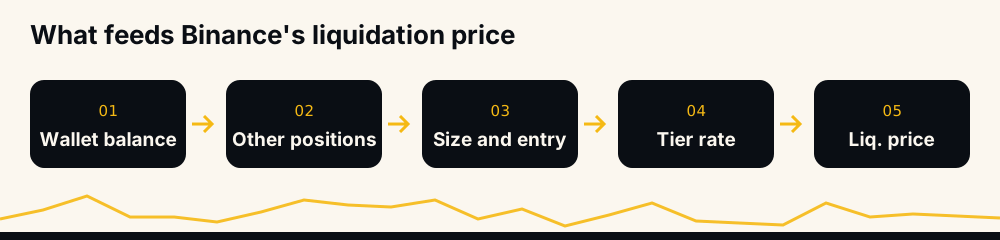
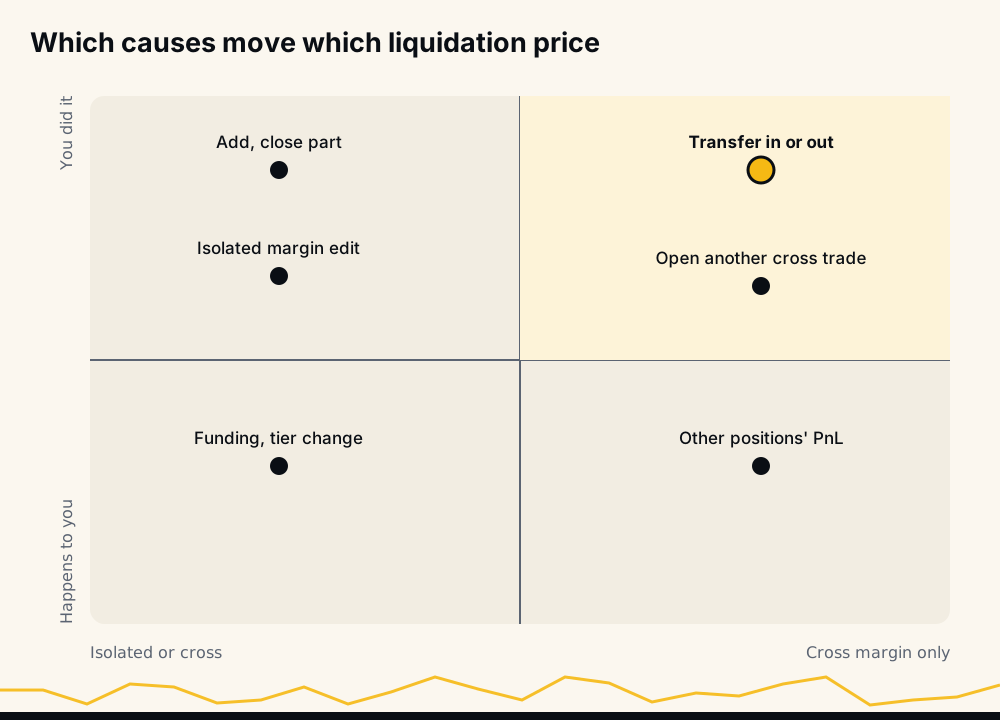
Your liquidation price on Binance Futures changes when an input to Binance's formula changes: your wallet balance, the profit or loss and maintenance margin of your other cross positions, the position's size and average entry, the margin behind it, or its maintenance tier. Funding, fees, transfers, adds, partial closes, margin edits and Binance's own tier updates all move one of those. Price alone does not.
Mark price approaching your liquidation price is the danger, not what moves the number. Below are the ten causes that do, with arithmetic you can redo. For a liquidation that already happened, see liquidated before your stop-loss; this article is about a position still open.
How Binance calculates your liquidation price
Binance's FAQ "How to Calculate Liquidation Price of USDⓈ-M Futures Contracts" (updated 31 December 2025) gives the formula as an image. For a one-way position it reads:
Liquidation price = (WB − TMM1 + UPNL1 + cum − side × Q × EP) ÷ (Q × MMR − side × Q)
- WB: wallet balance; in cross mode the cross wallet balance, in isolated mode the position's own isolated wallet.
- TMM1, UPNL1: maintenance margin and unrealized PnL of all your other contracts. Binance sets both to 0 in isolated mode.
- cum: the maintenance amount of the position's tier. MMR is the tier's maintenance margin rate.
- side: 1 for a long, −1 for a short. Q is the size, EP the entry price.
You can check it: Binance's own BTCUSDT worked example (wallet 1,535,443.01, 109.488 BTC at 32,481.98, 2.5% rate, 16,300 maintenance amount) comes out at 26,316.89, the figure Binance prints.
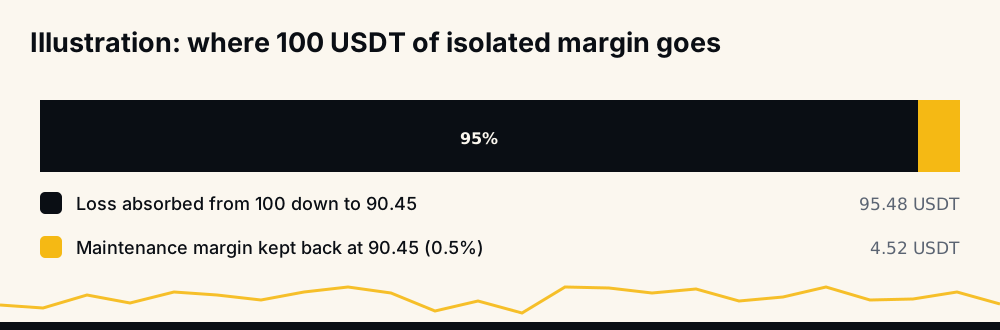
A reference case for the rest of the article, with illustrative numbers: long 10 units at 100 on 10x isolated, 100 USDT of margin, a 0.5% rate, no maintenance amount, fees ignored. Liquidation = (100 − 1,000) ÷ (0.05 − 10) = 90.45. At that price the position has lost 95.48 USDT and the last 4.52 is the maintenance margin Binance keeps back.
Notice what is missing: mark price. Binance says "liquidation occurs when the Mark Price hits the liquidation price of a position" (liquidation protocols, updated 4 January 2026). Mark price is the trigger, not an input. Why mark and not last price is covered in mark price vs last price on Binance.
Cause 1: your other cross positions are winning or losing
In cross mode, UPNL1 and TMM1 are live. Binance's futures blog (Three Misconceptions About Liquidations, 23 December 2022) puts it plainly: in cross margin "the liquidation price constantly changes in accordance with the performance of your positions", while in isolated mode it "remains unchanged".
Illustration: a 300 USDT cross wallet, the same long 10 at 100, and one other position with 5 USDT of maintenance margin. With the other position flat, liquidation is (300 − 5 − 1,000) ÷ −9.95 = 70.85. Let that position lose 200 USDT and it becomes (300 − 5 − 200 − 1,000) ÷ −9.95 = 90.95, worse than the same trade on isolated margin.
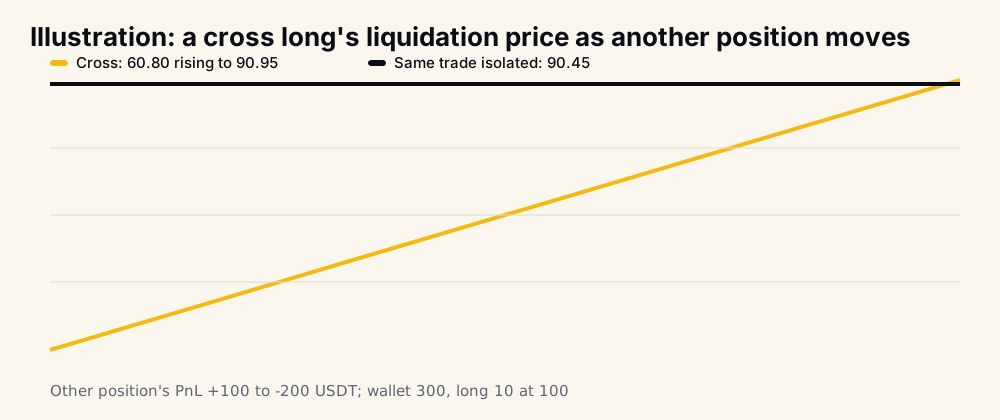
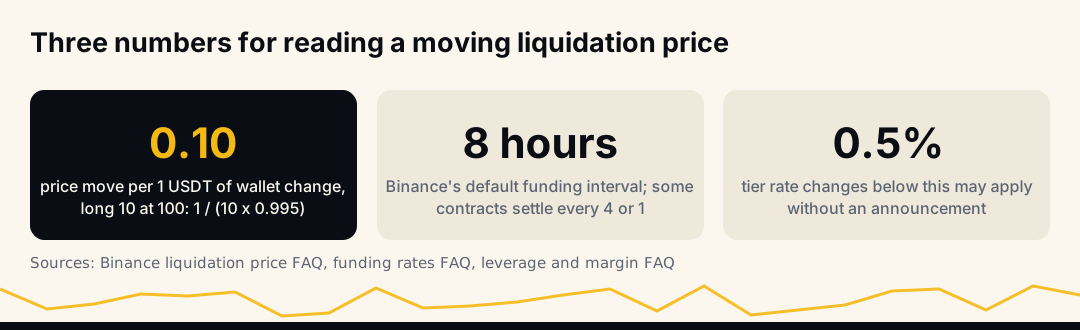
The rule behind the slope: for a long, each USDT that leaves the margin pool lifts liquidation by 1 ÷ (Q × (1 − MMR)). Here that is 1 ÷ 9.95, about 0.10 per USDT. In Hedge Mode with cross margin, Binance adds, "both long and short positions of the same symbol share the same liquidation price."
Cause 2: money moved in or out of the futures wallet
WB is in the numerator, so anything that changes the wallet moves a cross liquidation price. Binance's blog on balances gives the composition: "Wallet Balance = Total Net Transfer + Total Realized Profit + Total Net Funding Fee - Total Commission", and notes that "opening new positions will not affect a user's wallet balance."
Transfer 50 USDT out of an illustrative 300 USDT cross wallet holding only the reference long and its liquidation goes from 70.35 to 75.38. Opening another cross position does not touch WB, but its maintenance margin and PnL enter TMM1 and UPNL1.
Cause 3: funding payments
Funding is paid between longs and shorts, usually every 8 hours at 00:00, 08:00 and 16:00 UTC; Binance can move a contract to 4-hour or 1-hour settlement (funding rates FAQ, updated 6 March 2026). The amount is "Nominal Value of Positions * Funding Rate", with nominal value at mark price. With a positive rate, longs pay shorts.
The same FAQ says a shortfall in your balance means funding "will be deducted from your position margin, which may affect your liquidation price", and the futures blog says funding "is either added to or subtracted from the wallet balance, changing the liquidation price." Binance's user-data stream confirms the isolated case: a funding fee on an isolated position is pushed together with that position's update.
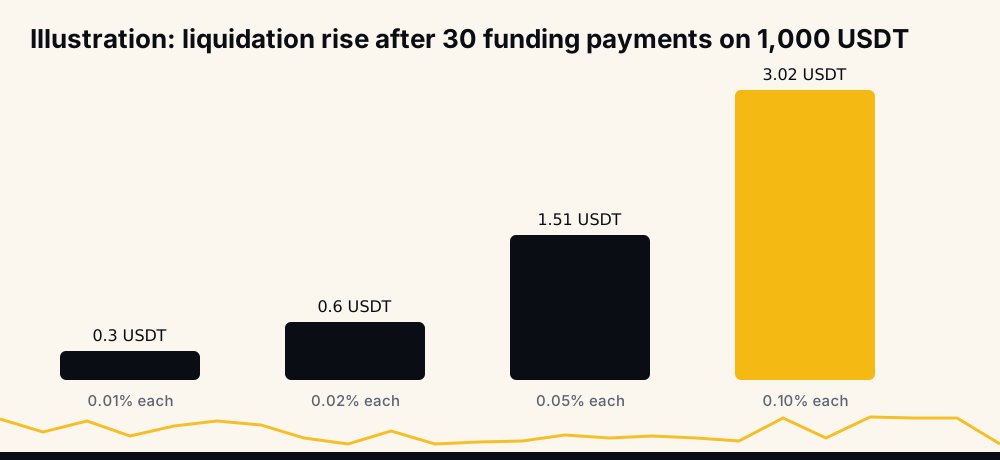
Illustration on the isolated reference long, notional held at 1,000 USDT for 30 payments (10 days at 8 hours): at 0.01% each it pays 3 USDT and liquidation rises 0.30, to 90.75; at 0.10% each it pays 30 USDT and liquidation rises 3.02. Receiving funding moves it the other way.
Cause 4: trading fees
Every fill costs commission, "Notional Value * Fee Rate" (fees FAQ, updated 5 January 2026), and commission comes out of the wallet balance. Illustrative: a 0.05% fee on a 1,000 USDT fill is 0.50 USDT, which lifts the cross long's liquidation by about 0.05.
Small per trade, real over many: on a busy cross account every trade's fees nudge each open position's liquidation price.
Cause 5: adding to the position
An add changes Q and averages EP. What it does to liquidation depends on the margin behind it, which is why traders see opposite results.
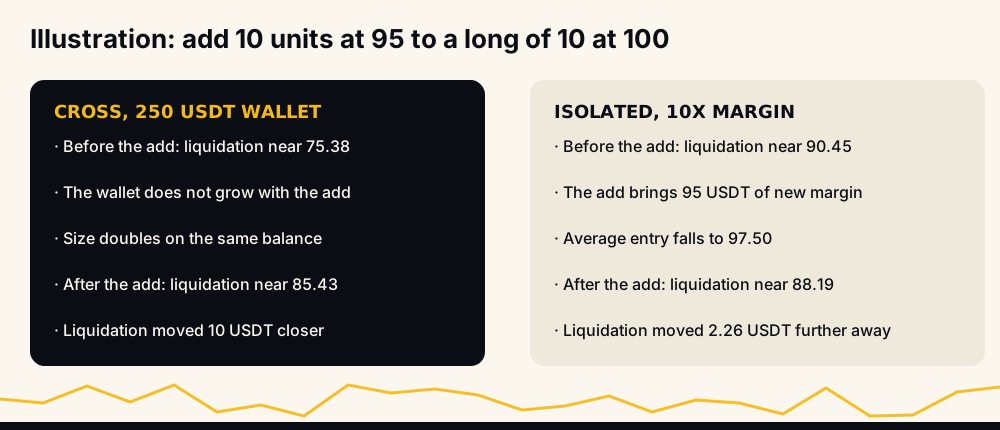
Illustration, long 10 at 100, adding 10 at 95 (new average 97.50):
- Cross, 250 USDT wallet. Before: (250 − 1,000) ÷ −9.95 = 75.38. After: (250 − 1,950) ÷ (0.10 − 20) = 85.43. Same wallet, double the size, liquidation 10 USDT closer.
- Isolated at 10x. The add brings 95 USDT of new margin, so WB is 195. After: (195 − 1,950) ÷ −19.9 = 88.19, further away than before.
Our average entry calculator gives the new entry before you click.
Cause 6: closing part of the position
A partial close shrinks Q and, in cross, turns part of the unrealized PnL into realized PnL in the wallet. Binance's blog lists "increasing or decreasing your position size" among the things that move the price.
Illustration: the cross position from cause 5, 20 units at 97.50 with liquidation at 85.43. Price is 92 and you close 10. The realized loss is 10 × 5.50 = 55 USDT, so WB drops to 195. The remaining 10 units: (195 − 975) ÷ −9.95 = 78.39. The wallet shrank, yet liquidation moved 7 USDT further away, because the position halved. Closing a winner works the same way, with realized profit adding to WB.
Cause 7: adding or removing isolated margin
In isolated mode you edit margin from the Positions tab with the edit icon (adjust margin FAQ, updated 2 January 2026). Adding margin raises WB and pushes liquidation away; removing it pulls liquidation closer.
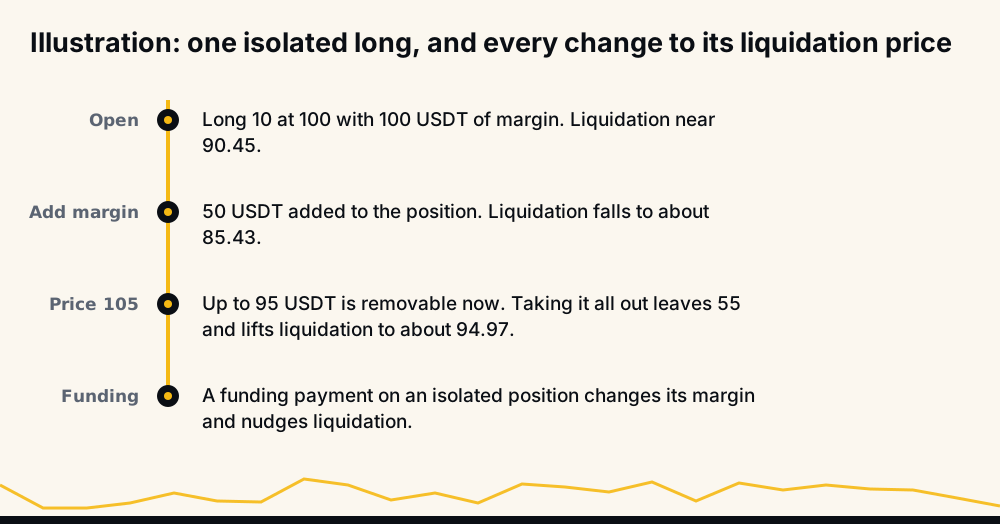
Binance caps removal at max(0, min(isolated wallet − the position's maintenance margin, isolated wallet + size × (mark − entry) − mark × size × initial margin rate)). Worked through: add 50 to the reference long (WB 150, liquidation 85.43). At mark 105 the cap is min(150 − 5.25, 150 + 50 − 105) = 95. Remove all 95 and WB is 55: liquidation jumps to 94.97, about 9.5% under the new price.
Cause 8: the position grew into a higher maintenance tier
Binance's leverage and margin FAQ (updated 27 March 2026): maintenance margin = "Notional Position Value * Maintenance Margin Rate - Maintenance Amount", and "the larger the position, the higher the Maintenance Margin rate." The liquidation FAQ adds that if the notional lands in a different tier than you assumed, you recalculate with that tier's rate and amount.
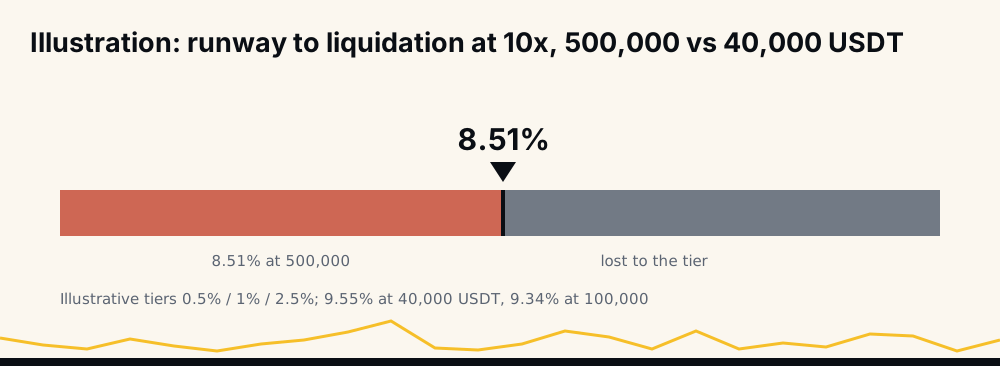
Illustrative tiers: 0.5% up to 50,000 USDT, 1% (maintenance amount 250) to 250,000, 2.5% (amount 4,000) above. A 10x isolated long from 100 reaches liquidation after a 9.55% move at 40,000 USDT, 9.34% at 100,000 and 8.51% at 500,000. Tiers also cap leverage by size: see Binance Futures leverage limits.
Cause 9: Binance changed the coin's tiers
Binance announces tier updates per contract, and its 5 October 2023 tier announcement said existing positions "will be affected" and advised adjusting position and leverage beforehand "to avoid any potential liquidation." A November 2024 notice, by contrast, said existing positions "will not be affected."
Some changes come without notice. The leverage and margin FAQ says that where a tier's maintenance margin rate changes by less than 0.5%, "Binance may, in its sole discretion, apply the adjustment without issuing an announcement." If MMR moves under you, the liquidation price moves with it.
Cause 10: collateral value in Multi-Assets Mode
In Multi-Assets Mode other assets back your margin, and Binance's futures FAQ blog (27 May 2022) says "the liquidation price may change more often than in Single-Asset Mode" because "as the price of the collateral assets changes, so does the liquidation price." A falling collateral coin pulls liquidation closer even when the traded coin is still.
Does leverage affect liquidation price?
Not directly: leverage is not in the formula. At opening it sets how much margin goes in (notional ÷ leverage), and on isolated that margin is WB. After opening, Binance's blog says that in cross mode, "changing the leverage will not impact the liquidation price of a contract", as long as you do not remove the available balance it frees. In isolated mode, Binance's FAQ blog says you can only raise the leverage of an open position, not lower it.
So "lower your leverage" really means "put more margin behind the same size". Background: how leverage trading works in crypto.
Why the liquidation price you see is an estimate
The number on screen is the formula applied to your account right now. Four reasons it can differ from the real liquidation:
- It assumes nothing else changes. A cross figure holds other positions' PnL where it is this second.
- Decimals. Binance's own FAQ notes "there may be a slight variation due to decimals."
- Volatile markets. Binance warns of "a discrepancy between the order's liquidation price displayed on the Liquidation History tab" and the price where the position was liquidated, which "often happens in a volatile market."
- Tier assumptions. If the size at liquidation sits in another tier, the figure has to be recalculated.
The order panel's Calculator icon has a Liquidation Price option for planning, and Binance calls its outputs estimates. Our liquidation price calculator uses each coin's real brackets.
Reading it in the app versus the API
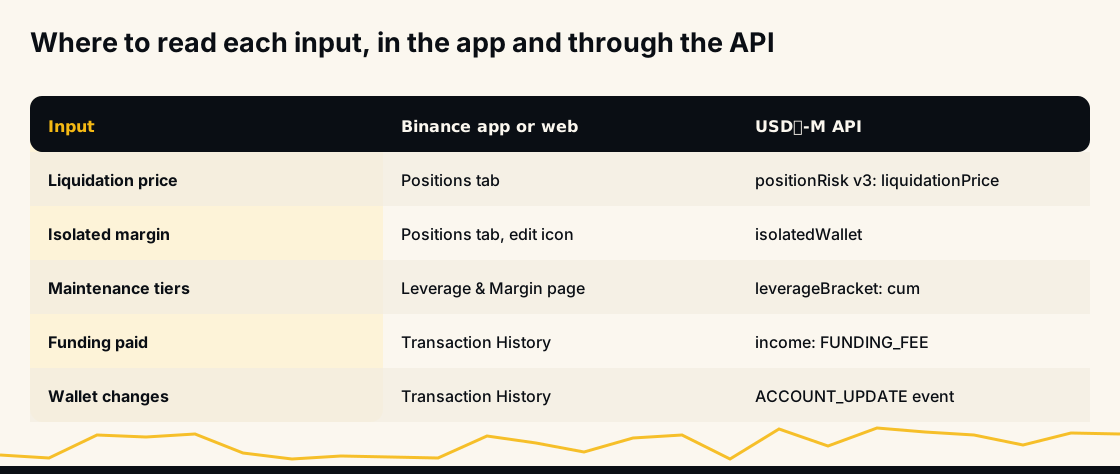
In the app, open positions sit in the Positions tab, with the edit icon for isolated margin; Transaction History holds the funding record ("your history of Funding Fees can be found in your transaction history", says Binance's funding fees blog).
Through the USDⓈ-M API:
GET /fapi/v3/positionRiskreturnsliquidationPrice,isolatedWallet,maintMargin,markPriceandnotional, for symbols with a position or open orders.GET /fapi/v1/leverageBracketreturns each bracket'snotionalFloor,notionalCap,maintMarginRatioandcum, everything you need to recompute the formula yourself.ACCOUNT_UPDATEon the user-data stream fires on balance and position changes, with a reason such asORDER,FUNDING_FEEorMARGIN_TRANSFER. Unfilled or cancelled orders do not trigger it.GET /fapi/v1/incomewithincomeType=FUNDING_FEEorCOMMISSIONlists what moved WB.
A liquidationPrice read once at entry goes stale; re-read it after any ACCOUNT_UPDATE.
How to keep your liquidation price where you want it
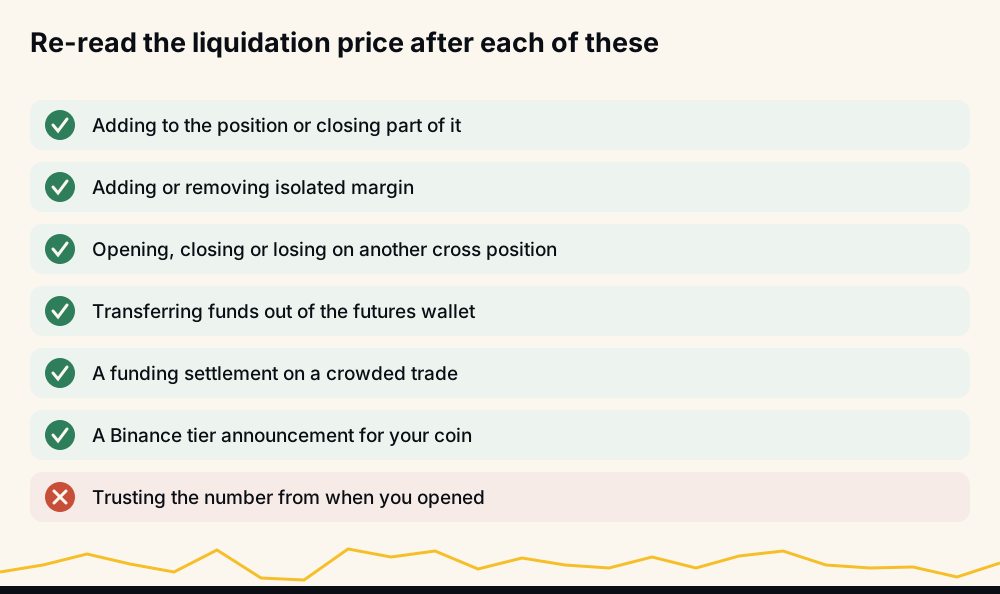
- Isolated margin stops other positions, transfers and other trades' fees from touching the position.
- Re-read after every add and check your stop still sits inside liquidation; see how to set a stop-loss in crypto.
- Watch funding and tier notices on positions you hold for days or in size.
- Add margin when needed. If Binance refuses, see margin is insufficient (-2019).
How HafizeBot's autotrader handles a moving liquidation price
HafizeBot's autotrader runs on your own Binance account, in One-way mode, the mode the formula above uses. You set leverage, position size, maximum open positions and stop-loss. The key needs futures trading only; use a key with withdrawals off, since HafizeBot never withdraws or transfers.
A stop beyond liquidation can never fire, so the bot asks you to lower a stop that sits beyond what your leverage allows; on isolated margin it uses 70% of the liquidation distance.
The signals are AI-generated, from a model that evaluates 240+ indicators, formulas and components across 523 Binance USDⓈ-M pairs. Broadcast signals carry a target and a maximum hold, not a stop, so the stop on your account is yours. The live performance page, regenerated hourly since June 2026, counts every missed signal against the target-hit rate; the monthly reports hold the 2021 to 2024 archive.
Frequently asked questions
Why is my liquidation price going up on a long? Something reduced the margin behind the position or increased its size. On cross, the usual causes are other positions losing, funding, fees or a transfer out; on either mode, an add, a margin removal or a higher maintenance tier.
Does liquidation price change in isolated margin? Only when you change the position or its margin. Binance says it "remains unchanged" in isolated mode otherwise, but adds, partial closes, margin edits, funding and a change to the coin's tier rate all move it.
Does leverage affect liquidation price? Leverage sets how much margin goes in when you open, and that margin decides the liquidation price. Changing leverage afterwards does not move a cross position's liquidation price as long as you leave the freed balance in the wallet.
What does estimated liquidation price mean? It is Binance's formula applied to your account as it stands now. Funding, fees, other positions and tier changes can move it later, and Binance notes the displayed figure can differ from the actual liquidation price in volatile markets.
How do I lower my liquidation price on a long? Put more margin behind the same size: add isolated margin, keep more in the cross wallet, or close part of the position. Each one raises the wallet balance relative to the size in Binance's formula.
Why did my liquidation price move when I added to my position? An add changes the size and the average entry. On cross the wallet stays the same while the size grows, so liquidation moves closer; on isolated the add brings its own margin, so it can even move further away.
The short version
A liquidation price is a formula of wallet balance, other positions, size, entry and tier; it moves when one of them moves, and mark price only decides when it is reached. Sources: Binance's liquidation price, liquidation protocols, funding, fees and leverage and margin FAQs, its futures blog and the USDⓈ-M API documentation.
To let a bot trade signals under your own leverage and stop, try 3 days of VIP Tier 1 free with /trial in @hafizebot; trial autotrading is capped at 10 USDT of margin per entry and 3 open positions. VIP is 50, 100 or 200 USDT a month via /join. The free channel t.me/getbinancefutures posts the stronger signals (strength 3 and up) 20 minutes after VIP.
This is not investment advice; leveraged futures can lose your whole margin, so trade only what you can afford to lose.