Multi-Assets mode is a Binance USDⓈ-M Futures setting that lets several coins count as margin at once, such as USDT, USDC, BTC or BNB, shared across USDT- and USDC-margined contracts. The price is that it allows cross margin only: isolated margin is refused (error -4168). To turn it off, open USDⓈ-M Futures, then Preference → Asset Mode → Single-Asset Mode, after cancelling open orders.
What Multi-Assets mode does
In the default Single-Asset mode, a USDT-margined contract is backed by USDT and nothing else. Binance's API documentation says it plainly: wallet balance, margin and available balance are "USDT only in single-asset mode". Any USDC or BNB sitting in the same futures wallet does not help a USDT-margined position.
Multi-Assets mode changes that. Eligible coins in the USDⓈ-M Futures wallet count towards margin at their USD value, and the margin is shared across USDT- and USDC-margined contracts, so a profit on one can cover a loss on another. Balances, margin and available balance are then reported in USD across everything that counts.
It is an account-wide switch for USDⓈ-M Futures, not a per-coin setting.
Single-Asset versus Multi-Assets, side by side
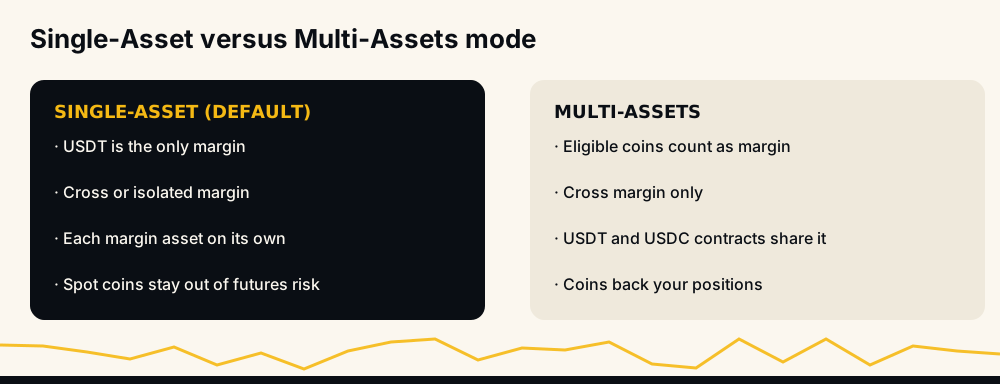
- What counts as margin: USDT only, against USDT plus other eligible coins.
- Margin types allowed: cross and isolated, against cross only.
- Contracts sharing margin: each margin asset on its own, against USDT- and USDC-margined contracts together.
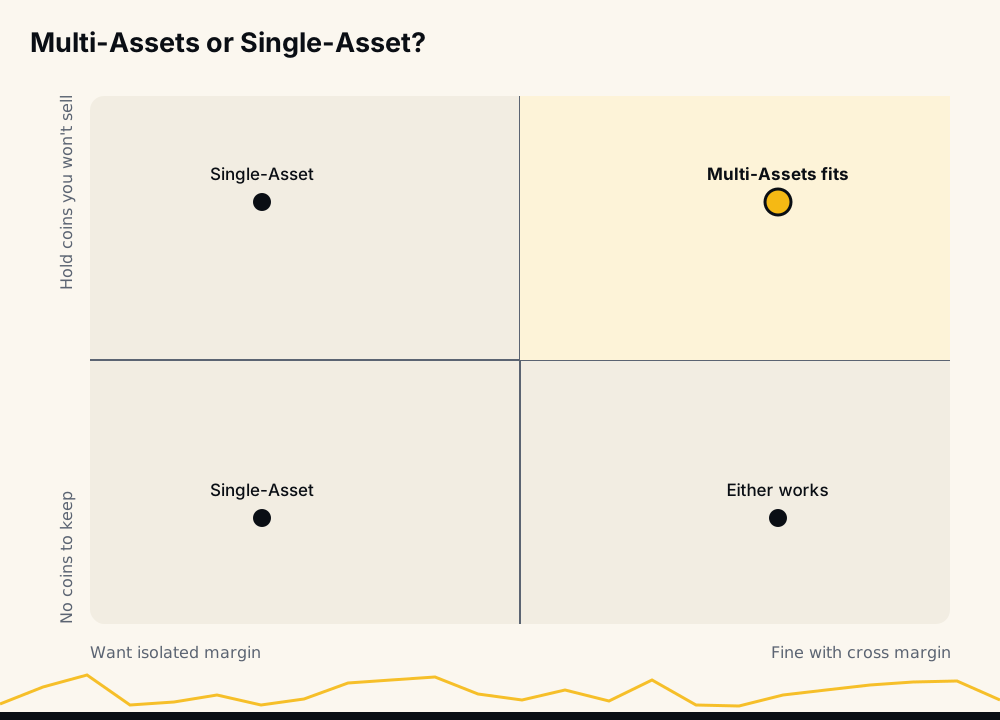
- Who it suits: anyone who wants each position's loss capped at its own margin, against traders who hold coins they would rather not sell and want them to back positions.
Which coins count, and at what value
Binance publishes the eligible coins and their limits on its Multi-Assets trading rules page, and changes them from time to time, so check the current list there before relying on a coin. Its FAQ names stablecoins and large coins such as BTC, ETH and BNB among them.
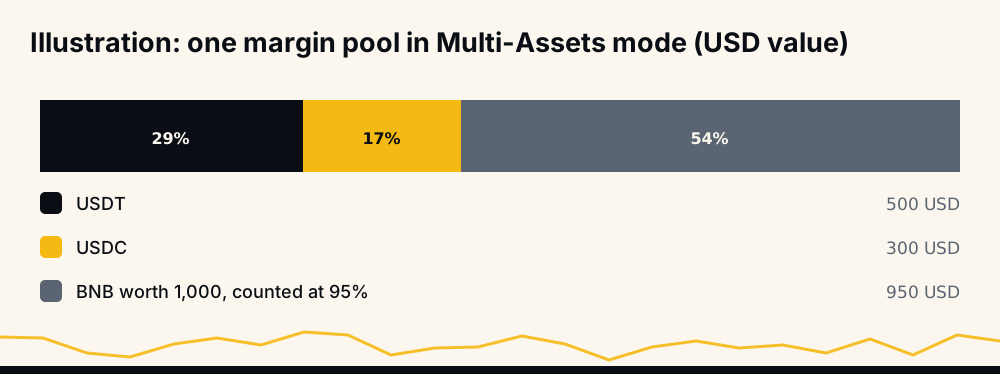
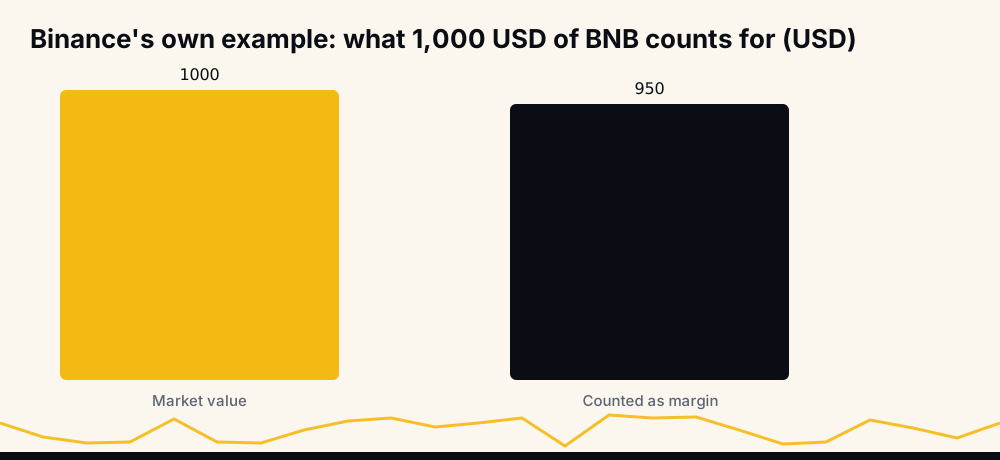
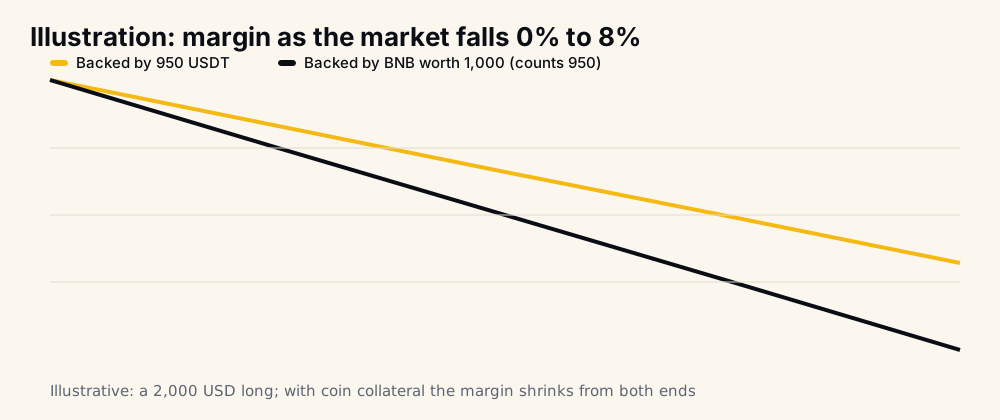
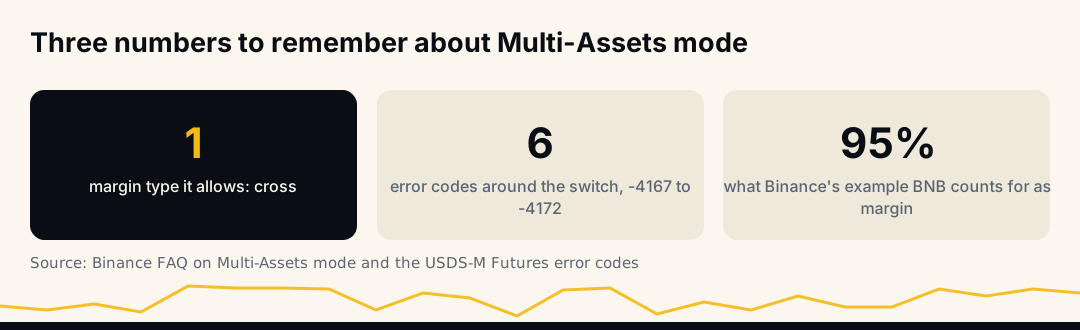
Non-stablecoin collateral is not counted at its full price. Binance applies a collateral value ratio, a discount on what each coin counts for; its FAQ illustrates it with BNB worth $1,000 counting as $950. The discount exists because the coin itself can fall while it backs your positions.
Why it allows only cross margin
Isolated margin means each position has its own fixed slice of margin, in one asset. Multi-Assets mode means margin is a pool of different coins valued together. The two ideas do not fit, so Binance allows Multi-Assets only with cross margin, where every position draws on the same pool.
That has a direct consequence for risk. On cross margin a losing position is not stopped by its own margin; it can draw on everything in the pool until the account's margin balance falls to the maintenance margin. How leverage trading works covers what that means for liquidation. For an automated account it changes what a stop is worth: the stop still closes a losing trade, but if it fails or is refused, nothing caps that trade's loss at its own margin.
How to check which mode your account is in
In the app or on the website, open USDⓈ-M Futures and go to Preference → Asset Mode: the selected option is the current mode.
Through the API, GET /fapi/v1/multiAssetsMargin returns "multiAssetsMargin": true for Multi-Assets mode and false for Single-Asset mode, and POST to the same path with multiAssetsMargin=true or false changes it. The account endpoint also tells you indirectly: in Multi-Assets mode its balances are USD-denominated across assets, where Single-Asset mode reports USDT only. Checking the mode once at start-up saves a bot from learning it through -4168 refusals.
How margin and liquidation work in this mode
In Multi-Assets mode Binance adds up the USD value of everything that counts, after the collateral discount, and treats it as one margin balance for all your USDⓈ-M positions. Unrealized profit and loss is added to that balance, and the initial margin of open positions and orders is taken out of what new orders can use.
Liquidation follows the cross-margin rule for the whole pool: when the margin balance falls to the maintenance margin the positions need, Binance starts closing them. There is no wall between positions, and none between your positions and your coins: a coin that falls in price lowers the margin balance exactly as a losing trade does.
A worked example you can redo
Take a pool of 500 USDT, 300 USDC and BNB worth 1,000 USD counted at 95%, so 1,750 USD of margin. Open a long of 2,000 USD notional at 5x: it needs 400 USD of initial margin, leaving 1,350 for new orders.
Now the market falls 8%, and BNB falls with it.
- The long loses 8% of 2,000: 160 USD.
- BNB is now worth 920 and counts for 874: 76 USD less margin.
- The margin balance drops from 1,750 to 1,514, and available balance from 1,350 to 1,114.
In Single-Asset mode with 1,750 USDT, the same move would cost only the 160. The extra 76 is the price of letting a coin back your futures, and it grows with leverage and with how much of the pool is not stablecoins. The numbers are an illustration; Binance's own discount differs by coin.
How to switch Multi-Assets mode on or off
On the Binance website: open Futures → USDⓈ-M Futures, choose Preference, then Asset Mode, and pick Single-Asset Mode or Multi-Assets Mode.
In the Binance app: go to Futures → USDⓈ-M, tap the ⋯ menu, choose Preferences, then Asset Mode.
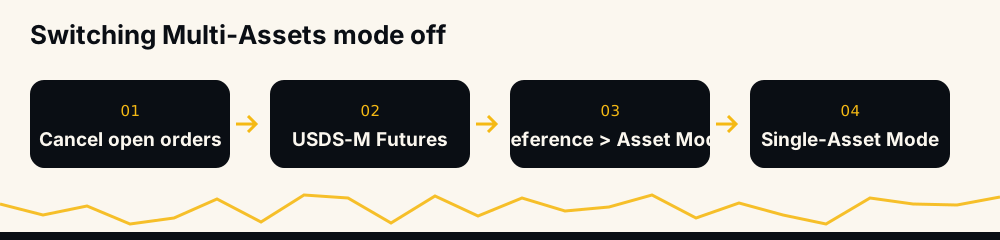
Binance says you can switch without closing open positions, with two conditions from its own error list:
- Open orders block the switch in either direction (-4170). Cancel them first, stops and take-profits included.
- Isolated positions block turning it on (-4167). Every USDⓈ-M symbol must be on cross margin first.
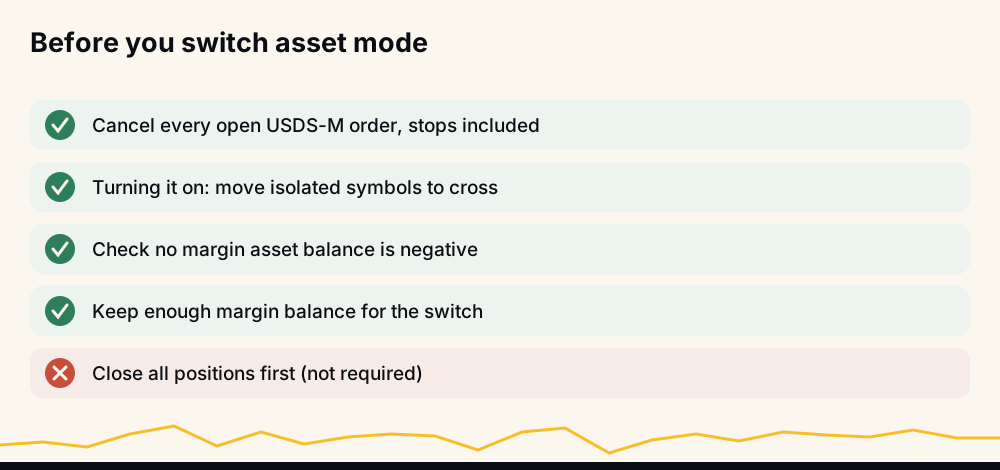
What turning it on means for isolated positions
Turning Multi-Assets on requires every USDⓈ-M symbol to be on cross margin (-4167 otherwise). But Binance also refuses to change a symbol's margin type while a position is open on it: error -4048, "Margin type cannot be changed if there exists position." So an open isolated position cannot simply be converted in place. In practice, close it (or wait for it to close), switch that symbol to cross, and only then turn Multi-Assets on.
Going the other way is easier: switching back to Single-Asset keeps your cross positions open, and you can set isolated margin on a symbol again once it has no position.
The errors that come with it: -4167 to -4172
Binance's USDⓈ-M Futures API returns a family of errors around this setting:
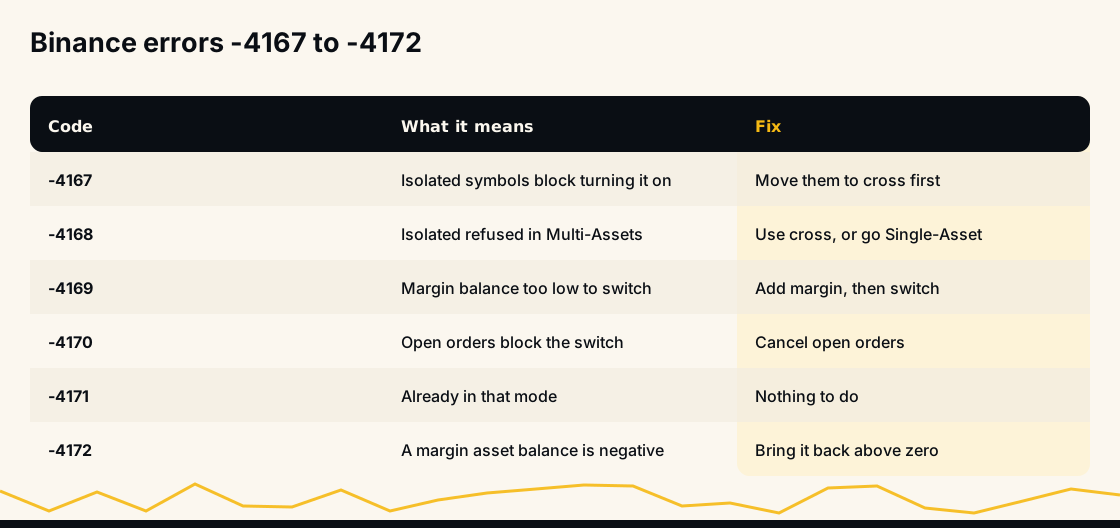
- -4167: "Unable to adjust to Multi-Assets mode with symbols of USDⓈ-M Futures under isolated-margin mode." Switch those symbols to cross first.
- -4168: "Unable to adjust to isolated-margin mode under the Multi-Assets mode." The one most people meet: isolated is not available while Multi-Assets is on.
- -4169: the switch is refused with insufficient margin balance.
- -4170: the switch is refused with open orders in USDⓈ-M Futures.
- -4171: the mode is already the one you asked for; nothing to do.
- -4172: the switch is refused while a margin asset's wallet balance is negative.
If you see -4168 from a bot or script, the account is in Multi-Assets mode and the code tried to set isolated margin on a symbol.
Is Multi-Assets mode risky?
It is not riskier by design, but it adds a risk Single-Asset mode does not have. Your margin is now partly made of coins whose price moves. If the market falls, a long position can lose while the BTC or BNB backing it loses value at the same moment, so the margin shrinks from both ends. The collateral discount softens this; it does not remove it.
The second effect is the cross margin it forces. A position that goes badly wrong can draw on the whole pool instead of stopping at its own margin, which is exactly what isolated margin exists to prevent.
Neither is a reason to avoid it; both are reasons to size positions with the pool's real, discounted value in mind and to keep a stop on every position.
Multi-Assets mode and trading bots
A bot that sets isolated margin on each symbol will be refused with -4168 on a Multi-Assets account. On HafizeBot, when Binance reports that an account is in Multi-Assets mode, the bot places that member's trades on cross margin, the only type Binance allows there, and /lastsignals notes it next to each trade. If you want each position's loss limited to its own margin, switch the account back to Single-Asset mode and keep isolated margin in your settings.
Two other settings interact with it. Margin is insufficient (-2019) is checked against the pool's discounted value, not your coins' market price. And the account's position mode is separate: what positionSide means covers one-way and hedge mode, which Multi-Assets does not change.
Common mistakes
- Moving coins into the futures wallet "to store them". In Multi-Assets mode, anything eligible there is margin, and it is exposed to every position on the account.
- Expecting full value. A coin counts at its discounted value, so the pool is smaller than the wallet total suggests.
- Keeping isolated margin in a bot's settings while the account is in Multi-Assets mode. Binance refuses isolated with -4168; the bot has to fall back to cross, or stop.
- Switching with orders still open. A single forgotten stop or take-profit is enough for -4170.
- Using it as a hedge. Holding BTC as collateral while trading BTC longs doubles the same exposure; it does not offset it.
When to turn it on, and when to leave it off
Turn it on if you hold coins you do not want to sell, understand that they now back your futures, and trade on cross margin anyway.
Leave it off, in Single-Asset mode, if you want isolated margin, run a bot with per-position loss limits, or would rather keep your spot coins out of your futures risk entirely.
Frequently asked questions
What is Multi-Assets mode in Binance? A USDⓈ-M Futures setting that lets several eligible coins count as margin together, valued in USD with a discount on non-stablecoins, and shared across USDT- and USDC-margined contracts. It allows cross margin only.
How do I remove Multi-Assets mode in Binance? Cancel open USDⓈ-M orders, then go to USDⓈ-M Futures → Preference → Asset Mode → Single-Asset Mode, on the website or in the app's ⋯ menu. Open positions can stay.
What does Binance error -4168 mean? "Unable to adjust to isolated-margin mode under the Multi-Assets mode": the account is in Multi-Assets mode, so isolated margin is refused. Use cross margin, or switch the account to Single-Asset mode.
Can I use isolated margin in Multi-Assets mode? No. Binance supports only cross margin in Multi-Assets mode, and before turning it on you must move every isolated symbol to cross (-4167 otherwise).
Does Multi-Assets mode count my BTC at full value? No. Binance applies a collateral value ratio, a discount that varies by coin and is listed on its Multi-Assets trading rules page. Its FAQ gives the example of BNB worth $1,000 counting as $950.
Binance multi asset mode nedir? Çoklu varlık modu (Multi-Assets), USDⓈ-M vadeli işlemlerde birden fazla coinin birlikte teminat sayılmasını sağlar; yalnızca çapraz (cross) marjinle çalışır. Kapatmak için açık emirleri iptal edip Preference → Asset Mode → Single-Asset Mode'u seçin.
The short version
Multi-Assets mode pools several coins as margin and allows only cross margin; Single-Asset mode keeps USDT as the only margin and lets you choose isolated. Switch between them under Preference → Asset Mode after cancelling open orders, and expect -4168 from any tool that tries isolated margin while Multi-Assets is on.
Every signal HafizeBot sends is published with its result on the performance page, misses included, and the same signals reach the free Telegram channel 20 minutes after VIP. This is information, not investment advice: leveraged futures can lose more than you expect, so trade only what you can afford to lose.