A break-even stop loss is a stop you move to your entry price, plus fees, once a trade is in profit, so the worst remaining outcome is closing at about zero. On Binance Futures the true level sits about 0.10% beyond entry at regular taker fees. It removes the loss on trades that come back, and it also closes some trades that would have dipped and then reached the target.
This article works through both halves: the exact price to use, and the arithmetic that says whether moving the stop helps your trades or quietly costs you. Every figure is either from Binance's own pages or arithmetic you can redo.
What is a break-even stop loss?
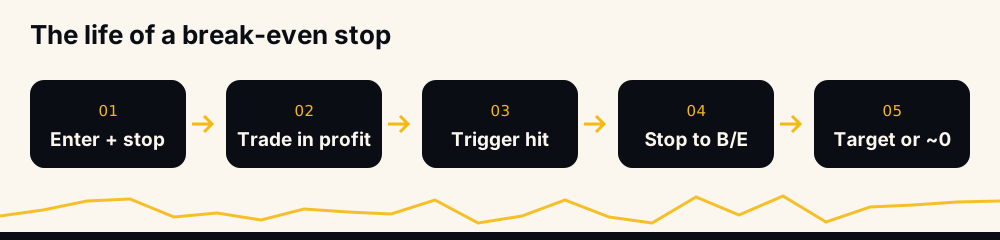
A normal stop loss caps what a trade can lose. A break-even stop is the same order moved later: once price has gone your way by some amount, you cancel the original stop and place a new one at the price where the position closes with no profit and no loss.
"Stop loss at break even" means exactly that. The trade can no longer lose money (fees and slippage aside), and it can still reach its take-profit. What you give up is room: price only needs to come back to entry to close you out.
The real break-even price on Binance, fees included
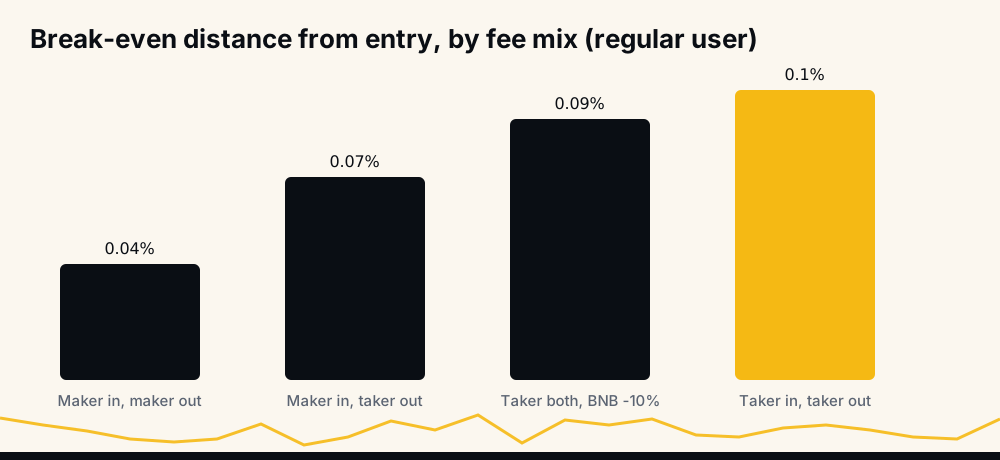
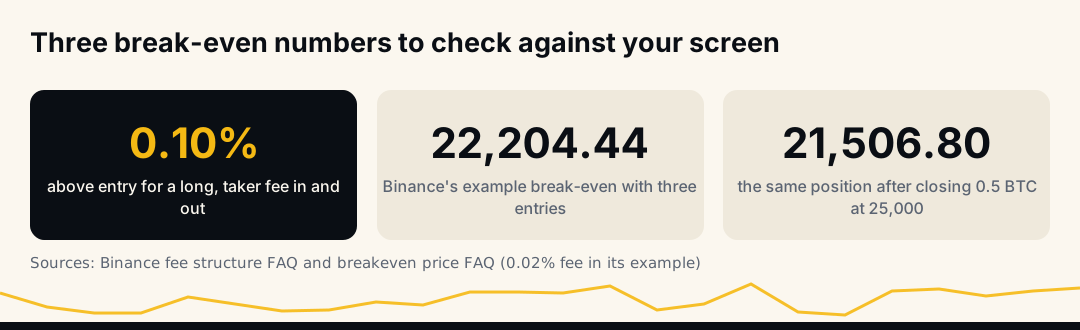
Entry price is not break-even. Binance charges a fee on the notional value of every fill: 0.02% maker and 0.05% taker for a regular user, as covered in Binance futures fees explained. A long opened and closed with market orders pays 0.05% twice, so it needs price about 0.10% above entry to come out at zero.
For a long, the level is entry × (1 + entry fee) ÷ (1 − exit fee). For a short, entry × (1 − entry fee) ÷ (1 + exit fee). A long at 100 with taker fees both ways breaks even at 100.10.
Binance also shows a break-even price for each open position. Its FAQ, "How to Visualize the Breakeven Price of Open Positions", explains how to see it in the app (Detailed Mode, then tap Entry Price) and how it is built: the cost of the entries, the fees on those entries included, divided by the size. Two details matter for a stop:
- The closing fee is not in it. A stop-market order fills as a taker, so it pays roughly another 0.05% on the way out.
- Funding is not in it. Binance says so directly: "Funding fee is currently not included in the calculation of the breakeven price." A long that paid funding for two days has a true break-even above the number on screen. See the funding rate explained.
The same level on a short
A short works in mirror image. Opened at 100 with taker fees both ways, it breaks even at about 99.90, so the break-even stop is a buy stop at about 99.90, just below entry, which fires if price climbs back to it. Funding also runs the other way: while the rate is positive, shorts receive it, which pulls a short's true break-even slightly toward entry; while it is negative, shorts pay and the level moves further below.
Round a short's stop down to the tick and a long's up. Rounding the wrong way by one tick on a cheap coin can be a larger error than the whole fee buffer.
Break-even with several entries or a partial close
Binance's FAQ has a worked example worth redoing, because it shows how adds and partial exits move the level. Three longs: 0.5 BTC at 20,000, 1.5 BTC at 22,000 and 0.5 BTC at 25,000, with a 0.02% fee. Break-even comes out at 22,204.44 USDT.
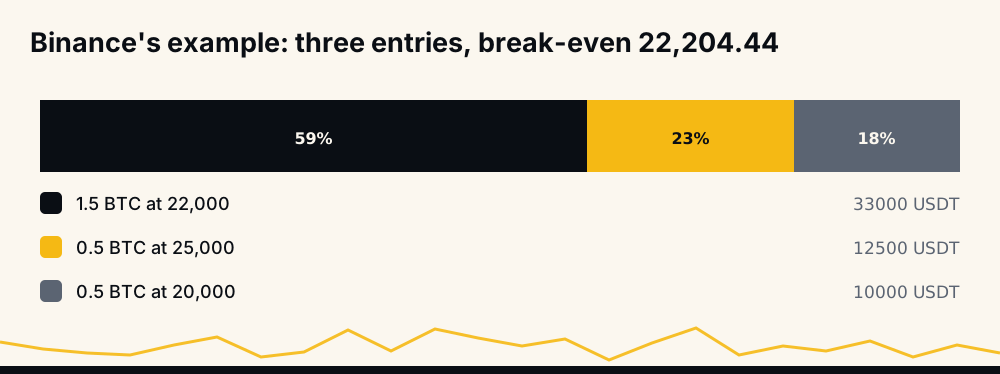
Close 0.5 BTC at 25,000 and the profit on that part lowers the break-even of what remains to 21,506.80 USDT, by Binance's own figures. Taking part of the profit first gives the rest of the position more room, which is why "take partial profit, then move to break-even" is a common pairing.
The same logic runs the other way when you add. An add above your average raises the break-even of the whole position, so a stop placed at the old level is now a losing stop. Averaging down moves it too; the arithmetic is in martingale and averaging down.
How to move your stop loss to break even on Binance
The steps are the same in the app and through the API:
- Read the position's break-even price in Binance, or work it out with the formula above.
- Add the closing fee. For a long, multiply by about 1.0005 at taker rates; for a short, divide. Round away from the loss side to the coin's tick size.
- Place the new stop first, as a reduce-only stop-market order on the closing side, so the position is never without one.
- Cancel the old stop once Binance has accepted the new one.
- Check the trigger type. Binance lets a stop trigger on last price or mark price; mark price vs last price explains why they can differ by more than your buffer.
If price has already fallen back through the level, Binance refuses the order with error -2021, "Order would immediately trigger." That is the exchange telling you break-even is now above the market; a later retry is the only fix. Other refusals are listed in Binance futures error codes.
When to move stop loss to break even
There is no universal trigger, and the common rules each trade one risk for another:
- A fixed percentage in profit, such as 1% or 1.5% from entry. Simple and testable.
- One unit of risk in profit: when the trade is up as much as the stop was risking. This ties the trigger to your own stop distance.
- After a partial take-profit, as in Binance's example above.
- After price clears a level you chose before entry.
The earlier the trigger, the more often ordinary noise brings price back to entry and closes you at zero. The later the trigger, the more trades still lose their full stop before it fires. Moving the stop to break-even immediately after entry is the same as having almost no stop room at all.
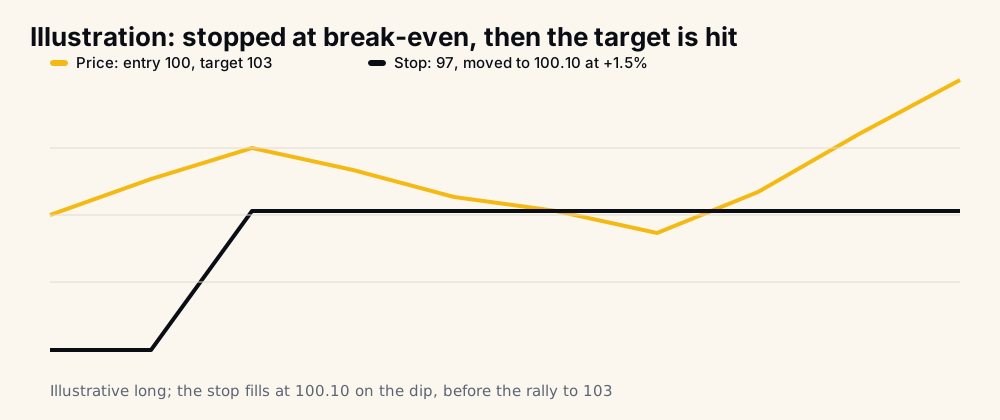
The chart shows the case break-even stops are bad at: a trade that does what it was supposed to do, but not in a straight line.
What a break-even stop costs: the arithmetic
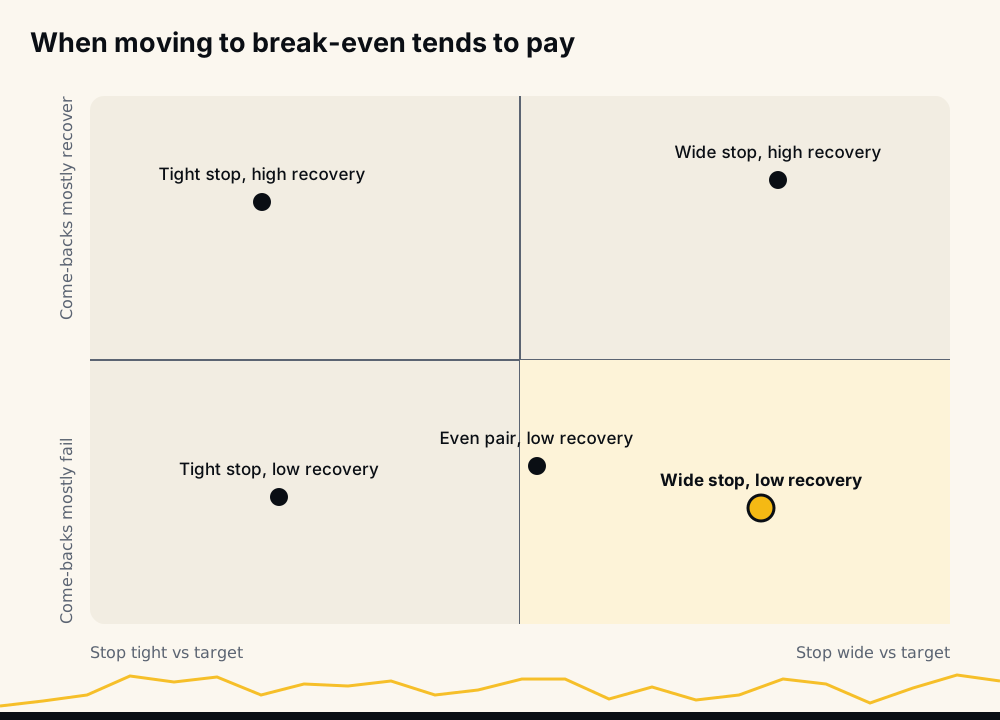
Consider only the trades that reach your trigger and then come back to entry, since a break-even stop changes nothing for the others. Call the target distance T and the original stop distance S, both as a price move from entry. Some share of those trades, call it r, would have gone on to the target if left alone; the rest would have hit the original stop.
- Without the move, those trades average r × T − (1 − r) × S.
- With the move, they all close at about zero.
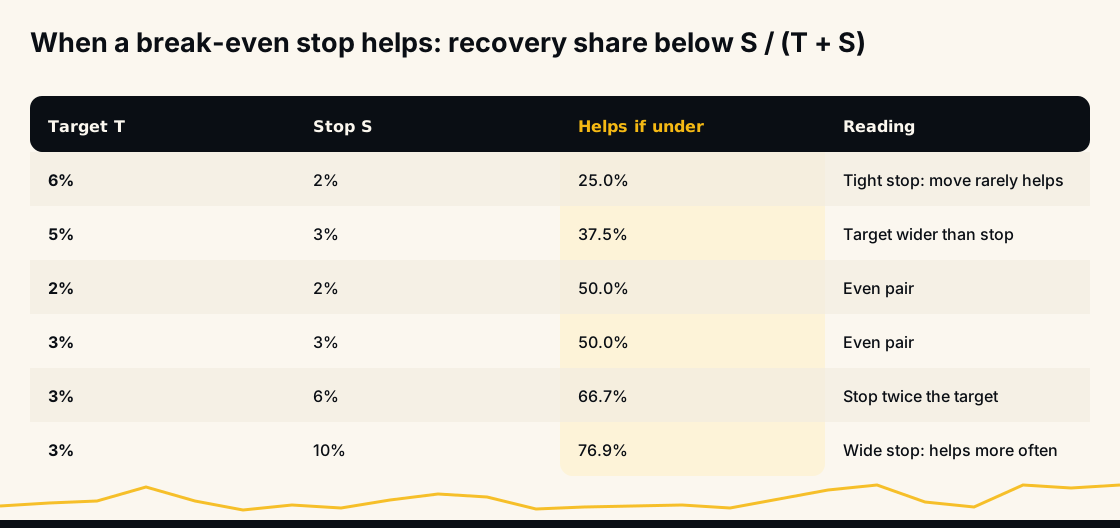
So the break-even stop helps only when r is below S ÷ (T + S). With a 3% target and a 3% stop, that is 50%. With a 3% target and a 10% stop, it is about 77%. The wider your stop compared with your target, the more of the come-back trades must recover before the move starts costing money.
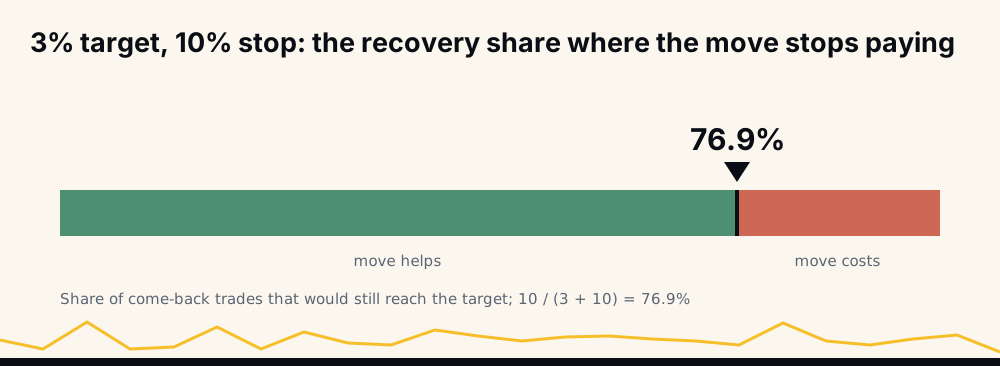
The number r is not in any textbook. It comes from your own trade history: the trades that reached your trigger, came back to entry, and then either reached the target or did not. If you have never measured it, you do not yet know whether a break-even stop is protecting you or costing you.
Break-even stop vs trailing stop
A break-even stop moves once and then waits. A trailing stop follows the best price at a set distance, the callback, and closes on a pullback of that size; how the callback works on Binance is covered in the trailing stop callback rate.
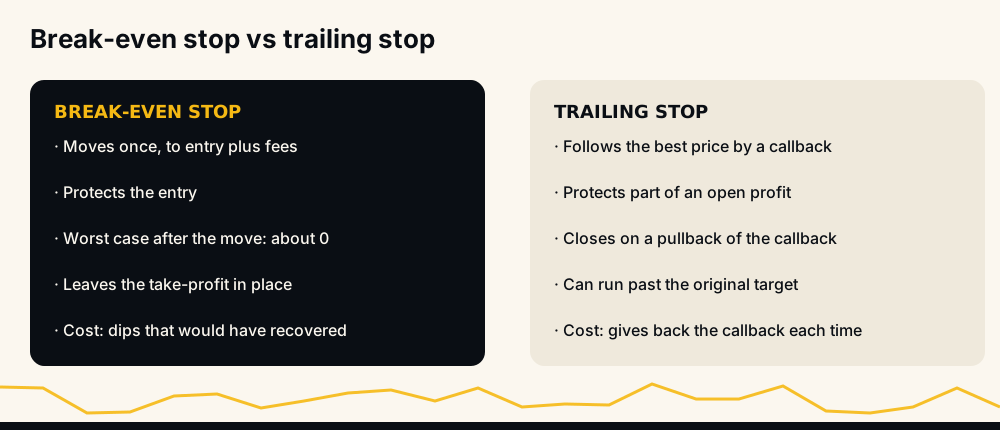
They answer different worries. A break-even stop protects the entry. A trailing stop protects part of an open profit and lets a strong move run past the target. "Break even trailing stop" setups combine them: move to break-even first, then trail once price is well beyond it.
Mistakes that turn break-even into a small loss
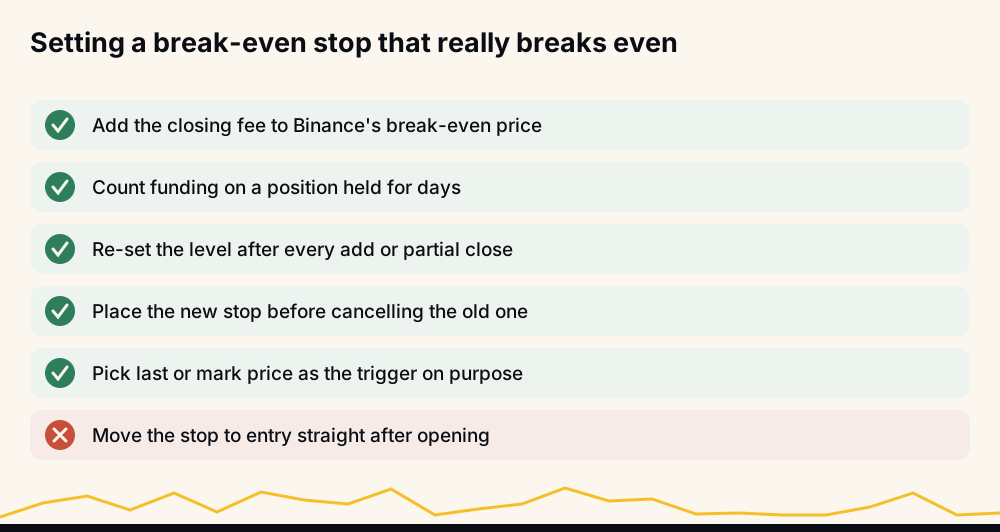
- Stop exactly at entry. Fees make that a small loss every time it fills.
- Forgetting funding. On a position held for days, the screen's break-even is too low for a long that paid funding.
- Not re-setting after an add. The average changed; the stop did not.
- Slippage in a fast market. A stop-market order fills at the next available price, which can be past the level. A stop-limit may not fill at all, as liquidated before your stop-loss shows.
- Cancelling first. For the seconds between cancel and replace, the position has no stop.
How HafizeBot's break-even stop works
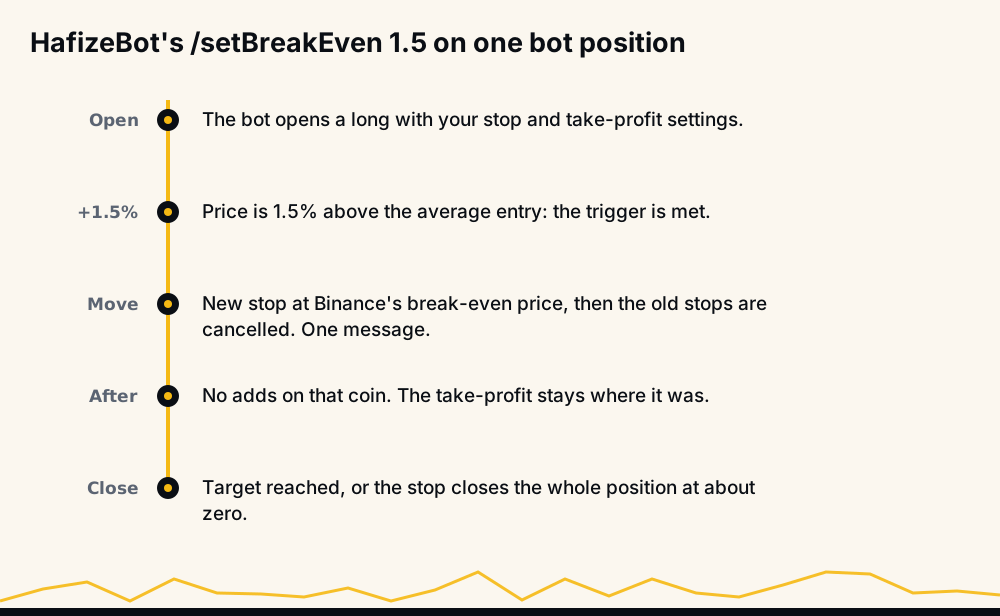
On Tier 3, /setBreakEven takes a percentage from 0.2 to 50 (0 or off turns it off). Once a position the bot opened is that far in profit from its average entry, the bot moves its stop to the position's break-even price as Binance reports it. The new stop goes in before the bot's earlier stops on the coin are cancelled, so the position always has one, and you get one message when it moves.
What to know before turning it on, from the command page and the Tier 3 help:
- Take-profits stay as they are, LIMIT or TRAILING (
/setTakeProfitType, with the callback set by/setTrailingCallback). - The bot adds nothing more to that coin until the position closes.
- The moved stop closes the whole position on that coin, a part you added by hand included. Positions you opened yourself are never touched.
- It costs some wins: a trade that dips back after being in profit and would have gone on to its target closes at about zero instead, and in a fast market a stop can fill a little past its price.
Your other stop settings, /setStopLoss and /setStopType, still decide the stop until the move. Signals come from a model that evaluates 240+ indicators, formulas and components; each broadcast signal carries a target and a maximum hold, without a stop. The performance page scores every signal at its own target and counts misses against the rate: in September 2026, 97.7% of 4,220 signals reached their target. The monthly reports hold the 2021 to 2024 archive.
Frequently asked questions
What does stop loss to break even mean? It means moving your stop from below entry (for a long) to the price where the position closes at zero after fees. From then on the trade can end at its target or at about zero, but not at the original loss.
When should I move my stop loss to break even? When your own record says the trades that come back to entry mostly fail to recover. The arithmetic above gives the line: below S ÷ (T + S) of them recovering, the move helps. Too early a trigger turns ordinary noise into a string of zero closes.
Why did my break-even stop close at a small loss? Usually the stop sat at entry or at Binance's displayed break-even, which leaves out the closing fee and funding. Slippage on a stop-market order in a fast market can add a little more.
Is a break-even stop better than a trailing stop? They do different jobs. A break-even stop protects the entry once; a trailing stop follows the price and protects part of the profit. Many traders use break-even first and trail afterwards.
Does Binance have a break-even stop button? Binance shows each position's break-even price, but the move itself is a stop order you place: a reduce-only stop-market at the level, placed before you cancel the old stop.
The short version
Put the stop at break-even plus the closing fee, re-set it after any add, and decide the trigger from your own record of trades that came back. A break-even stop trades losses for missed targets, and only your numbers say which side wins. Sources: Binance's break-even price FAQ, its fee structure and the USDⓈ-M error codes.
To watch signals with a target and a maximum hold, join the free channel t.me/getbinancefutures, which posts the stronger signals (strength 3 and up) 20 minutes after VIP. To let the bot place your stops on your own Binance account, /trial in @hafizebot gives 7 days of VIP Tier 1, capped at 10 USDT of margin per entry and 3 open positions; Tier 3, which includes the break-even stop, is 200 USDT a month.
This is not investment advice; leveraged futures can lose your whole margin, so trade only what you can afford to lose.