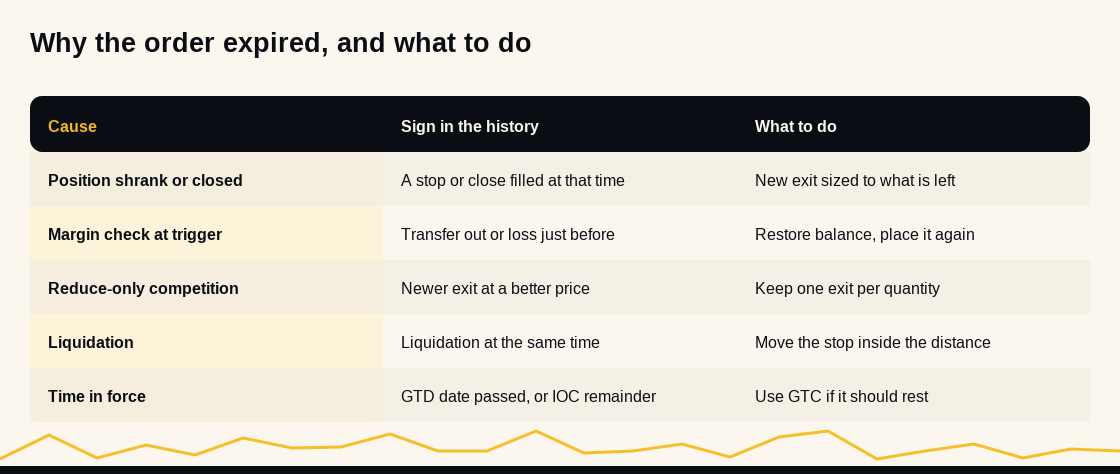
"Expired" in Binance Futures order history means Binance removed the order itself. "Canceled" means you did. A take-profit or stop-loss expires when it can no longer do what it was placed to do: the position it was meant to reduce is gone or has become smaller than the order, the account failed the margin check when the order triggered, the position was liquidated first, or the order carried a time limit that ran out. The first is the one that catches people, because it leaves whatever remains of the position without that exit until you place a new one.
What "Expired" means
Binance's futures order statuses are NEW, PARTIALLY_FILLED, FILLED, CANCELED, REJECTED, EXPIRED and EXPIRED_IN_MATCH. The API documentation lists them without explanation. The clearest line Binance has published is in a futures blog post from 27 May 2022: "Canceled Orders are canceled manually by the user," while "Expired Orders are canceled by the system".
The same post lists when an order placed to reduce a position expires: when "the user places a new order to close the position", when it "doesn't pass the second margin check", when the account "doesn't have a position under reduced only", "or when the position is liquidated."
An expired order was accepted and rested on the book. That is the difference from REJECTED, which never got that far, as with "ReduceOnly Order is rejected" (-2022). An order that expires without a fill costs nothing.
One thing this page is not about: a signal marked "expired" in a signal channel is a call that ran out of time, with no exchange order involved. That is covered in what happens when a crypto signal expires.
The cause: the reduce-only order is now larger than the position
A reduce-only order may only shrink a position. When the position drops below the order's quantity, the order would open a position the other way if it filled, so Binance removes it. It is not trimmed to fit.
The usual way to get there is one take-profit covering several entries, with a separate stop for each entry. Here is the sequence with numbers (the prices are an illustration; the mechanism is what we have watched happen):
| Step | What happens | Position | Resting exits |
|---|---|---|---|
| 1 | Buy 600 at 0.5000, stop for this entry at 0.4750 | Long 600 | Stop 600 |
| 2 | Buy 400 more at 0.4900, stop for this entry at 0.4655 | Long 1,000 | Stop 600, stop 400 |
| 3 | One reduce-only limit take-profit for both: sell 1,000 at 0.5100 | Long 1,000 | Take-profit 1,000, stop 600, stop 400 |
| 4 | Price falls to 0.4750. The first stop sells 600 | Long 400 | Take-profit 1,000, stop 400 |
| 5 | The take-profit (1,000) is larger than the position (400). Binance expires it | Long 400 | Stop 400 |
| 6 | Price recovers to 0.5100. Nothing sells | Long 400 | Stop 400 |
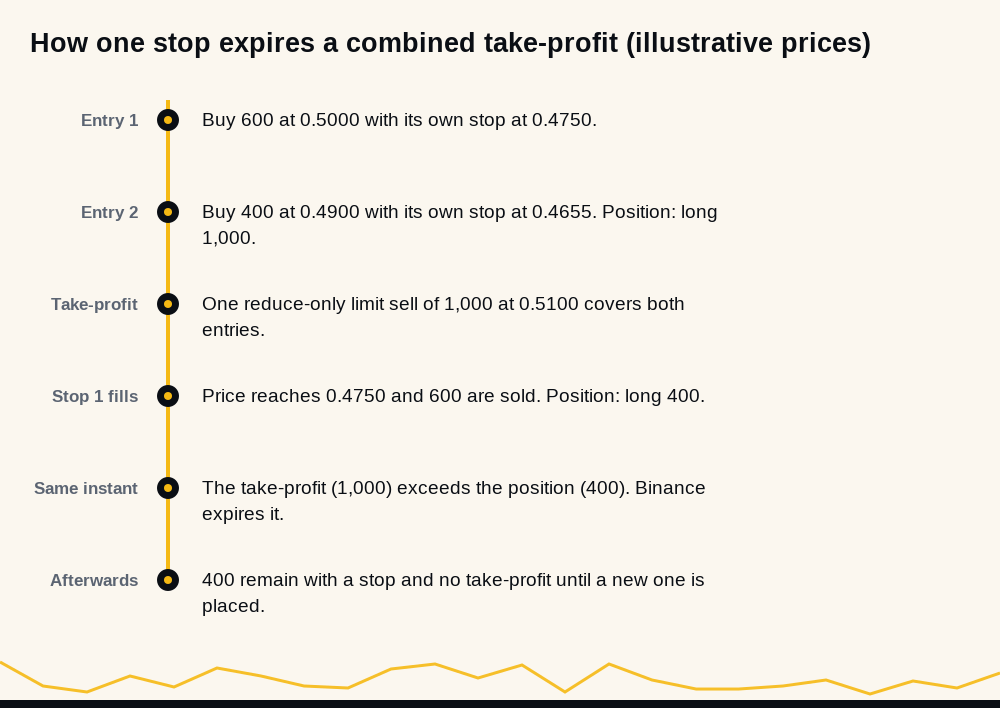
Step 5 is immediate. We have seen this on accounts our autotrader trades, and each time the take-profit's EXPIRED event carried the same millisecond as the stop's fill. There is no window in which to fix the order. The only remedy is a new one.
Step 6 is the cost. The 400 that are left still have their stop, so the downside is covered. The upside is not: the price can return to the target and go straight past it.
The simpler variant is the full close. If a stop, a manual close or another take-profit takes the whole position, every reduce-only order left on that coin has nothing to reduce and expires. That one is harmless.
A failed margin check at trigger
Stop and take-profit orders with a trigger price are checked for margin when they trigger. Binance's support page "Summary of Failed Orders in Binance Futures": if "your margin balance is insufficient" at that check, "the order status will be shown as expired."
Binance's own example is moving funds out of the futures wallet after placing the order. Other positions losing on cross margin drain the same balance. An exit that only reduces a position needs no new margin, so this mostly hits trigger orders that open or add. If a stop-entry of yours expired at its trigger price, look at the free balance at that minute. Margin is insufficient (-2019) explains what counts towards it.
Reduce-only competition
Two reduce-only limit orders on one coin can add up to more than the position. Binance settles that with what its support page calls the reduce-only competition: "higher priority Reduce-only Limit orders will cause low-priority reduce-only orders to be canceled." Priority goes to the order with the more aggressive price.
Binance's example: you are long 100. Order A is a reduce-only sell of 50 at 1,000 USDT. You add order B, a reduce-only sell of 60 at 999. B's price is more aggressive and its 60 is more than the 50 that A leaves free, so A is removed.
The support page says "canceled". You did not cancel it, and a 2020 answer on Binance's developer forum lists this case among the reasons an order shows as expired: a reduce-only order "replaced by another reduce-only order at a better price". Whichever word your order history uses, the cause is the newer exit.
Market reduce-only orders at or above the position size, and stop reduce-only orders, are outside the competition and have the highest priority.
Liquidation got there first
When a position is liquidated, Binance clears the orders around it before it does anything else. From "Binance Futures Liquidation Protocols" (updated 4 January 2026): on cross margin "all open orders of the trader" are cancelled, on isolated margin the trader's open orders "in the same token".
So a stop-loss that shows Expired next to a liquidation did not fail to trigger. Its trigger price was never reached before the liquidation price was, which is a placement problem: the stop sat beyond the liquidation distance for that leverage. Liquidated before the stop-loss works through the distances.
Time in force: GTD, IOC and FOK
Some orders carry their own end.
- GTD (Good Till Date) is cancelled by Binance at the
goodTillDateyou sent. That time must be more than 600 seconds ahead, and Binance warns that in extreme market conditions the cancel "might be delayed". - GTC is not forever either. Binance's API definitions give a GTC order one year from placement.
- IOC (Immediate or Cancel) fills what it can at once and the system removes the rest.
- FOK (Fill or Kill) and Post Only orders that cannot be honoured are rejected, and Binance's support page says such an order "will not be recorded in the order history". If you see Expired, it was not one of these.
Two rarer system endings: self-trade prevention ends an order with the status EXPIRED_IN_MATCH, and in thin markets the price filter can stop a market order, which Binance describes as "Market orders may not be fully executed or expire".
How to find the reason in order history
Start from the expired order's time and work outwards.
- Order History, same coin, same minute. A filled stop, a manual close or another take-profit at that time means the position shrank or closed. That is the first cause above.
- Position History. A liquidation at that time settles it.
- Open Orders. A newer reduce-only limit order at a better price points to the competition.
- Transaction History. A transfer out or a large realised loss just before a trigger order expired points to the margin check.
- The order's own details. A time in force of GTD, or an IOC with a partial fill, explains itself.
Through the API, GET /fapi/v1/order returns the status. Since 23 October 2025 the ORDER_TRADE_UPDATE stream event also carries er, the order's expire reason. Stop and take-profit orders with a trigger have lived in Binance's Algo Service since 9 December 2025, so their rejections arrive in the ALGO_UPDATE event.
Do not wait long. Binance drops an expired or cancelled order that never traded three days after it was created, and a later query for it answers -2013, "Order does not exist."
How to re-place the exit safely
- Read the position first. Use the quantity Binance shows now.
- Subtract the exits that still rest. If another take-profit already covers part of the position, the new order covers only the rest.
- Place one reduce-only order for exactly that quantity at your target. Too large and it is refused or expires again at the next partial close.
- Check the stop the same way. Its quantity should match what is left.
- Or use an order that sizes itself. A
STOP_MARKETorTAKE_PROFIT_MARKETorder sent withclosePositioncloses whatever the position is when it triggers. Binance's rules for it: it cannot carry a quantity and cannot be combined with reduce-only.
If you run a bot, ask what it does on an EXPIRED event for its own exit. Dropping the order from its books is not enough; it has to compare the position with the exits that are left. HafizeBot's autotrader does this for its own take-profit: when Binance expires it while part of the position is still open, the bot places one new take-profit at the same price, for the quantity Binance reports at that moment. How to set take profit on Binance Futures compares the order types, and what happens to open positions if the bot stops covers exits that outlive the bot.
Frequently asked questions
Why did my take-profit order expire on Binance Futures? Most often because the position became smaller than the order: a stop or a manual close took part of it, and a reduce-only order larger than the position is removed by Binance. Read the position and place a new take-profit for what is left.
What is the difference between Expired and Canceled on Binance? Binance's wording: cancelled orders are cancelled by the user, expired orders are cancelled by the system. Expired means a rule ended the order.
Why did my stop-loss expire without closing the position? Either the position was liquidated before the stop's trigger price was reached, or the account failed the margin check when the order triggered, or another exit closed the position first so the stop had nothing left to do.
Does an expired order cost a fee? No. An order that expires without trading has no fill, so there is no commission and no realised profit or loss from it.
Will Binance resize a reduce-only order when my position shrinks?
No. An order larger than the position is removed whole. The exception is a stop or take-profit sent with closePosition, which has no quantity and closes whatever is open when it triggers.
How long can I still see an expired order? In the API, an expired or cancelled order with no fills is gone three days after it was created. Check the order history soon after the event if you need the details.
Check the position, then the order
An expired exit is Binance telling you the position changed under the order. Read the position, count the exits that remain, and place one order that fits. Sources: Binance's USDⓈ-M API definitions, new-order rules and change log, its support pages "Summary of Failed Orders in Binance Futures" and "Binance Futures Liquidation Protocols", its futures blog (27 May 2022), and order events from accounts we trade.
HafizeBot publishes its signals with their results on the performance page, and the stronger ones reach the free Telegram channel 20 minutes after VIP. None of this is investment advice. Futures positions can lose their whole margin; trade only what you can afford to lose.