To set a take profit on Binance Futures, tick TP/SL when you place the opening order, or add one later from the Positions tab under TP/SL. You can also place a separate take-profit order, or a plain reduce-only limit order at your target. A take profit waits for its trigger price, by last or mark price, then sends a limit or market order that closes the position.
The four ways close a position at a profit, but they differ in what they cost, whether they can fail to fill, and whether you can change them later. Below is each one, with the trigger rules Binance documents, worked fees, partial targets and the reasons a take profit sits there and does nothing.
How a take profit order works on Binance Futures
A take profit is a conditional order. It waits until the price reaches your trigger, then sends the actual closing order. Binance's API documentation for the New Algo Order endpoint states the condition for each side:
- SELL take profit (closes a long): fires when the latest price is at or above the trigger price.
- BUY take profit (closes a short): fires when the latest price is at or below the trigger price.
A stop-loss is the mirror image: a SELL stop waits for the price to fall to its trigger. That is why a take profit placed on the wrong side is refused, the case covered in order would immediately trigger (-2021).
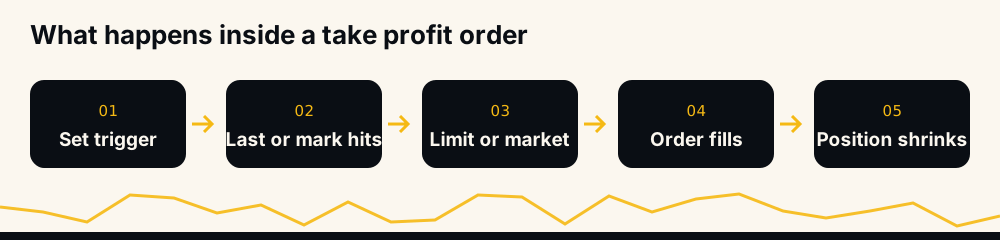
"Latest price" means whichever price you told the order to watch. Binance's types of order FAQ (updated 7 April 2026) says you can set the order "to be triggered based on the 'Last Price' or the 'Mark Price'."
Four ways to set a take profit
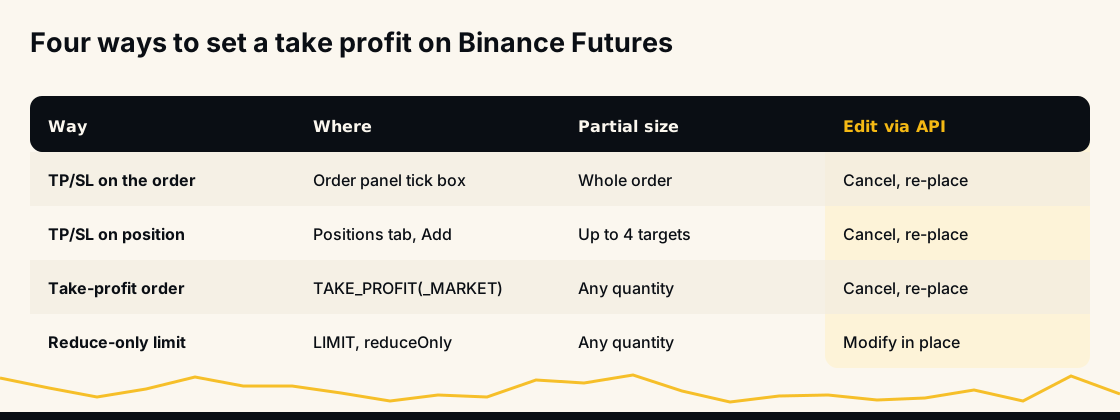
- TP/SL on the opening order. Binance's FAQ: "When you open a Futures position, you can check the box next to [TP/SL] to set a take profit or stop loss price." Quick, and the exit exists from the first second of the trade.
- TP/SL on the open position. In the Positions tab, click Add under TP/SL, open the Take Profit tab, pick Limit or Market, enter the stop price (and a limit price for Limit) and the amount, as Binance's split target FAQ describes.
- A separate take-profit order. In the API these are
TAKE_PROFIT(limit) andTAKE_PROFIT_MARKET. They behave like the TP/SL above; you just place them as their own order. - A reduce-only limit order at the target. No trigger at all: the order rests on the order book at your price from the start and fills when the market trades there. Reduce-only means it can only shrink the position, never open a new one.
Take profit market vs take profit limit
Once the trigger fires, the closing order goes out as a market order or a limit order.
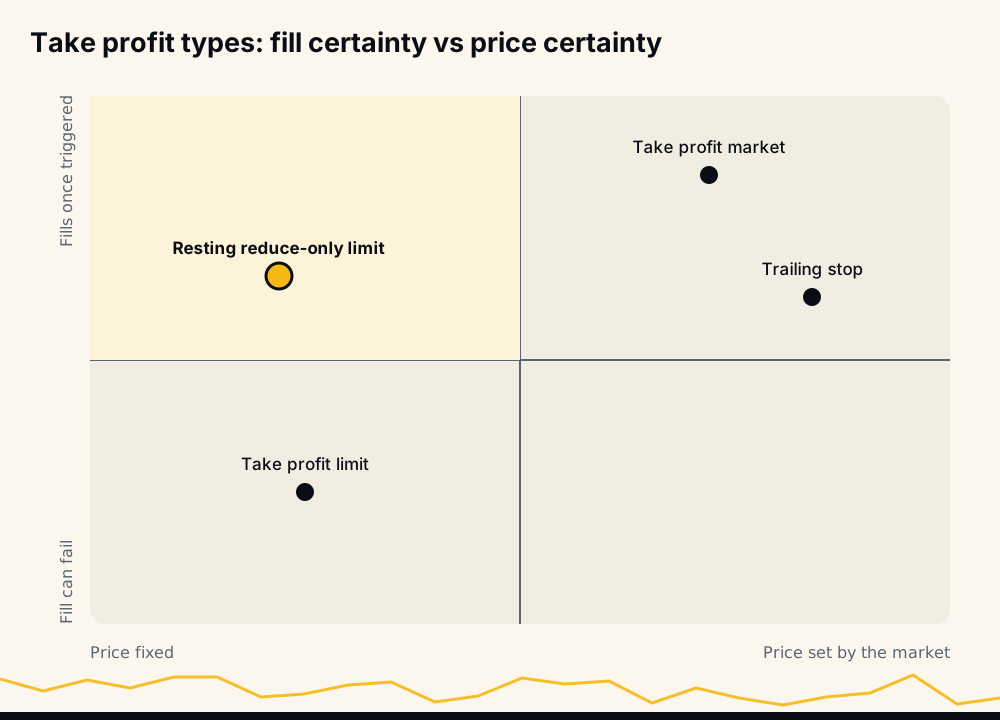
- Market fills against the order book straight away. You are sure to get out, but not sure of the price, and you pay the taker fee.
- Limit goes out at the limit price you set. You are sure of the price, but if the market moves past it quickly, the order can sit unfilled while the price falls back.
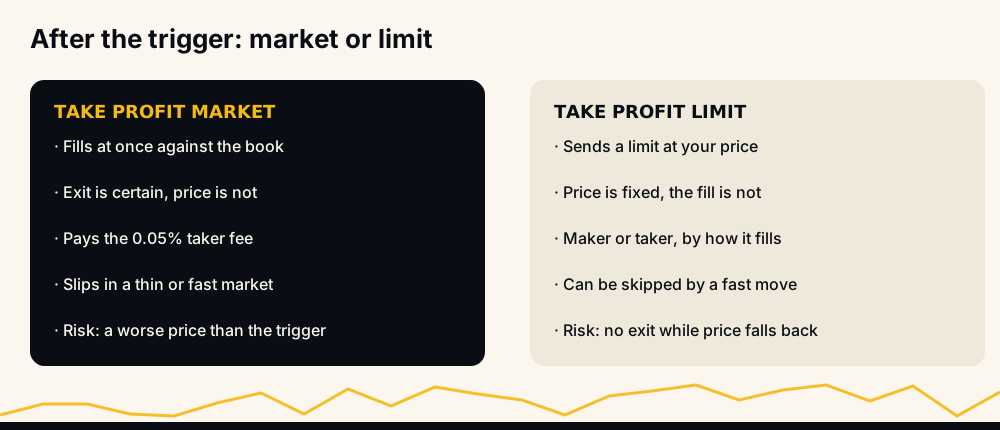
Binance's TP/SL guide for its margin product gives the reason, and the same mechanics apply on futures: if the market moves too quickly, "there might not be enough time to fill the orders", "especially when the stop price and the limit price are very close." Leave a gap between trigger and limit price if you choose Limit, or accept the slippage of Market.
The reduce-only limit (way 4) sits on the book before the price arrives, so it fills at your price or better once the market trades through it, and a resting order normally pays the maker fee.
What a take profit costs in fees
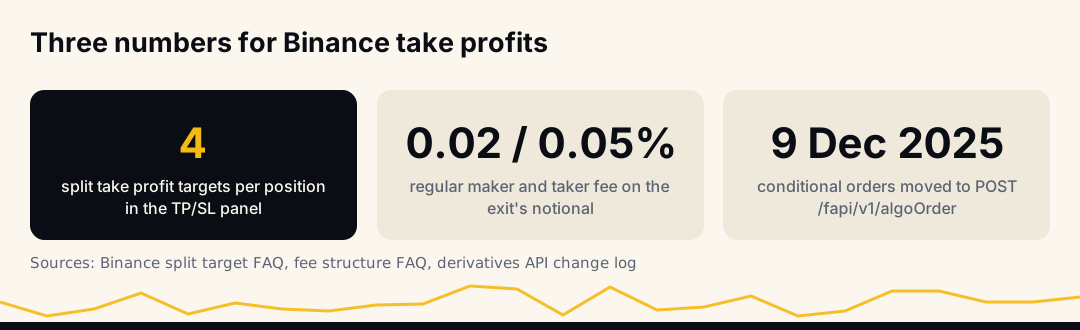
Fees are charged on the notional of each fill: 0.02% maker and 0.05% taker for a regular user, as Binance futures fees explained works through. Take an illustrative long of 20 units at 100 (2,000 USDT notional), market entry, target 103.
- Gross profit at 103: 20 × 3 = 60 USDT.
- Entry fee, taker: 2,000 × 0.05% = 1.00.
- Exit as a resting limit, maker: 2,060 × 0.02% = 0.41. Net 58.59.
- Exit as a market take profit, taker: 2,060 × 0.05% = 1.03. Net 57.97, before slippage.
- If that market exit slips 0.1%, it costs another 2.06. Net about 55.91.
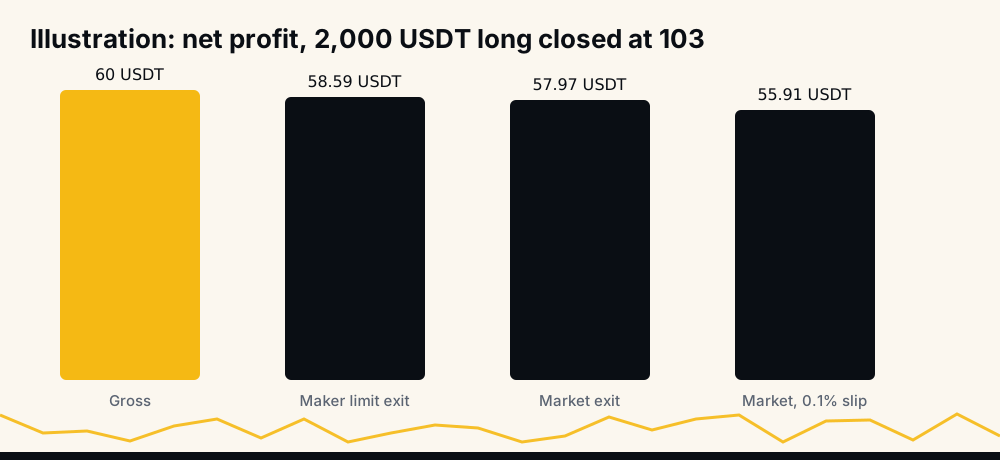
The gap looks small on one trade. Over hundreds of trades at leverage, where notional is many times the margin, it is a real share of what a strategy keeps.
How to take partial profits on Binance Futures
The TP/SL panel on a position has Add Split Target: "You may add up to 4 Take Profit or Stop Loss targets," each with its own amount. The size slider sets the share, and Binance's example is a 25% take profit covering a quarter of the position.
You can do the same with several reduce-only limit orders at different prices, each for part of the size.
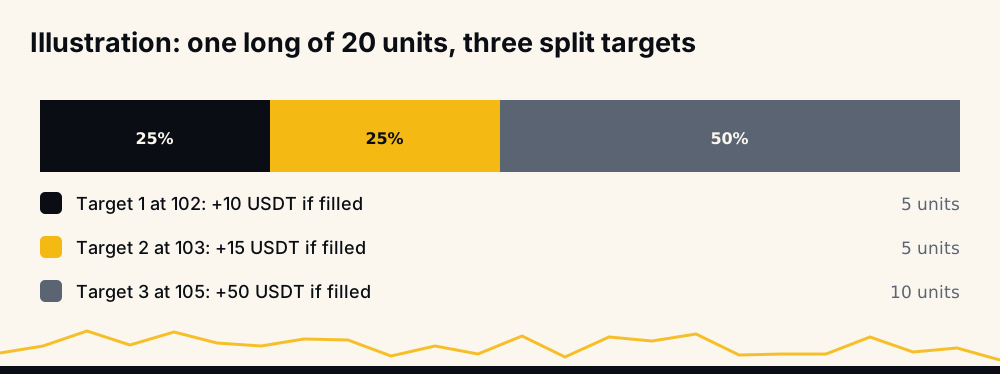
Partial targets change what the trade earns as well as where it exits. With the split above, a run to 105 earns 10 + 15 + 50 = 75 USDT, more than one take profit at 103. If the price reaches 103 and turns down to a stop at 97, it earns 10 + 15 and loses 30 on the remaining 10 units, a net −5 USDT, where a single take profit at 103 would have closed the whole trade at +60. Neither is better in general; it depends on how often your trades go past their first target.
How to change take profit on Binance Futures
In the app, cancel the take profit with the [x] button next to the order, or "Cancel All", as Binance's split target FAQ shows, then add a new one with the price you want.
Through the API, the type decides. Binance's Modify Order endpoint says "currently only LIMIT order modification is supported", and both quantity and price must be sent. A reduce-only limit take profit can be moved in place; a TAKE_PROFIT or TAKE_PROFIT_MARKET order has to be cancelled and placed again, with a moment in between when no take profit exists.
Last price or mark price, and price protection
Last price is the latest trade on Binance; mark price is a fair-value price Binance computes and uses for liquidation. A last-price take profit can fire on a short spike that the mark price smooths out, which some traders like for take profits and dislike for stops. Mark price vs last price on Binance explains how each is built.
The API adds price protection: with priceProtect=true on a TAKE_PROFIT_MARKET or STOP_MARKET order, Binance does not trigger it if the gap between mark and last price is larger than the symbol's triggerProtect value from GET /fapi/v1/exchangeInfo. It guards against triggering on a broken print, at the cost of sometimes not triggering at all.
Why a Binance take profit was not triggered or filled
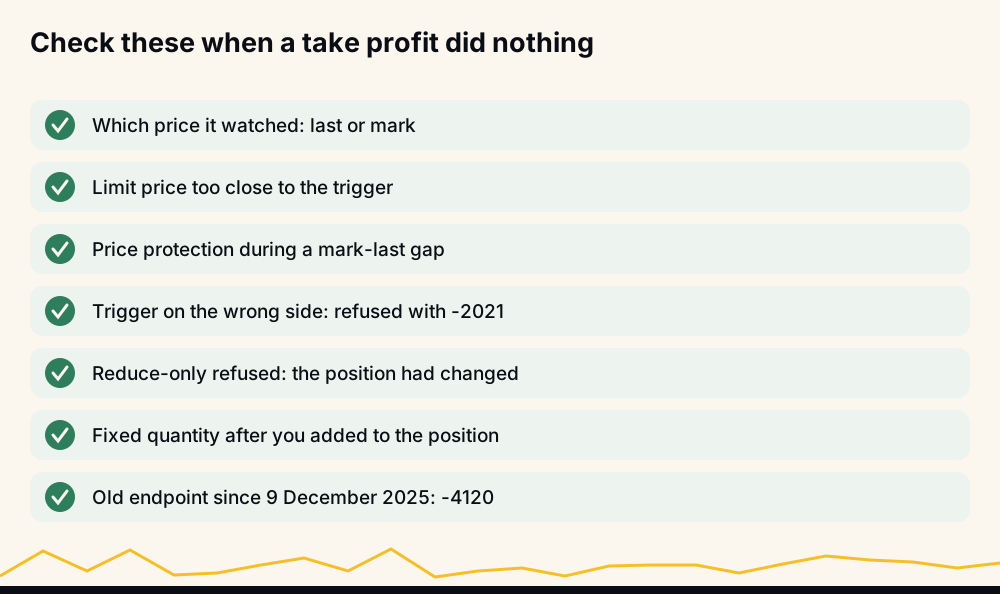
- It watched the other price. The chart shows last price; a mark-price take profit may not have reached its trigger.
- It triggered but did not fill. A take-profit limit with its limit price too close to the trigger can be skipped by a fast move.
- Price protection held it back during a large gap between mark and last price.
- It was never accepted. A trigger on the wrong side returns -2021 when you place it.
- Reduce-only was rejected. If the position was already closed or is smaller than the order, Binance refuses the reduce-only exit; reduce-only order failed lists the causes.
- The size changed. A take profit for a fixed quantity does not grow when you add to the position, so part of the position has no exit.
- A bot uses an old endpoint. Since 9 December 2025 conditional orders, take profits included, go through
POST /fapi/v1/algoOrder; Binance's change log says the old order endpoints block them with -4120.
Take profit orders through the API
For a trigger-based take profit, send POST /fapi/v1/algoOrder with algoType=CONDITIONAL, type=TAKE_PROFIT_MARKET or TAKE_PROFIT, and triggerPrice. TAKE_PROFIT also needs a price. Then choose:
closePosition=true(market type only) closes the whole position on that side when triggered, and cannot be combined withquantityorreduceOnly;- or a
quantitywithreduceOnly=trueto close part of it. Binance does not acceptreduceOnlyin Hedge Mode.
workingType picks MARK_PRICE or CONTRACT_PRICE (last price, the default). For the resting version, send a normal LIMIT order with reduceOnly=true to POST /fapi/v1/order. Round the price to the symbol's tick size and the quantity to its step size, both from exchangeInfo, or the order is refused.
Trailing take profit on Binance
A trailing stop can serve as a take profit: it starts at an activation price, follows the best price and closes on a pullback of your callback rate. It catches more of a strong move and closes below its best price by design. Binance trailing stop callback rate works through the exits at 1% to 5%, including the case where a wide callback closes a winner at a loss.
How HafizeBot's autotrader places take profits
HafizeBot opens each entry at market on the member's own Binance account and then places the take profit. The member picks the type with /setTakeProfitType:
- LIMIT (the default) is a reduce-only limit order at the signal's target, placed right after the entry. This is way 4 above.
- TRAILING arms once the price is 1% beyond the target and closes on a pullback, set with
/setTrailingCallbackfrom 1% to 5%. A signal that only touches its target never arms it, and the position then stays open with no take profit working.
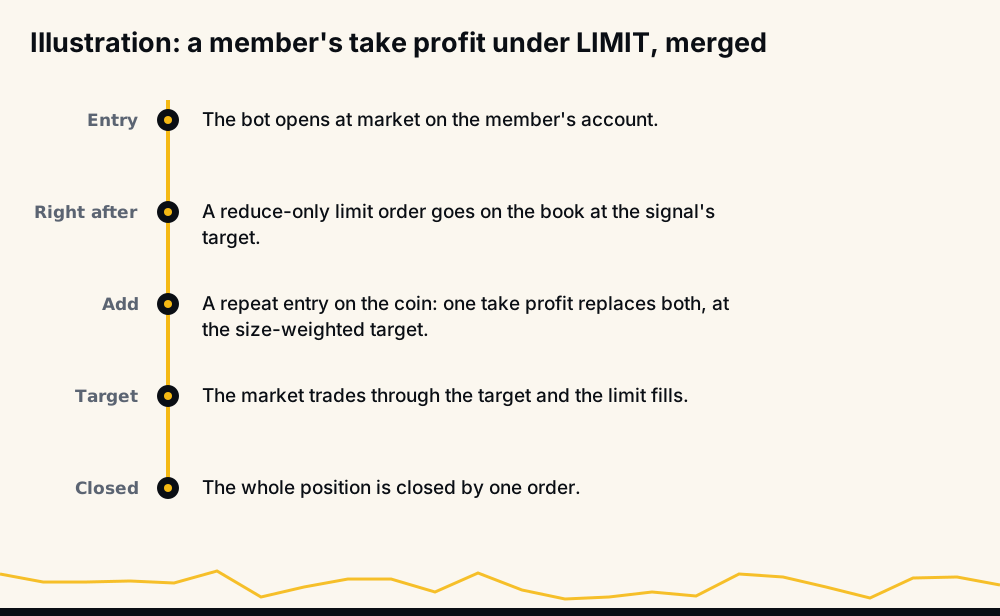
When the bot adds to a coin the member already holds, /combineTakeProfits (on by default) replaces the separate orders with one take profit for the whole position at the size-weighted target, which avoids the size mismatch in the checklist. The live performance page scores every signal at its own target, as LIMIT closes it: September 2026 reads 97.7% of 4,220 signals reaching target, with every missed signal counted against the rate. The help page on limit or trailing take-profit compares the two settings.
Frequently asked questions
How do I set a take profit on Binance Futures? Tick TP/SL when you place the order and enter a take profit price, or open the Positions tab and click Add under TP/SL for a position you already hold. You can also place a reduce-only limit order at your target.
How do I set multiple take profits on Binance Futures? In the position's TP/SL panel, use Add Split Target: Binance allows up to 4 take profit targets, each with its own amount. Several reduce-only limit orders at different prices do the same thing.
Should I use take profit market or take profit limit? Market makes sure you get out once the trigger fires, at whatever price the book gives and at the taker fee. Limit fixes the price but can fail to fill in a fast move, so leave room between trigger and limit price.
Why was my Binance take profit not triggered? Most often it watched mark price while you were looking at last price, or the reverse. Other causes are price protection, a trigger on the wrong side that was never accepted, or a reduce-only exit refused because the position had changed.
Can I take profit without closing my whole position? Yes. Set the take profit's amount to part of the position, use split targets, or place a reduce-only limit order for part of the size. The rest of the position stays open with its own exits.
Does a take profit order cost fees on Binance? Yes, the fill pays the normal trading fee on its notional. A resting limit usually pays the 0.02% maker rate and a market exit the 0.05% taker rate, for a regular user.
Summary and sources
A take profit is a trigger plus a closing order; which price it watches, whether it closes at market or limit, and whether it rests on the book decide how it behaves. Sources: Binance's types of order and TP/SL split target FAQs, and the USDⓈ-M New Algo Order and Modify Order documentation and change log.
To have take profits placed for you on every signal, start 3 days of VIP Tier 1 free at hafizebot.com/trial or with /trial in @hafizebot; trial autotrading is capped at 10 USDT of margin per entry and 3 open positions. The free channel t.me/getbinancefutures posts the stronger signals (strength 3 and up) 20 minutes after VIP. Margin type matters for what a missed take profit can cost: see isolated vs cross margin.
This is not investment advice; a take profit can be skipped or filled late in a fast market, so trade only what you can afford to lose.