You can read HafizeBot's signals in any country where Telegram works, because the free channel and VIP are both Telegram channels. Auto-trading is narrower: it works only on Binance USDⓈ-M Futures, so it is available to you only where Binance itself lets you open and use a Futures account lawfully. HafizeBot supports no other exchange, no spot trading and no other Binance product.
We get this question every week from Türkiye, Pakistan, India, Iran, Germany and elsewhere, often in the form "does it work with Bybit or OKX?". This page gives the full answer once, with the parts that depend on you, the parts that depend on Binance, and the parts we will not help with. It is not legal or tax advice: the rules where you live are yours to check.
The short answer, part by part
HafizeBot is not one thing. It is a free signal channel, a paid VIP channel, a trial, and an optional autotrader that places orders on your own Binance account. Each part has a different requirement, and only one of them depends on Binance's view of where you live.
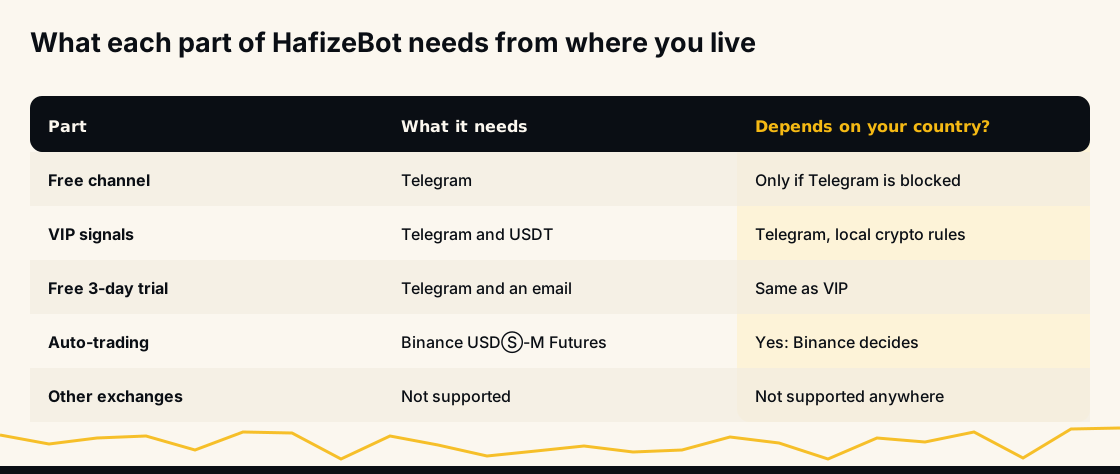
- Free channel: needs Telegram and nothing else. Same signals as VIP, 20 minutes later.
- VIP signals: need Telegram and a way to send USDT. Signals arrive the moment they are posted.
- Free trial: three days of VIP Tier 1: send
/trialin @hafizebot, or get a one-time code by email on the trial page. - Auto-trading: needs a Binance USDⓈ-M Futures account in your own name, with an API key. This is the part where your country matters.
So the honest answer to "can I use it here?" is usually "yes, for reading signals", followed by "it depends on Binance" for the bot.
Reading signals works anywhere Telegram works
Every signal HafizeBot posts goes to Telegram. The free signals channel receives each one 20 minutes after VIP, and anyone can join it without paying or registering.
Two practical limits apply. You need a Telegram account with a username, because @hafizebot replies with an error to accounts without one. And Telegram itself has to be reachable where you are; if your government blocks it, that is a local matter we cannot change.
Reading a signal and placing the trade yourself is also possible on any Binance account that offers USDⓈ-M Futures to you. The entry and target in each signal are prices on Binance futures pairs. If you want to see how those signals have played out before deciding anything, the live performance page lists every one since June 2026, and the signal dataset covers the 2021 to 2024 archive. As of 10 October 2026, the home page reports 24,243 signals posted since June 2026.
Auto-trading works only where Binance offers you USDⓈ-M Futures
The autotrader does not hold money and does not run its own exchange. It sends orders to your Binance account through an API key you create, and Binance decides whether to accept them. That means the real question is not "does HafizeBot work in my country?" but "does Binance let me, as a verified resident of my country, open and use a USDⓈ-M Futures account?".
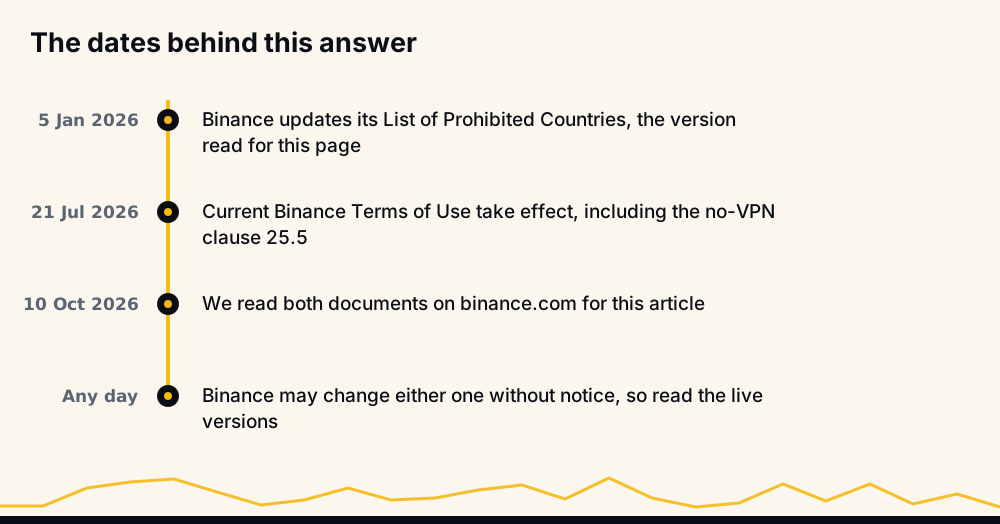
We do not keep our own list of countries, on purpose. Binance changes what it offers, product by product and place by place, and a list on our blog would go stale the week after it was written. Binance's Terms of Use (effective 21 July 2026) say its services "may be wholly or partially restricted in some countries", and that Binance can change which services are available to you at any time.
In practice that gives three cases:
- Your country is on Binance's prohibited list. You cannot hold a Binance account there, so the autotrader cannot run for you.
- You can hold a Binance account, but Futures is not offered to you. Spot trading alone is not enough: the bot trades USDⓈ-M Futures only.
- Binance opens a USDⓈ-M Futures account for you after identity verification. The autotrader can run, subject to the account setup described further down.
What Binance's own list says, checked on 10 October 2026
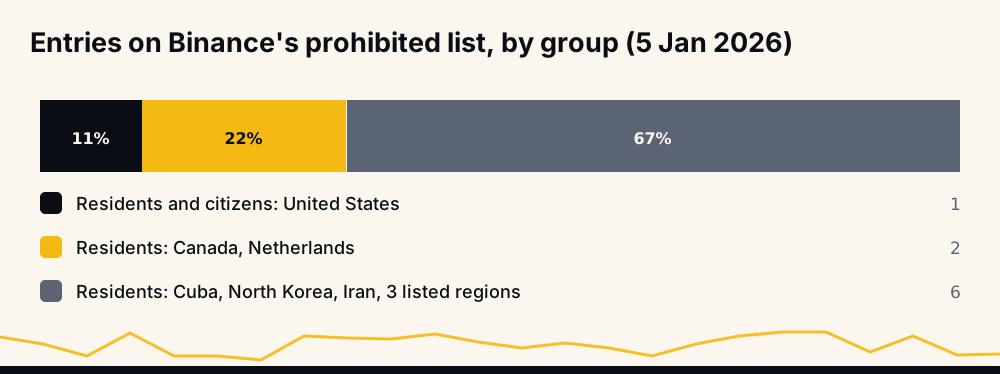
Binance publishes a List of Prohibited Countries, which its Terms of Use point to. The version we read on 10 October 2026 is dated 5 January 2026. Binance's list names:
- the United States, covering anyone located, established, resident, operating there or holding US citizenship;
- Canada and the Netherlands, for anyone located, established or resident there;
- Cuba, North Korea, Iran, Crimea and the so-called Donetsk and Luhansk People's Republics, for anyone located, established or resident there.
The list also says Binance may add "such other locations" from time to time and update it "without prior notice". Being absent from the list does not mean Futures is open to you: the Terms allow partial restrictions, so a country can keep Binance and still lose a single product. Read the live list rather than this summary, and treat our date as the moment it was true.
How to check your own country in five minutes
You do not need us to tell you whether auto-trading will work. Binance's own screens answer it, and checking costs nothing.
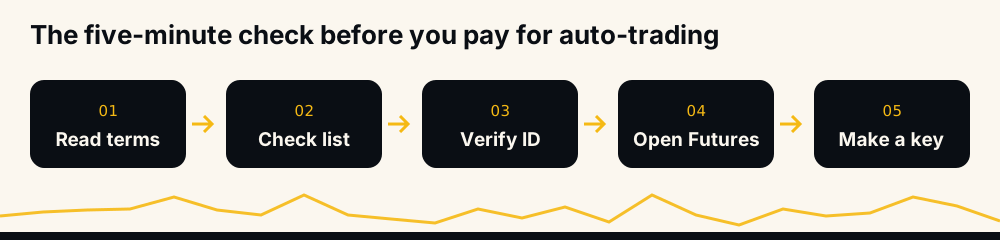
- Read Binance's Terms of Use and the prohibited list, both linked above.
- Log in to binance.com and complete identity verification with documents from where you actually live.
- Open the Futures section and choose USDⓈ-M. Binance's own guide to opening a Futures account says identity verification must be complete before you can trade Futures.
- If Binance lets you open the Futures account, create an API key and see whether the Enable Futures permission can be ticked.
- If any step is refused, stop there. That refusal is Binance's answer, and it is the one that counts.
Do this before you pay for VIP with auto-trading in mind. If Binance says no, the free channel still gives you every signal, and VIP still gives you instant delivery, but the autotrader has nothing to connect to.
Why not use a VPN or someone else's account?
Because it breaks Binance's rules, and the person who pays for that is you. Clause 25.5 of Binance's Terms of Use says users must not try to get around a country restriction in any way, "including by use of any virtual private network to modify your internet protocol address". Clause 25.1 lets Binance suspend, hold or close the account of anyone who is not eligible, and clause 25.3 says open positions may then be closed, by you or by Binance.
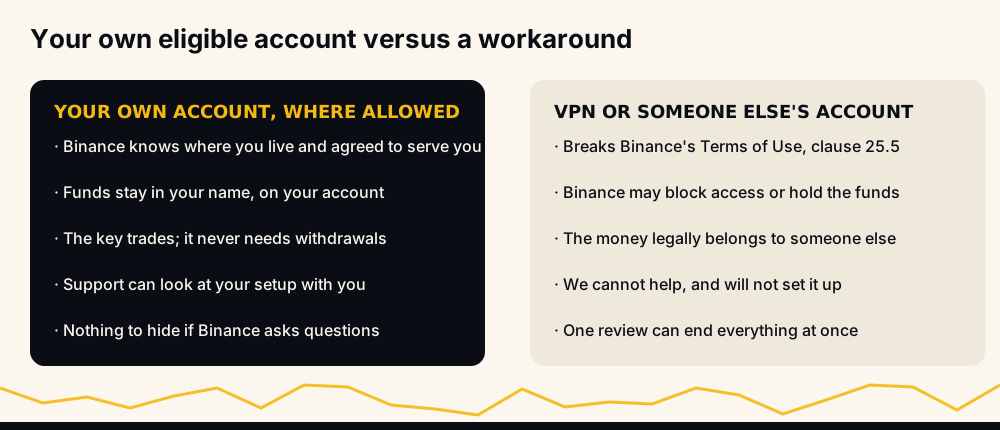
Using a friend's or relative's verified account is worse. The money on that account legally belongs to them, Binance's checks are about the account holder, and any dispute between the two of you has no clean way out. We cannot help with either workaround and will not help set one up. The rule is simple: trade only on an account in your own name, in a place where Binance agreed to serve you.
Does HafizeBot work with Bybit, OKX or other exchanges?
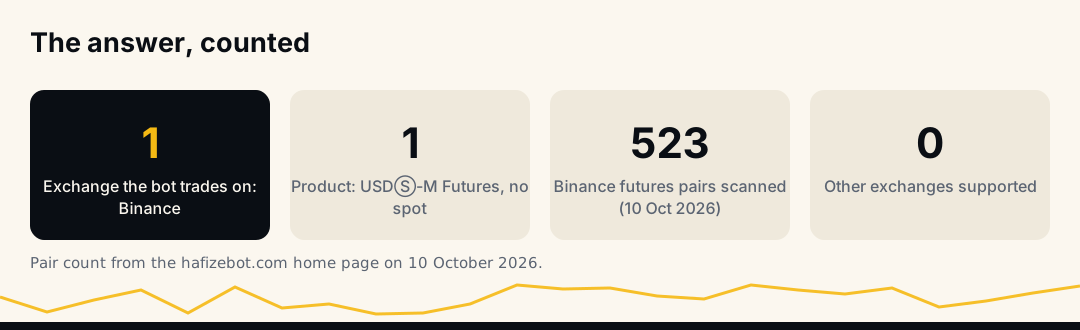
No. The autotrader connects to one venue only: Binance USDⓈ-M Futures on binance.com. It does not support other exchanges, Binance spot, COIN-M futures, options, or Binance's separate regional platforms. A key from any of those will not work.
You can still read the signals and decide to act on them elsewhere by hand, but keep three things in mind:
- The prices are Binance's. Entry and target come from Binance futures pairs, and another exchange's price for the same coin can differ, especially in fast markets.
- The pair may not exist there. HafizeBot's home page reported 523 Binance futures pairs scanned on 10 October 2026; another venue lists its own set.
- The published record is Binance's. Results on /performance are measured on Binance prices, so they say nothing about fills on another venue.
Why one exchange, and why Binance USDⓈ-M Futures
Supporting one venue properly beats supporting five badly. Every exchange has its own order types, error codes, position modes, margin rules and API limits. The autotrader places real orders with real money, and each of those details has to be handled exactly: what happens when an order is refused, when margin runs short, when the account is in the wrong mode, or when the exchange is slow to answer.
Binance USDⓈ-M Futures is where the signals are priced, where the published record is measured, and where the order handling has been built and tested. Adding a second exchange would mean a second set of failure cases on paying members' accounts, so other venues are out of scope for now. If that changes, this page will say so first.
What your Binance account needs before the bot can trade
Once Binance has opened a USDⓈ-M Futures account for you, the setup is the same everywhere.
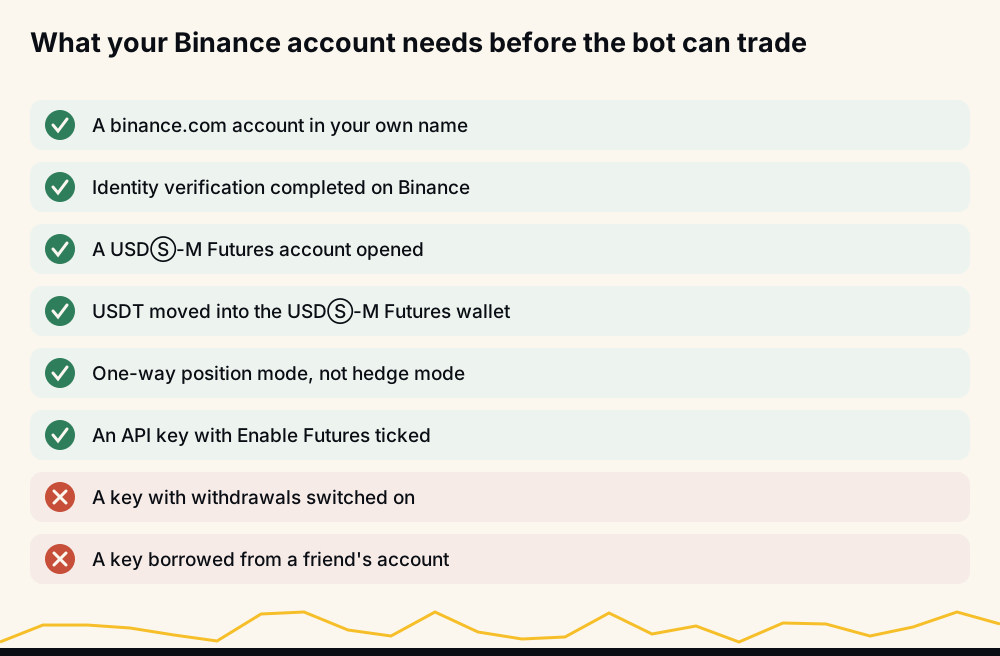
- USDT in the USDⓈ-M Futures wallet. Spot, Funding and Earn balances do not count. Without margin there, Binance refuses every order.
- One-way position mode. The autotrader works only in one-way mode; the help page on one-way mode shows where to switch it.
- An API key with Enable Futures ticked and withdrawals off. The step-by-step is in how to create a Binance API key, and the security reasoning is in how to connect a trading bot to Binance safely.
- The key restricted to our server's IP, as the API key help page explains, and pasted only on the website, never in a chat.
If Binance refuses the key once it is added, the guide to invalid API key, IP or permission errors walks through the usual causes in order. If your account is in Multi-Assets mode, read what Binance Multi-Assets mode does before you start, because it forces cross margin.
Paying from your country: USDT only
VIP is paid in USDT and nothing else. There is no card payment, no bank transfer and no PayPal, so a local card or bank that does not handle crypto purchases does not block you, and a local card that does is not accepted either.
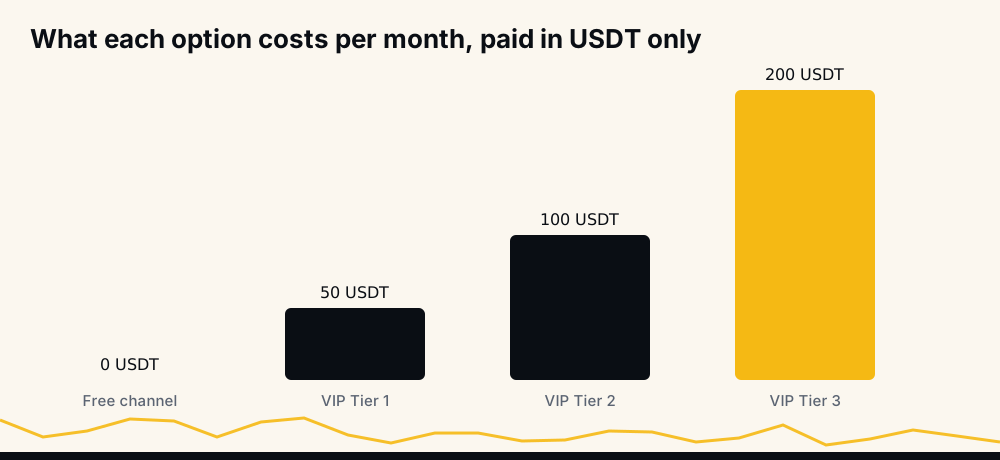
You send /join to @hafizebot, pick one of the networks it lists, and send USDT to the address it shows. The how to join VIP help page walks through the rest. Tier 1 is 50 USDT a month, Tier 2 is 100 and Tier 3 is 200, and nothing renews unless you switch it on; the pricing guide covers what each tier changes. Whether you may buy, hold or send USDT where you live is a local question, so check it before paying.
Language: the bot speaks English
The @hafizebot interface, its commands and its replies are in English today. Signals are mostly symbols, prices and percentages, so they read the same in any language. The /guides command sends PDF guides in English and Turkish, and this blog publishes articles in many other languages, including Turkish, German, Spanish, Russian, Arabic and Hindi.
Support answers in English, and if you write in another language we add a sentence in yours where we can. Writing in your own language is fine; we would rather understand the question than have you struggle with it.
Taxes and local law are yours to check
Crypto rules differ a lot between countries, and they change. Some places restrict derivatives, some tax every trade, some limit how residents send money abroad. We are not lawyers or tax advisers, and nothing on this page tells you what is legal or taxable where you live.
Before you trade, check your local rules for crypto derivatives and for holding USDT, keep records of your trades and payments, and ask a local adviser if the sums matter to you. Your Binance trade history is the record you will need, and it stays on your own account.
Which plan fits where you stand
Put your country check and your goal side by side, and the choice gets simple.
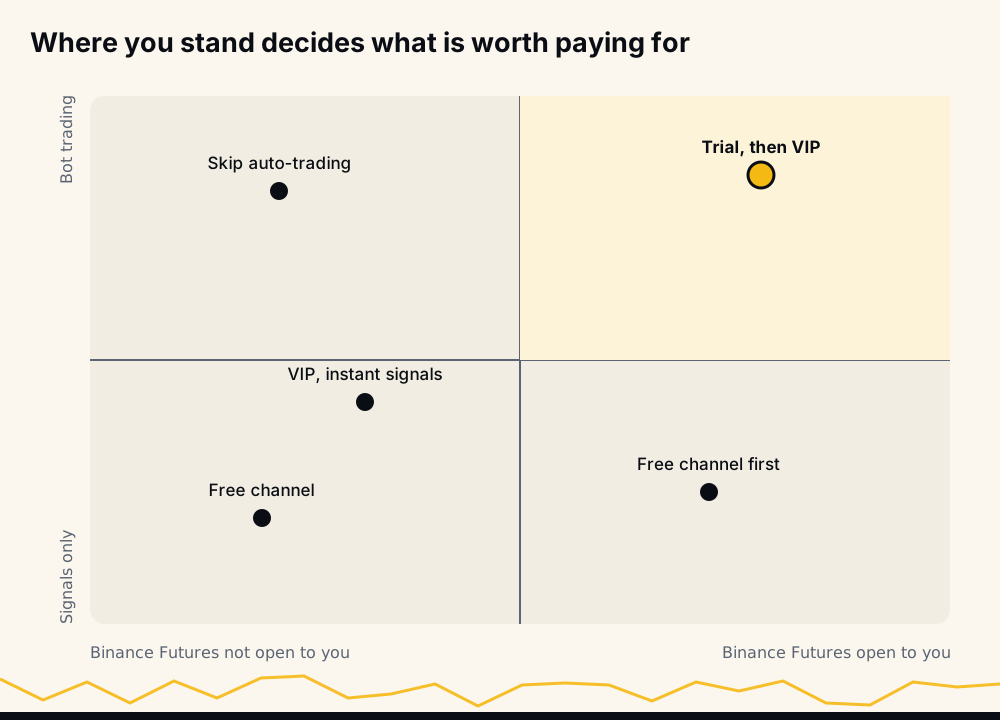
- Futures not open to you, signals only: the free channel, or VIP if you want signals without the 20-minute delay.
- Futures not open to you, but you want the bot: do not pay for auto-trading. It cannot run.
- Futures open to you: the free plan and the three-day trial come first, then VIP if the trial convinces you.
FAQ
Can I use HafizeBot in Pakistan, India or Türkiye? You can read the signals anywhere Telegram works, including all three. Auto-trading depends on whether Binance opens a USDⓈ-M Futures account for you after identity verification; check that on binance.com, along with your local rules on crypto derivatives.
Can I use HafizeBot from Iran or the United States? You can read signals on Telegram, but Binance's List of Prohibited Countries, as we read it on 10 October 2026, includes both, so you cannot hold the Binance account the autotrader needs. Please do not try to get around that with a VPN or another person's account.
Does HafizeBot work with Bybit, OKX or Binance spot? No. The autotrader trades only Binance USDⓈ-M Futures on binance.com. You can read the signals and trade elsewhere by hand, but prices, available pairs and results will differ from what we publish.
Do I need to complete KYC on Binance? Yes, for auto-trading. Binance's own Futures guide says identity verification must be complete before you can trade Futures, and the bot can only trade what Binance allows on your account.
Can I pay for VIP with a card or bank transfer?
No. Payment is USDT only, sent on one of the networks /join shows in @hafizebot. Check your local rules on buying and sending USDT before you pay.
Is the bot available in my language? The bot itself is in English. The PDF guides come in English and Turkish, and many blog articles are published in other languages too.
Where to start
If you are not sure yet, start where nothing depends on your country: join the free signals channel, compare what you see with the performance record, and read whether HafizeBot is legit for the limits of that record. If Binance opens a USDⓈ-M Futures account for you, the three-day trial lets you try auto-trading with small caps before you pay anything.
Futures trading with leverage can lose more than you expect, and quickly. Nothing here is investment advice, no result is promised, and you should only trade what you can afford to lose.