Binance error -4164, "Order's notional must be no smaller than 5.0 (unless you choose reduce only)", means the order's value, quantity times price, is below that coin's minimum on USDⓈ-M Futures. The number in the message is the coin's own minimum, so it reads 5 on many contracts and 20, 50 or more on others. Fix it by making the order bigger, or by sending it as reduce-only if it closes a position.
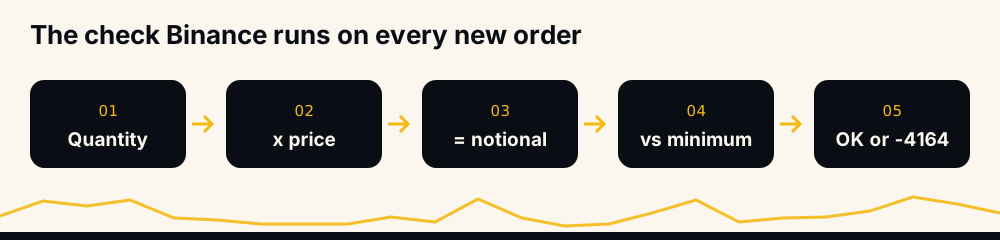
The confusion usually comes from one word. "Notional" means the size of the position, and the margin you put up is a smaller number. A 10 USDT margin at 2x is a 20 USDT order; the same margin at 1x is a 10 USDT order. Binance checks the 20 or the 10, never the margin, so the same trade can pass at one leverage and fail at another.
What -4164 means in Binance's documentation
Binance's USDⓈ-M Futures error code list gives the code as -4164 MIN_NOTIONAL, "Order's notional must be no smaller than 5.0 (unless you choose reduce only)". The 5.0 in the documentation is an example: real refusals carry the minimum of the contract you traded, which is why people search for the same sentence ending in 20 or 100.
The rule behind it is the MIN_NOTIONAL filter. Binance's common definitions say it "defines the minimum notional value allowed for an order on a symbol", that "an order's notional value is the price * quantity", and one detail that catches market orders: "Since MARKET orders have no price, the mark price is used."
So three numbers decide whether an order passes: the quantity you send, the price Binance multiplies it by, and the coin's minimum.
Why the message says 5, 20, 50 or 100
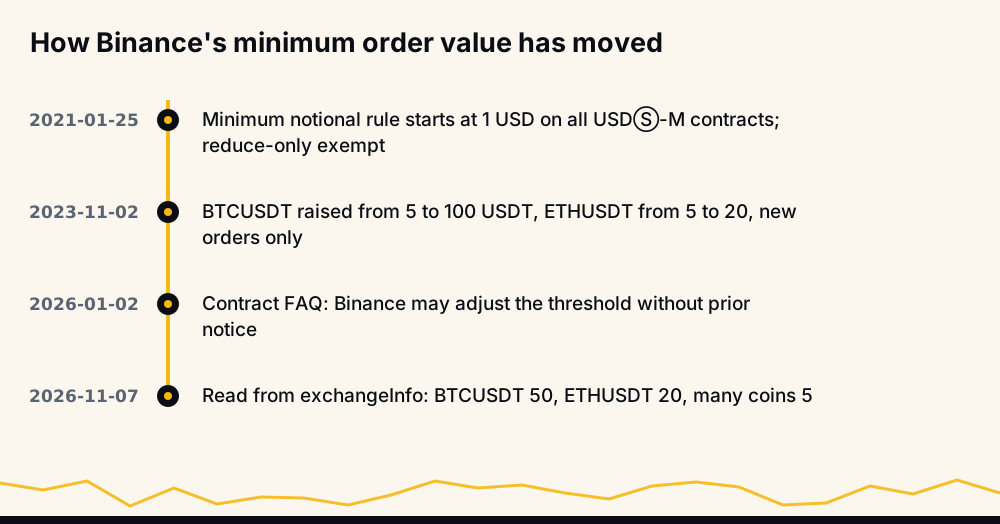
The minimum is set per contract and Binance changes it. When the rule began, its January 2021 announcement set a threshold of $1 for all USDⓈ-M contracts from 25 January 2021, exempted reduce-only orders, and warned that Binance would "adjust the threshold from time to time without prior announcement."
It did. From 2 November 2023, an update for BTCUSDT and ETHUSDT raised BTCUSDT's minimum from 5 to 100 USDT and ETHUSDT's from 5 to 20, for new orders only.
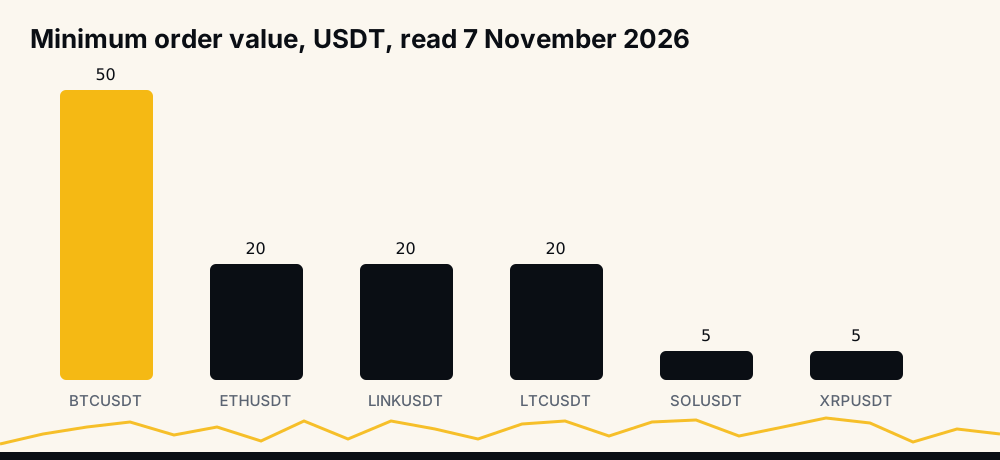
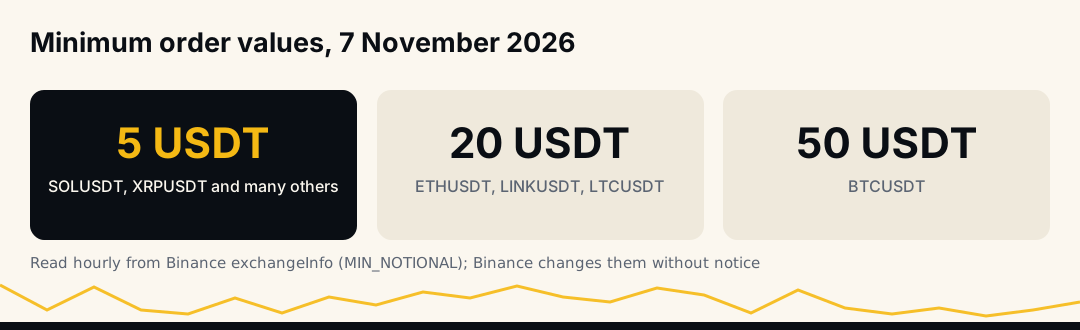
The figures move again without an announcement. On 7 November 2026, the minimums our calculators read from Binance's exchange information every hour were 50 USDT for BTCUSDT, 20 USDT for ETHUSDT, LINKUSDT and LTCUSDT, and 5 USDT for the other large coins we checked, among them SOLUSDT, BNBUSDT, XRPUSDT and ADAUSDT. So 20 is not reserved for the two biggest coins. Treat those as a snapshot and check the coin you trade before relying on them.
How to find a coin's minimum order on Binance
There are two reliable sources, and both are Binance's own.
On the website, the USDⓈ-M contract specifications FAQ (updated 2026-01-02) points to the Trading Parameters page, which lists every perpetual contract's minimum order value, minimum quantity and price step. The same FAQ repeats that "Binance Futures may adjust the minimum order threshold from time to time without prior notice".
Through the API, GET /fapi/v1/exchangeInfo returns a filters list for each symbol. Three filters matter for order size:
- MIN_NOTIONAL:
{"filterType": "MIN_NOTIONAL", "notional": "5.0"}, the minimum value. - LOT_SIZE:
minQty,maxQtyandstepSizefor limit orders. - MARKET_LOT_SIZE: the same three for market orders, which can differ.
An order has to satisfy all of them at once. The value must clear MIN_NOTIONAL, the quantity must be at least minQty, and it must be a whole multiple of stepSize.
The arithmetic: notional, margin and leverage
Since the check is on notional, the margin you need for the smallest allowed order falls as leverage rises:
Minimum margin = coin's minimum notional ÷ leverage
For a coin with a 20 USDT minimum, the smallest order needs 20 USDT of margin at 1x, 10 at 2x, 4 at 5x and 2 at 10x. For a 50 USDT minimum, it is 50, 25, 10 and 5.
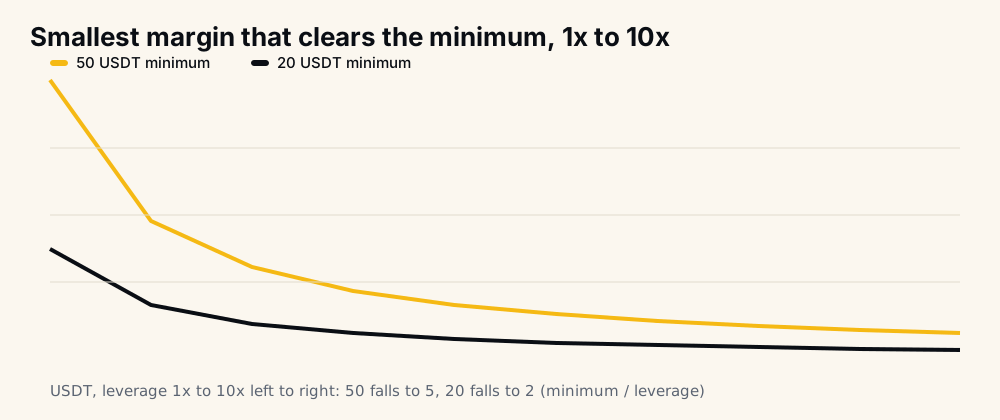
That curve tempts people to reach the minimum with leverage. It works, but leverage also brings the liquidation price closer, so the fix for a small account is usually a bigger position at modest leverage or a different coin. What leverage to use on crypto signals shows why size and stop, not leverage, should set the risk.
Five ways an order slips under the minimum
A trader who knows the minimum still meets -4164, because the value Binance computes is not always the value you had in mind.
- Rounding down to the step. You divide 20 USDT by the price, round the quantity down to
stepSize, and the rounded quantity is worth 19.6 USDT. Round, then multiply back and check. - A limit price below the market. A buy limit 3% under the current price has a notional 3% smaller than the same quantity at market. Binance multiplies by your limit price.
- Market orders priced at the mark. The check uses the mark price, which can sit slightly away from the last trade on a fast move.
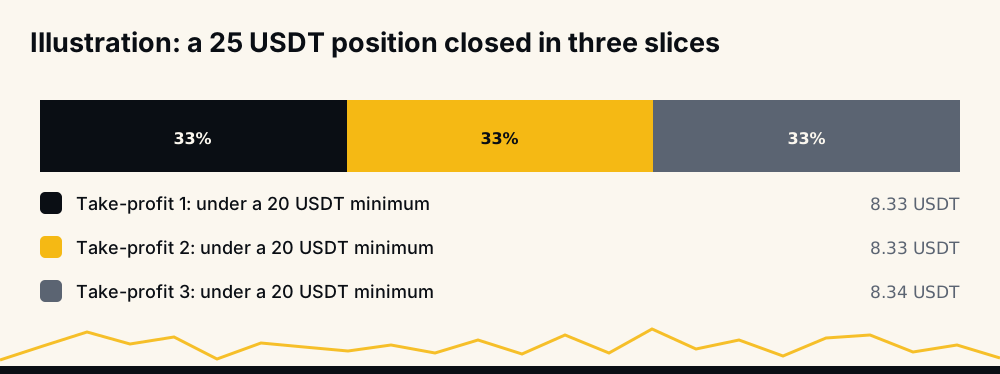
- Splitting the position. A 25 USDT position closed in three equal take-profit slices makes three orders of about 8.33 USDT each. Without reduce-only, every slice under the minimum fails.
- A small leftover. After a partial fill or a partial close, the remainder may be worth 3 USDT. A new order to close it is too small unless it is reduce-only.
The reduce-only exemption, and when it applies
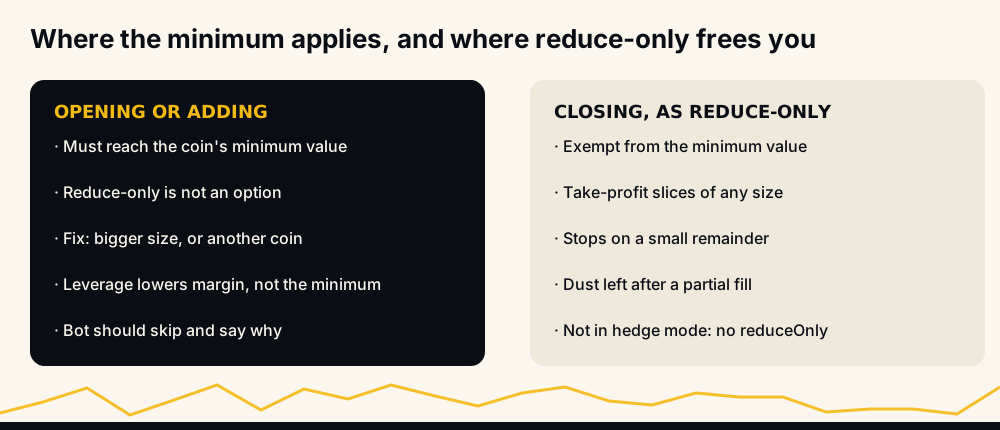
The message itself names the way out: "(unless you choose reduce only)". Binance's 2021 announcement said the same: a "Reduce-Only" order is not affected. A reduce-only order can only shrink an existing position, so Binance lets it be any size.
That makes the exemption the right tool for exits:
- Take-profit slices on a small position go through if each is flagged reduce-only.
- Stops that close a remainder below the minimum go through as reduce-only.
- Closing dust left after a partial fill goes through as a reduce-only market order.
Two limits apply. Reduce-only cannot open or add to a position, so it is no help for entries. And on a hedge-mode account the reduceOnly field cannot be sent at all, as Binance's New Order reference says; there, side and position side mark the order as a close. Why a reduce-only order failed covers the -2022 refusal that comes from a reduce-only order with nothing left to reduce.
-4164 and the errors next to it
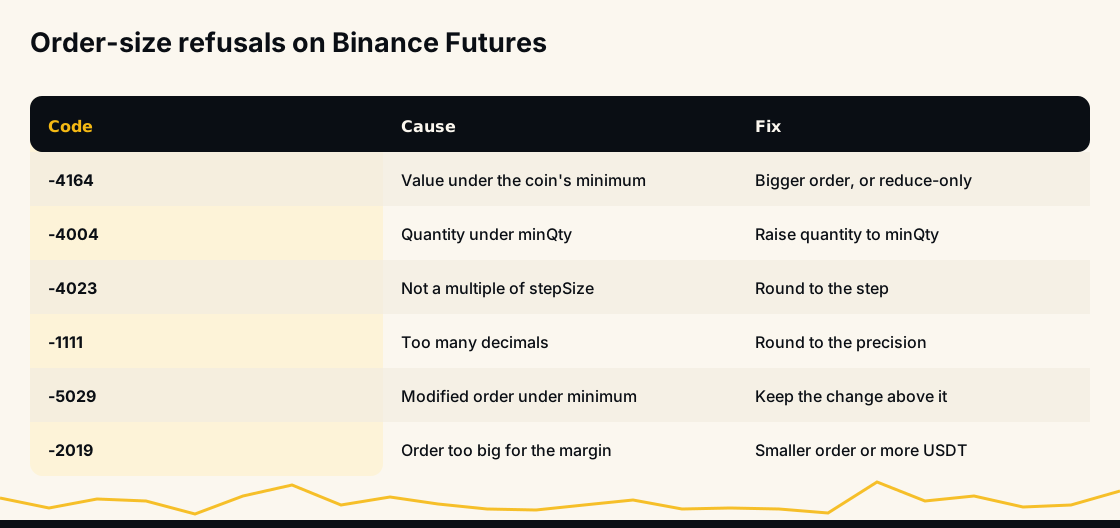
Binance has several size refusals that look alike, and the fix differs:
- -4164 MIN_NOTIONAL: the value is too small. Raise the quantity or use reduce-only for a close.
- -4004, "Quantity less than min quantity": the quantity is under
minQty, even if the value is fine. - -4023, "Qty not increased by step size": the quantity is not a multiple of
stepSize. - -1111, "Precision is over the maximum defined for this asset": too many decimals.
- -5029, "Order's notional must be no smaller than %s": the same rule applied when you modify an existing order to a smaller size or price.
- -2019, margin insufficient: the opposite problem, an order too big for the free balance; see Binance margin is insufficient.
The full set, sorted by whether a retry can help, is in Binance Futures error codes. -4164 cannot be retried into success: the same order fails the same way.
How to fix -4164 by hand
- Read the number in the message. It is the coin's minimum value in USDT.
- Raise the order value above it with room to spare, because rounding and price moves can shave a little off. If 20 is the minimum, aim for 22 or more.
- Check what that does to your risk. A bigger position with the same stop loses more at the stop. The position size calculator flags an order below a coin's minimum and shows the loss at your stop.
- For exits, tick Reduce-Only on Binance's order form. It lets a small close through.
- Or choose another coin. If the minimum is out of proportion to your account, a coin with a 5 USDT minimum fits better.
How a bot should avoid -4164
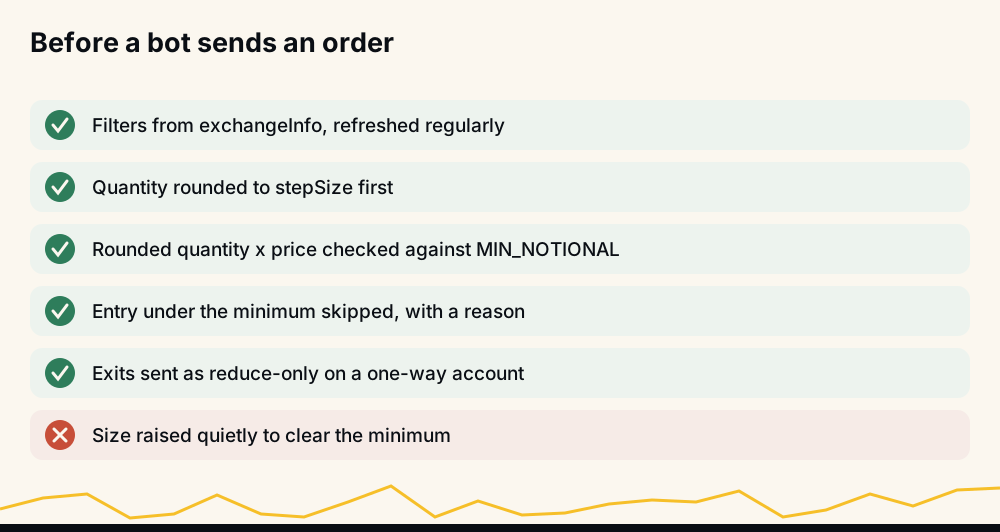
A bot sends many small orders, so it meets this error more than a person does. The checks are cheap:
- Read
exchangeInfoat start-up and refresh it regularly, since the minimums change without notice. - Compute the quantity, round it to
stepSize, multiply back by the price Binance will use, and compare with MIN_NOTIONAL before sending. - If the entry is under the minimum, skip it and say why. Quietly raising the size breaks the user's own risk setting.
- Send every exit as reduce-only on a one-way account, so take-profit slices and leftovers never hit the minimum.
Minimum orders in HafizeBot's autotrader
HafizeBot's autotrader does that check itself. Before placing an entry it compares the order with the coin's minimum value and minimum quantity from Binance, and skips the entry if it falls short; if Binance still refuses one, the bot tells you that your position size is below this coin's minimum order, with a link to the help page on minimum orders. Other coins keep trading normally.
The order the bot sends is worth your position size times your leverage. The default settings start at 5 USDT at 2x, a 10 USDT order. That clears coins with a 5 USDT minimum, but on the 7 November 2026 figures above it is under the 20 USDT minimum of ETHUSDT, LINKUSDT and LTCUSDT and the 50 of BTCUSDT, so those entries are skipped. Raise /setPositionSize to trade them; /setLeverage also makes the order bigger, but it moves the liquidation price closer, so a larger size at modest leverage is the safer route.
The signals themselves are AI-generated, from a model that evaluates 240+ indicators, formulas and components. Every broadcast signal is scored on the live performance page, where September 2026 settled at 97.7% of 4,220 signals reaching target, missed ones counted against the rate; skipped entries on your account are a separate matter from that record.
Frequently asked questions
What does "Order's notional must be no smaller than" mean on Binance? It is error -4164. The order's value, quantity times price, is below the minimum Binance sets for that contract, and the number at the end of the message is that minimum in USDT. Reduce-only orders are exempt.
What is the minimum order size on Binance Futures? It depends on the contract. On 7 November 2026 many coins, SOLUSDT and XRPUSDT among them, had a 5 USDT minimum, while ETHUSDT, LINKUSDT and LTCUSDT had 20 and BTCUSDT 50. Check the Trading Parameters page or the MIN_NOTIONAL filter in exchangeInfo, because Binance changes them without notice.
Is the Binance minimum order based on margin or position size? Position size. Binance compares the notional value, quantity times price, with the minimum. Margin is the notional divided by leverage, so higher leverage lowers the margin needed for the same minimum order.
Why did my take-profit order fail with -4164? The take-profit was worth less than the coin's minimum, often because the position was split into several slices. Send each slice as reduce-only and the minimum no longer applies.
How do I fix Binance API error -4164? Round the quantity to the step size, multiply it by the price Binance will use, and compare it with the MIN_NOTIONAL value from exchangeInfo before sending. Raise the size for entries, or use reduce-only for exits.
Does reduce-only work in hedge mode? No, Binance does not accept the reduceOnly field in hedge mode. There, an order closes a position through its side and position side, for example SELL with LONG.
The short version
-4164 is a size check on value, not margin: quantity times price must reach the coin's own minimum, which is 5 USDT on many contracts and 20 or 50 on others. Read the number in the message, raise the entry with some room, and send exits as reduce-only.
To see the signals before trading any size, the free channel posts the stronger ones (strength 3 and up) 20 minutes after VIP. The 7-day free trial in @hafizebot caps autotrading at 10 USDT of margin per entry and 3 open positions, so at 2x each entry is a 20 USDT order, on the line for ETHUSDT and under BTCUSDT's minimum. Plans are 50, 100 or 200 USDT a month through /join.
This is not investment advice; leveraged futures can lose your whole margin, so trade only what you can afford to lose.