Binance error -4061, "Order's position side does not match user's setting", means the order's positionSide does not fit the futures account's position mode. A hedge-mode account needs LONG or SHORT on every order; a one-way account accepts only BOTH or no position side at all. Fix it by switching the account's Position Mode on Binance, or by changing what your bot sends.
The error is common because the setting lives in one place and the orders come from another. You change Position Mode on Binance's screen; a bot, a script or a trading terminal builds the orders somewhere else and assumes a mode. When the two disagree, every order is refused, and nothing in the message says which side is wrong. Below is how to find out, and how to fix whichever side you choose.
What -4061 means, in Binance's own words
Binance lists the code in its USDⓈ-M Futures error code reference as -4061 POSITION_SIDE_NOT_MATCH: "Order's position side does not match user's setting." The "user's setting" is the Position Mode of your futures account, and the order's side is the positionSide field of the order you sent.
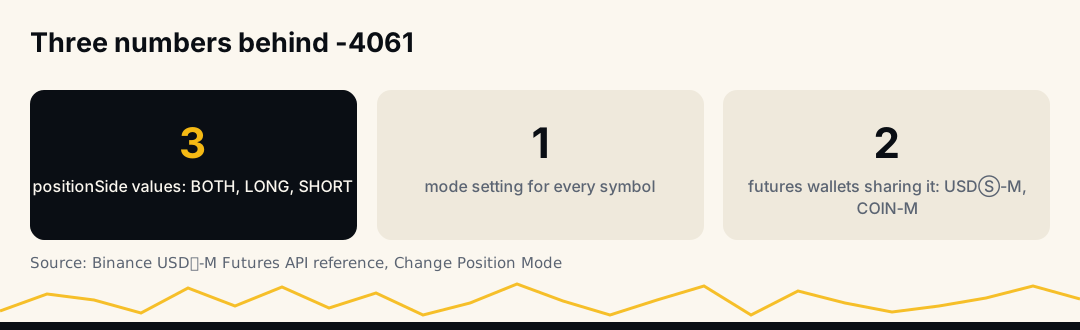
The New Order reference defines that field in one line: "Default BOTH for One-way Mode; LONG or SHORT for Hedge Mode. It must be sent in Hedge Mode." Binance's own hedge mode FAQ (updated 2026-01-21) defines the two modes:
- One-way Mode: "you can only hold positions in one direction under one Futures contract."
- Hedge Mode: "you can simultaneously hold positions in both long and short directions under the same Futures contract."
So one-way accounts expect orders aimed at the single position on a coin (BOTH), and hedge-mode accounts expect each order to say which of the two positions it belongs to.
The three cases that cause -4061
Binance's developer community forum keeps a short answer to this error that lists the cases outright. The order is refused when:
- The account is in hedge mode and the order has no
positionSide. Binance treats a missing field asBOTH, which a hedge account cannot place. - The account is in hedge mode and the order says
positionSide=BOTH. Same mismatch, written out. - The account is in one-way mode and the order says
LONGorSHORT. A one-way account has no long leg or short leg to aim at.
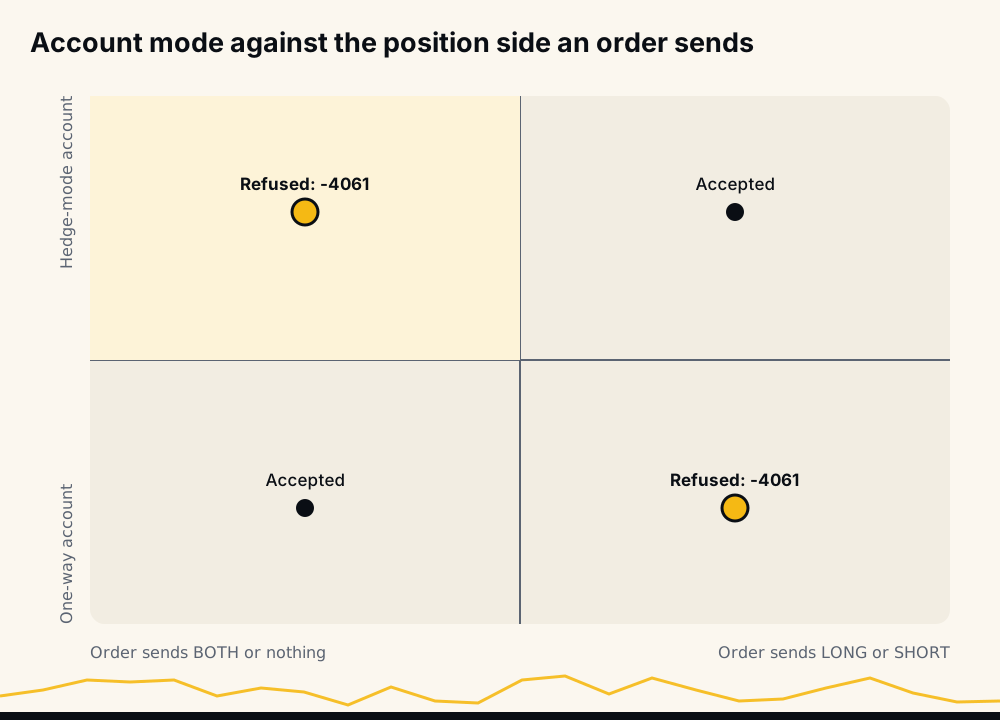
Cases 1 and 2 are by far the most frequent in practice. Most retail bots and signal autotraders are written for one-way mode, and they break the moment the account is switched to hedge mode for a manual trade. Case 3 hits the opposite setup: a script written for hedge mode pointed at a fresh account, which starts in one-way mode by default.
Check which position mode your account is in
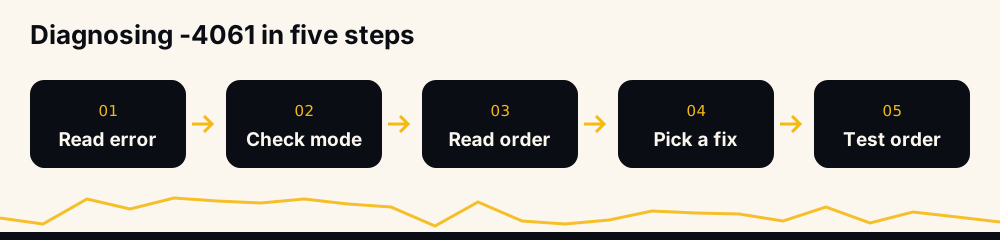
Before changing anything, find out which mode the account is really in. There are two ways.
On Binance's screen. Open the futures trading page, choose USDⓈ-M, click the settings icon at the top right, then Position Mode. Binance's FAQ labels the menu "Features", and the app has shown it as "Preference"; the Position Mode entry is the same in both. The selected option is your current mode.
Through the API. GET /fapi/v1/positionSide/dual returns {"dualSidePosition": true} for hedge mode and false for one-way mode. The forum answer recommends exactly this: read the mode, then "compare the obtained Position Mode with what was sent in the new order's parameter positionSide."
Then look at the order that failed. Your bot's log, or the request your library built, shows whether positionSide was sent and with which value. Put the two side by side and you know which of the three cases you hit.
Why a bot that worked yesterday now returns -4061
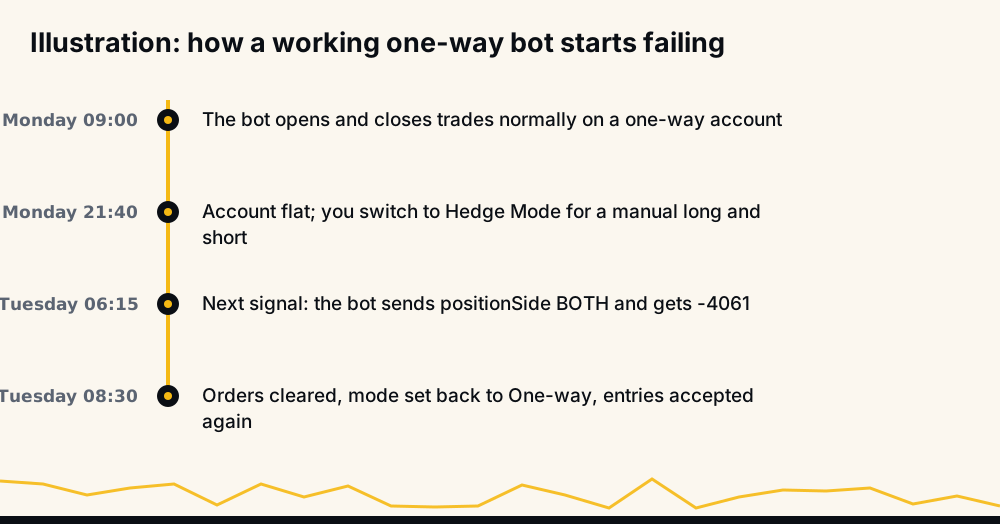
Nobody edits a working bot to break it. When -4061 appears out of nowhere, the account's mode changed underneath the bot, and there are more ways for that to happen than people expect.
- You switched to hedge mode for a manual trade. The switch is allowed whenever the account is flat, so it is easy to do on a quiet evening and forget.
- You changed COIN-M, and USDⓈ-M changed with it. Binance's Change Position Mode reference says the endpoint changes the mode "on EVERY symbol", and that after Binance's CM migration "UM and CM share the same dualSidePosition setting," so a call flips both.
- Another app switched it. Any tool with a futures-enabled key can call
POST /fapi/v1/positionSide/dual. A second bot, a copy-trading tool or a trading terminal set up for hedge mode can change the mode for every other program on the same account. - The bot cached the mode. A program that reads the mode once at start-up and never again will keep sending the old shape after you change it.
- A different account. A new API key on a sub-account or a second account brings that account's mode, and a new futures account starts in one-way mode.
Fix option 1: switch the account back to one-way mode
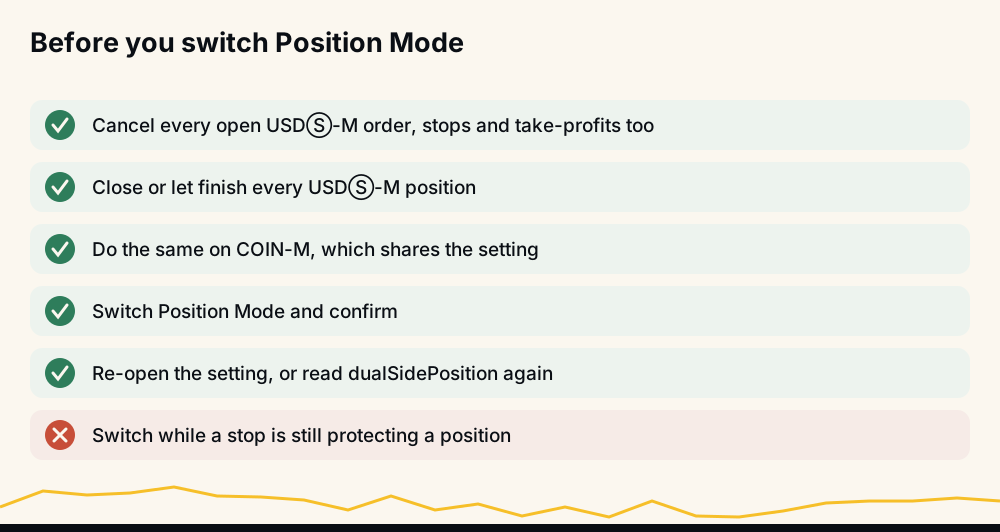
If your bot is built for one-way mode, which is the common case, change the account. Binance's FAQ is firm on the condition: "Position Mode cannot be adjusted while you have open positions or open orders." In practice:
- Cancel every open order, including take-profit and stop-loss orders, on every USDⓈ-M contract.
- Close every open position. Each one is a live trade, so decide first whether to close it now or wait for it to finish.
- Do the same on COIN-M futures, because the two share the setting and a single open order there blocks the change.
- Switch Position Mode to One-way and confirm.
- Re-open the setting to check it stuck, or read
dualSidePositionagain through the API.
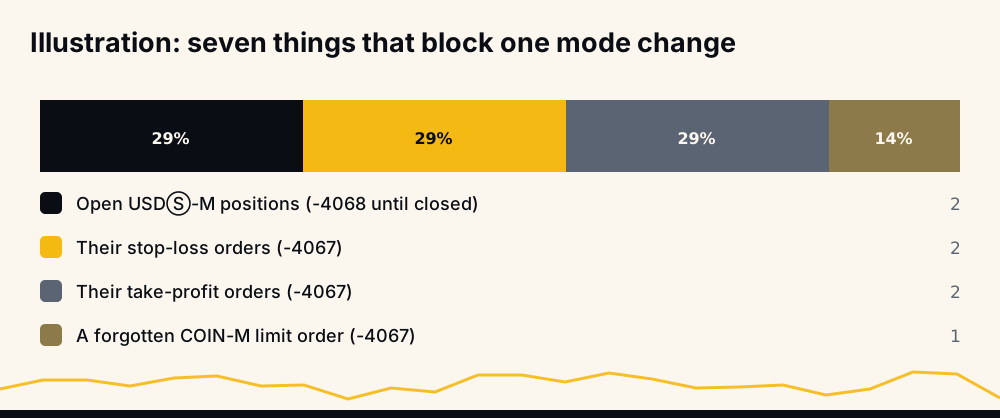
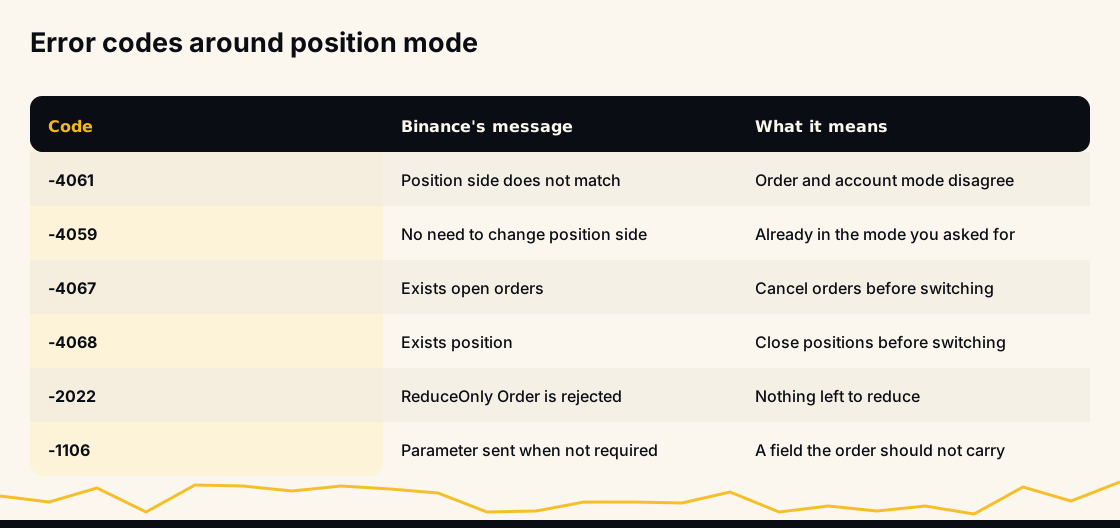
If the switch is refused, the code tells you why: -4067, "Position side cannot be changed if there exists open orders", and -4068, "Position side cannot be changed if there exists position." A third code, -4059, "No need to change position side", means the account was already in the mode you asked for, so the mismatch is on the order side.
On a busy account the list of things to clear is longer than it looks, because every position usually carries its own stop and take-profit:
Fix option 2: change what your bot sends
If you want the account in hedge mode, the bot has to speak hedge mode. Every order must carry positionSide, and side plus position side together decide what the order does:
| You want to | side | positionSide |
|---|---|---|
| Open or add to a long | BUY | LONG |
| Close or reduce a long | SELL | LONG |
| Open or add to a short | SELL | SHORT |
| Close or reduce a short | BUY | SHORT |
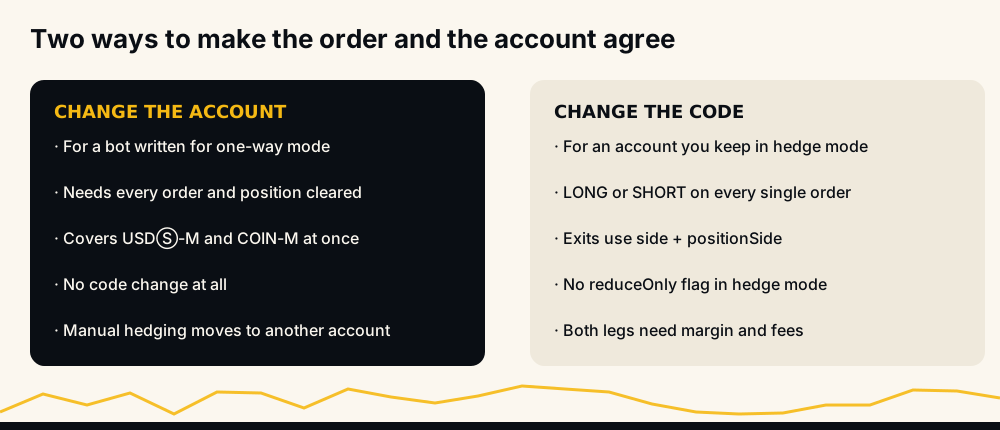
Two more rules come with hedge mode. The reduceOnly flag "cannot be sent in Hedge Mode", says the reference, so exits rely on side and position side alone. A library that adds reduceOnly=true to every stop has to drop that habit for a hedge-mode account. And every order type you send, stops and take-profits included, needs the same field.
If you want the account in one-way mode instead, the bot should send BOTH or leave the field out. One-way is simpler for automation: the signed position size per coin tells you everything, and reduceOnly keeps an exit from flipping the position.
Make the bot check the mode before it trades
A bot that cannot handle both modes should at least notice the wrong one. Three habits prevent most -4061 runs:
- Read the mode at start-up, and again whenever an order comes back with -4061, before sending anything else.
- Stop and say so. Retrying an order that failed with -4061 sends the same mismatch again; the fix is a person changing the account or the configuration. A clear message ("this account is in hedge mode; switch it to one-way") saves an hour of guessing.
- Never switch the mode for the user. Changing it needs an empty account, so a bot that tried would have to cancel orders and close positions it may not own. That is the user's decision, on Binance.
The general version of this is in Binance Futures error codes, which sorts every common code by whether it is safe to retry; -4061 is not.
What hedge mode costs, before you keep it
Some people meet -4061, read that the fix is "use hedge mode properly", and keep it. Before you do, know what it changes. Binance's FAQ on calculating the margin requirement (updated 2026-01-02) gives the hedge-mode requirement as "Long-Side Margin Requirement + Short-Side Margin Requirement", so the two legs do not offset for margin. Holding a 1 BTC long and a 0.5 BTC short at 22,000 USDT and 10x ties up about 3,300 USDT; the same net exposure in one-way mode, a 0.5 BTC long, needs about 1,100.
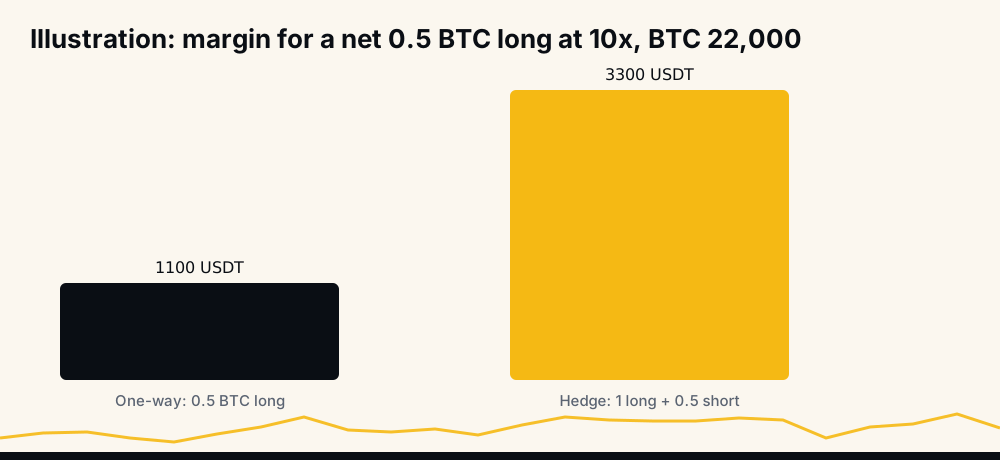
You also pay fees on both legs and handle two positions per coin. Hedge mode vs one-way mode on Binance works through margin, liquidation and funding in each mode. If you like hedging by hand and also run a bot, keep them on separate accounts; a Binance sub-account for a trading bot shows the setup.
Errors that look like -4061 but are not
A few neighbouring refusals mention position side or reduce-only and get mixed up with it:
- -4059, "No need to change position side": a mode-change request for the mode you already have.
- -4067 and -4068: a mode change blocked by open orders or an open position.
- -2022, "ReduceOnly Order is rejected": a reduce-only order that would not reduce anything, usually because the position is already gone. Why a reduce-only order failed lists the causes.
- -4062, "Invalid or improper reduceOnly value": a reduce-only flag Binance cannot accept in that order's context.
- -1106, "A parameter was sent when not required": Binance's generic refusal for a field the order should not carry, which developers have reported for a stray
reduceOnly.
-4061 and HafizeBot's autotrader
HafizeBot's autotrader trades only in one-way mode: one position per coin, entries, take-profits and stops built on that. If your Binance futures account is in hedge mode, Binance refuses the bot's orders with -4061, and the bot tells you in plain words that the account is in hedge mode, with a link to the one-way mode help page. It does not switch the mode for you, because that is your account's setting and changing it needs your positions and orders cleared first.
The fix is the five steps under option 1: clear orders and positions on USDⓈ-M and COIN-M, switch to One-way, and the next signal goes through. Members who also hedge by hand keep that on a separate Binance sub-account, as the help page suggests. The key the bot uses needs futures trading only, with withdrawals off, and is pasted at hafizebot.com/app/keys, never in a chat.
The signals themselves are AI-generated, from a model that evaluates 240+ indicators, formulas and components, and every broadcast signal is scored on the live performance page, missed ones counted against the target-hit rate.
Frequently asked questions
What does "Order's position side does not match user's setting" mean? It is Binance error -4061. The order's positionSide does not fit the account's position mode: hedge mode needs LONG or SHORT on every order, and one-way mode accepts only BOTH or no position side.
How do I fix Binance error -4061? Check your Position Mode on Binance or with GET /fapi/v1/positionSide/dual, then compare it with the order. Either switch the account to the mode your bot expects, after clearing all orders and positions, or change the bot to send the position side that matches.
How do I change from hedge mode to one-way mode on Binance? Open the USDⓈ-M futures screen, click the settings icon, then Position Mode, and select One-way. Binance allows it only with no open positions and no open orders, and the setting is shared with COIN-M futures.
Why can't I change my position mode on Binance? Something is still open. Binance returns -4067 when open orders block the change and -4068 when an open position does; check COIN-M futures as well as USDⓈ-M, because they share the setting.
Which mode should a trading bot use, one-way or hedge? Use whichever mode the bot was written for. Most retail bots and signal autotraders, HafizeBot's included, use one-way mode, because one position per coin keeps entries, exits and reduce-only orders simple.
Can I use hedge mode and a one-way bot at the same time? Not on one account, because the mode applies to every symbol. Put the bot on a Binance sub-account in one-way mode and keep your hedge-mode trading on the other account.
Fixing -4061 in one minute
Read the account's mode, read the order's position side, and make one match the other. For a one-way bot that means an empty account switched back to One-way, COIN-M included; for hedge-mode code it means LONG or SHORT on every order and no reduceOnly. Once they agree, -4061 does not come back until something changes the mode again.
If you want to see what a one-way autotrader would have traded before connecting a key, the free channel posts the stronger signals (strength 3 and up) 20 minutes after VIP. VIP signals arrive instantly in @hafizebot, with optional autotrading on your own account; the 3-day free trial caps autotrading at 10 USDT of margin per entry and 3 open positions, and plans are 50, 100 or 200 USDT a month through /join.
This is not investment advice; leveraged futures can lose your whole margin, so trade only what you can afford to lose.