"Enable Futures" is greyed out or missing on a Binance API key for one of five reasons. You have no Futures account yet. The key was created before you opened one, and such a key can never get the permission. The key has no IP restriction, and Binance locks every box except reading until a trusted IP is saved. Portfolio Margin is active on the account. Or the key belongs to a sub-account that has no Futures account of its own. An old key has to be replaced with a new one; a key without an IP only needs the IP saved first, and the box unlocks. The order that always works: Futures account, then the key, then the IP, then Enable Futures.
Why the box is locked
Binance answers this in its FAQ "How to Create API Keys on Binance?" (updated 6 November 2026), under "Why can't my API key enable Futures permission?": "If the API key is created before you enable your Futures Account, or you have activated Portfolio Margin, the API key won't be able to enable Futures permission."
The same page has the IP rule: "Effective from 2023-01-30 00:00 (UTC), the system-generated API key's permission can only be set to [Enable Reading] if your IP is unrestricted."
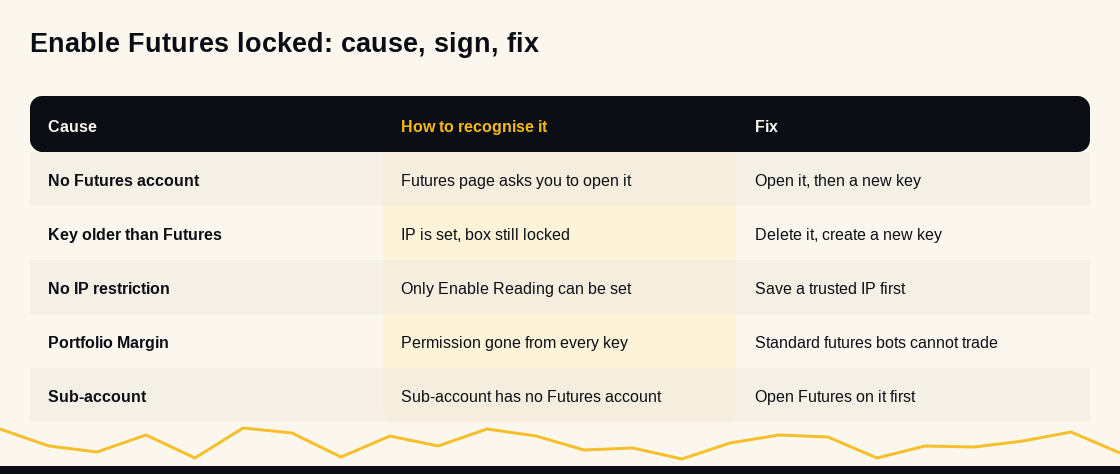
Those two sentences cover nearly every case. This table tells them apart:
| Cause | How to recognise it | Fix |
|---|---|---|
| Futures account not opened | The Futures page still asks you to open or activate the account | Open it, pass Binance's quiz, then create a new key |
| Key created before the Futures account | Futures works in the app, the key has an IP, and the box still will not tick | Delete the key and create a new one |
| No IP restriction | The key is set to unrestricted and every box except Enable Reading is locked | Restrict it to a trusted IP, save, then tick Enable Futures |
| Portfolio Margin is on | The account is in Portfolio Margin mode; Enable Futures came off every key at once | A standard futures bot cannot use this account; see below |
| Sub-account | The key belongs to a sub-account that has no Futures account of its own | Open Futures on the sub-account, then manage its key from Sub Accounts |
The Futures account or its quiz is not finished
A key can only carry a permission the account has. Before a Futures account exists there is nothing to enable.
Binance wants three things before it lets you create any key: "Enable two-factor authentication (2FA) on your account", "Verify your identity", and "make a deposit of any amount to your Spot Account to activate your account". The Futures account comes on top. You open it once from the Futures page, and Binance's first-trade guide (14 May 2025) says "You need to pass a quiz to activate your Binance Futures account".
An account stuck halfway through that step looks open and is not. Go to the USDⓈ-M Futures page. If it asks you to open, activate or continue, finish that first.
The key was created before the Futures account
This is the cause nobody guesses, because the key looks healthy. It reads balances. Its IP is set. The Futures account works in the app. The box stays dead.
Binance's developer documentation says it as flatly as the FAQ does. On the endpoint that reports a key's permissions, the note on enableFutures reads: "The Futures API cannot be used if the API key was created before the Futures account was opened".
Nothing repairs such a key. Opening Futures afterwards does not upgrade it, and editing it changes nothing. Delete it, create a new one, and paste the new key and its new secret wherever the old pair was used. Binance shows the secret of a system-generated key once, so copy it before you leave the page.
We check for this on members' keys. The pattern: Binance's main API accepts the key, and the futures API refuses the same key with -2015. Portfolio Margin produces the same pair of answers.
The IP restriction comes first
A fresh key starts with reading only. Tick-boxes for anything else stay locked while the key is open to any address. Binance: "Unrestricted-IP-Access HMAC API Key(s) won't have any permission other than reading."
So the order on the key's edit screen matters:
- Choose the option to restrict access to trusted IPs only (Binance's FAQ calls the other state "Unrestricted-IP-Access").
- Add the address. For a bot this is its server's IP, which the bot's own setup page shows. For your own script it is the public IP of the machine that runs it.
- Confirm, so the IP is saved.
- Now tick Enable Futures, save, and confirm with your two-factor code.
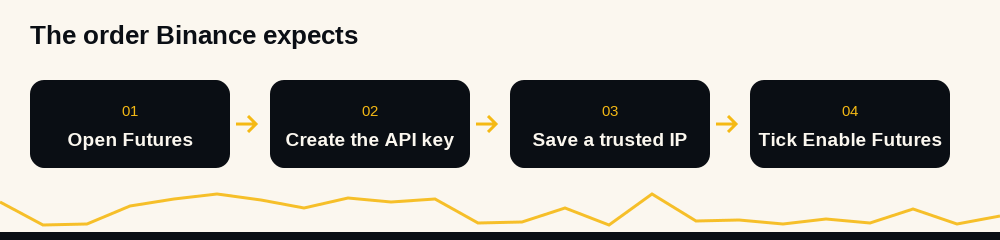
HafizeBot's setup instructions put the IP before the permissions for this reason. A home connection whose IP changes will break an IP-restricted key later with -2015, "Invalid API-key, IP, or permissions for action"; a server with a fixed address does not have that problem.
Portfolio Margin
Portfolio Margin is a separate account mode, and it takes the futures permission away. Binance's "Binance Portfolio Margin API" FAQ (updated 20 January 2026): once the mode is enabled, "the [Enable Futures] permission will be automatically removed from all your existing API Keys", and "The removal of this permission is permanent and cannot be reversed."
Keys on such an account trade through Binance's separate PAPI endpoints under a different permission, Enable Portfolio Margin Trading. The ordinary futures endpoints stay available "for market data purposes, excluding trading and user data-related endpoints". A bot written for the standard USDⓈ-M futures API cannot place orders there. HafizeBot is one of those: it cannot use Portfolio Margin accounts.
Sub-accounts
Two things go wrong with sub-accounts.
The first is where you look. Sub-account keys are managed from the master account. Binance's sub-account FAQ: "Go to the [API Management] tab to create and edit sub-account API Keys and API access", inside the Sub Accounts section of the master account. Each sub-account can hold up to 30 keys.
The second is the same rule as above, one level down. The sub-account needs its own Futures account before its key can enable futures. Open it on the sub-account, then create the key.
A sub-account is a good home for a bot, with one limit to know: regular users' sub-accounts are capped at 5x futures leverage. Using a Binance sub-account for a trading bot covers the setup.
How to check what a key can do
On the website, API Management shows each key with its ticked boxes and its IP setting. Binance's menu path: [Profile], [Account], [API Management]. In the app: [More], the [Others] section, [API Management].
From code, ask Binance directly. GET /sapi/v1/account/apiRestrictions is a signed call on the main API (api.binance.com, weight 1) and answers with one true or false per permission: enableReading, enableFutures, enableWithdrawals, ipRestrict, enablePortfolioMarginTrading, plus the key's createTime.
Put that answer next to one signed futures call, such as the futures balance, and the cause falls out. This is the table our autotrader uses:
| Futures call | apiRestrictions call | What it means |
|---|---|---|
| Works | enableFutures: true |
The key is fine |
| Works | enableFutures: false, ipRestrict: false |
No trusted IP yet: add it, then tick the box |
| Works | enableFutures: false, ipRestrict: true |
The box is simply not ticked |
| Refused, -2015 | Works | Futures refuses this key: it is older than the Futures account, or Portfolio Margin is on |
| Refused, -2015 | Refused, -2015 | The IP list leaves out the caller, or the key was deleted |
The last two rows are why -2015 alone cannot be diagnosed. Its text, "Invalid API-key, IP, or permissions for action", names three causes, and only the main API's answer separates them.
HafizeBot runs this check when a member saves a key or sends /on. If Enable Futures is off, auto-trading stays off and the member is told why, so no order is sent only to be refused.
Permissions a trading bot needs, and the ones it must not have
A USDⓈ-M futures bot needs two boxes: Enable Reading, which every key has, and Enable Futures. And one setting: an IP restriction to the bot's server.
It needs nothing else. Leave these off:
- Enable Withdrawals. A trading bot never needs withdrawal permission. Binance will not let you tick it without an IP restriction anyway: "Adding IP access(IPv4 format) restrictions is mandatory to enable withdrawal permission."
- Spot & Margin trading, margin loans, options. A futures bot uses none of them.
- Internal and universal transfer. These move funds between your accounts and wallets.
HafizeBot never needs withdrawal permission and never transfers funds. If a member saves a key that can withdraw, the keys page says so: "This key can withdraw funds. HafizeBot never needs that. Turn off 'Enable Withdrawals' on Binance for safety." Connecting a bot to a Binance API key safely goes through the risks of each box, and how to create a Binance API key has the whole setup from the first screen.
Frequently asked questions
Why is Enable Futures greyed out on my Binance API key? Either the key has no IP restriction, and Binance locks everything except reading until a trusted IP is saved, or the key was created before your Futures account was opened. Add the IP first. If the box is still locked, create a new key.
Can I enable futures on an old API key? Not if it was created before the Futures account existed. Binance's FAQ says such a key "won't be able to enable Futures permission". Delete it and create a new one.
Why is the Enable Futures option missing completely? The account has no Futures account yet, or Portfolio Margin is active. With Portfolio Margin, Binance removes Enable Futures from every existing key and the removal is permanent.
Do I have to restrict the IP to enable futures? Yes for a system-generated key. Since 30 January 2023 such a key can only be set to Enable Reading while its IP is unrestricted.
Does a futures trading bot need withdrawal permission? No. A futures bot needs Enable Reading and Enable Futures. Keep Enable Withdrawals off on any key you give to software.
How do I check an API key's permissions without logging in?
Call GET /sapi/v1/account/apiRestrictions with the key. It returns enableFutures, enableWithdrawals, ipRestrict and the other permissions as true or false.
The order that works
Futures account, new key, trusted IP, Enable Futures, withdrawals off. Sources: Binance's FAQs "How to Create API Keys on Binance?", "Binance Portfolio Margin API" and "Binance Sub-Account Functions and Frequently Asked Questions", its developer documentation for the API key permission endpoint, and the key checks in HafizeBot's own code.
If the key is for HafizeBot, connecting your Binance API key has each screen, and the free VIP trial lets you test the connection with capped autotrading. Results are on the performance page; questions go to @hafizebot. None of this is investment advice. Futures trading can lose the whole margin of a position; trade only what you can afford to lose.