Binance error -1021, INVALID_TIMESTAMP, reads "Timestamp for this request is outside of the recvWindow." The timestamp in your signed request is too far from Binance's clock: more than recvWindow milliseconds behind it (5000 unless you send another value) or more than 1000 ms ahead of it. The usual cause is the clock of the machine that sent the request. Turn on automatic time sync, force one sync now, and send the request again. Your API key, your balance and the order itself are fine. A larger recvWindow helps only when the clock is slow or the network is; it does nothing for a clock that runs fast.
What Binance checks
Quoted from Binance's USDⓈ-M Futures error list, read on 21 November 2026. -1021 has two texts under one code.
| Code | Binance's name | Binance's text | What it means |
|---|---|---|---|
| -1021 | INVALID_TIMESTAMP |
Timestamp for this request is outside of the recvWindow. | The request looked too old when it arrived |
| -1021 | INVALID_TIMESTAMP |
Timestamp for this request was 1000ms ahead of the server's time. | Your clock runs ahead of Binance's |
| -1022 | INVALID_SIGNATURE |
Signature for this request is not valid. | The signature does not match what was sent |
| -5028 | ME_RECVWINDOW_REJECT |
Timestamp for this request is outside of the ME recvWindow. | The order was still inside the window at the door and outside it at the matching engine |
Every signed call (orders, balances, positions, leverage) carries a timestamp. Binance's general API page says it "should be the millisecond timestamp of when the request was created and sent", and that recvWindow may be sent "to specify the number of milliseconds after timestamp" the request is valid for. "If recvWindow is not sent, it defaults to 5000."
The whole rule is a few lines on that page:
if (timestamp < serverTime + 1000 && serverTime - timestamp <= recvWindow) {
  // process request
} else {
  // reject request
}
Two things follow from it. The check has two sides, and recvWindow appears on one of them only. A request is refused before anything else happens to it, so after -1021 there is no order to look for and nothing to cancel.
Slow clock or fast clock
The two sides fail for different reasons and are fixed differently.
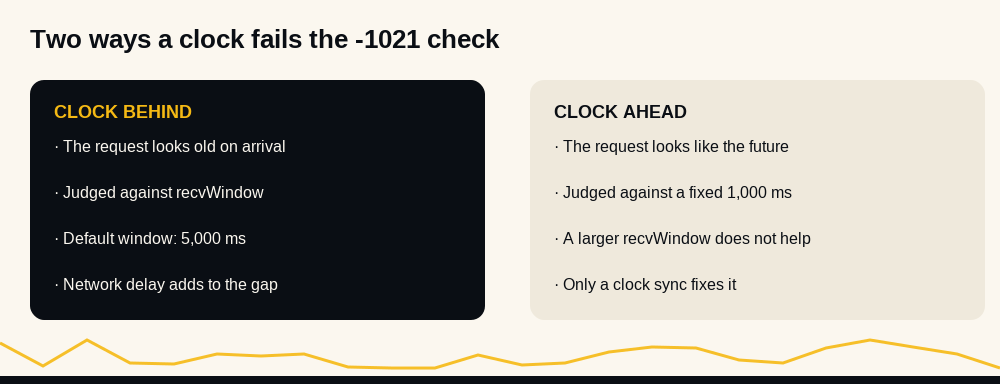
Your clock is behind. The timestamp looks old. With the default window, a clock 5 seconds slow fails every time, and a clock 4 seconds slow fails whenever the request takes more than a second to arrive. This is the first text in the table.
Your clock is ahead. The allowance is 1000 ms and no parameter changes it. A clock 2 seconds fast fails with recvWindow at 5000 and fails the same way at 60000. If you raised recvWindow and nothing changed, this is your case.
Your clock is right and the request was late. A slow or congested connection, a proxy, or a request that waited in your own program after it was signed. The timestamp was correct when it was written and old when it arrived.
One more cause looks like a clock problem and has nothing to do with the clock: the unit. Binance's page says "All time and timestamp related fields are in milliseconds." A timestamp in seconds has 10 digits where Binance expects 13, so it reads as a moment in January 1970 and is far outside any window.
Measure the drift before changing anything
Binance publishes its clock. GET /fapi/v1/time needs no key, costs a request weight of 1, and is described as "Test connectivity to the Rest API and get the current server time." The answer is one field:
{
  "serverTime": 1499827319559
}
To measure your offset, note your own time in milliseconds just before the call (t0) and just after it (t1), then compare the middle of the two with Binance's answer:
offset = serverTime - (t0 + t1) / 2
A positive offset means your clock is behind Binance, a negative one means it is ahead. Run it three or four times and look at the spread. An offset that stays within a few tens of milliseconds is a healthy clock, and your -1021 comes from delay between signing and arrival. An offset of whole seconds is a clock that is not being synchronised.
Use this endpoint for the purpose. The serverTime field inside GET /fapi/v1/exchangeInfo carries Binance's own comment: "Ignore please. If you want to check current server time, please check via "GET /fapi/v1/time"".
Fix the clock on Windows, macOS and Linux
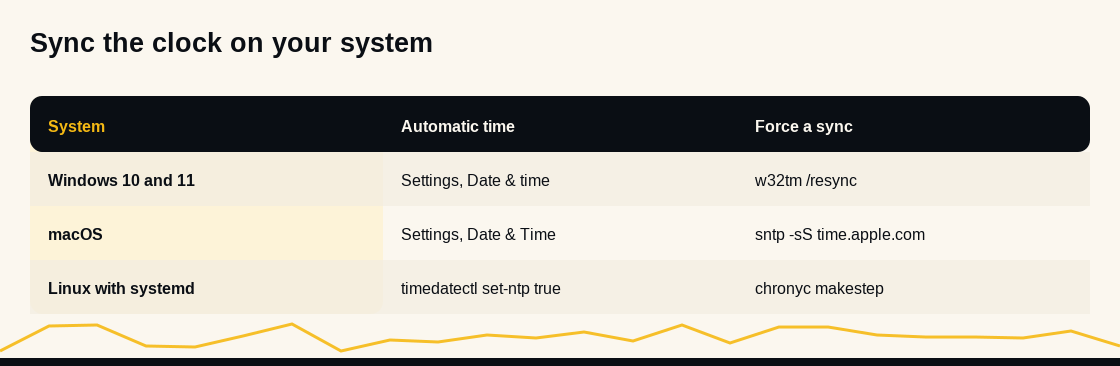
Binance's "Frequently Asked Questions on API" (updated 13 January 2025) says of this error: "Typically, this error only occurs if the server time and your system time don’t sync." It suggests a clock tool on Windows and ntpdate on Linux and Mac. The operating systems' own tools do the same job. The steps below are theirs.
| System | Turn on automatic time | Force a sync now |
|---|---|---|
| Windows 10 and 11 | Settings, Time & language, Date & time, "Set time automatically" | "Sync now" on the same page, or w32tm /resync in a command prompt opened as administrator |
| macOS | System Settings, General, Date & Time, "Set time and date automatically" | sudo sntp -sS time.apple.com in Terminal |
| Linux with systemd | sudo timedatectl set-ntp true |
timedatectl status should show "System clock synchronized: yes"; with chrony, sudo chronyc makestep |
Then measure again. A computer that drifts back within hours has a sync service that is switched on and not reaching its time server (a firewall that blocks NTP, UDP port 123, is the common reason), or a failing clock battery on an old desktop.
The time zone does not matter. A Unix timestamp counts milliseconds since 1970 in UTC whatever zone the screen shows, so changing the zone neither causes -1021 nor fixes it. Setting the time by hand rarely gets within a second, which is why the fix is the sync service.
On a VPS, in a virtual machine, in Docker and WSL
A VPS usually keeps good time because the provider's image runs a time service. Check it instead of assuming: timedatectl status on the server, then the offset measurement above. Minimal images sometimes ship without any time service.
A virtual machine on your own computer loses time whenever the host sleeps. The guest wakes up believing no time has passed and is behind by the length of the nap. Enable the hypervisor's time synchronisation, or run a time service inside the guest.
WSL 2 on Windows has the same habit after the laptop sleeps. sudo hwclock -s inside WSL sets its clock from the hardware clock; restarting WSL with wsl --shutdown does it too.
Docker containers have no clock of their own on Linux. They read the host's, so the host is where the fix goes. On Docker Desktop for Windows and macOS the containers run inside a small virtual machine, and that machine can fall behind after sleep; restarting Docker Desktop resets it.
What a bot should do
- Keep the machine's clock synchronised. Everything below is second to this.
- Write the timestamp last. Take the time, sign and send in one go. A request that is signed, put in a queue and sent later carries the time it was queued. This is the usual cause of -1021 on a server whose clock is correct.
- Sign again on every retry. Resending the same bytes after a timeout resends an old timestamp. Build the retry from a fresh one.
- Send milliseconds. Python's
time.time()and PHP'stime()return seconds; multiply by 1000 and drop the fraction. - Use an offset if you cannot fix the clock. Read
GET /fapi/v1/timeat start-up, keep the offset from the formula above, add it to every timestamp, and refresh it from time to time. Many client libraries have a setting that does this. It corrects a clock that is steadily wrong; it does not help one that jumps. - Leave
recvWindowalone unless the network needs it. Binance's reasoning, from the same page: "WithrecvWindow, you can specify that the request must be processed within a certain number of milliseconds". A window of a minute means an order delayed for 50 seconds on the way is still accepted, at whatever the price is by then.
The USDⓈ-M Futures page gives no upper limit for recvWindow. Binance's Spot API documentation does: "Maximum recvWindow is 60000 milliseconds." and "It is recommended to use a small recvWindow of 5000 or less!"
For orders there is a second check. Binance's change log of 17 April 2023: "The recvWindow check will also be performed when orders reach matching engine." An order can pass the first check and be refused at the second with -5028 if it reaches the matching engine too late. The remedy is the same: sign again and resend.
-1021 is a refusal at the door, which makes it safe to try again. HafizeBot's autotrader treats a -1021 on an account read as a passing error and reads again. The guide to Binance API rate limits covers the other errors that are a matter of timing.
-1021 or -1022
The two arrive together in searches because both come from signed requests, and because a program with one mistake in its signing code often has two. They are separate checks.
-1022, "Signature for this request is not valid.", says nothing about time. Binance's rules for the signature: "Endpoints use HMAC SHA256 signatures." and "Use your secretKey as the key and totalParams as the value for the HMAC operation.", where "totalParams is defined as the query string concatenated with the request body."
So -1022 has three usual causes:
- The secret is wrong. A character lost in copying, a space or line break pasted with it, the secret of a different key, or the key and the secret swapped.
- What was signed is not what was sent. A parameter added after signing (
recvWindowandtimestampthemselves are common ones), parameters reordered by an HTTP library, or a value encoded differently in the two places. - The signature is not at the end. Binance: "Please make sure the
signatureis the end part of yourquery stringorrequest body."
A wrong clock does not produce -1022, and a wrong secret does not produce -1021. If you get both on different calls, fix the clock first, because it is the quicker one to prove. Invalid API key, IP or permissions covers -2015 and -2014, the codes a wrong or restricted key gives, and how to connect a trading bot to a Binance API key safely covers pasting the pair without damage.
Frequently asked questions
What does "Timestamp for this request is outside of the recvWindow" mean?
Binance compared the timestamp in your request with its own clock and found it more than recvWindow milliseconds old (5000 by default) or more than 1000 ms in the future. The request was refused before it was processed.
How do I fix Binance error -1021?
Synchronise the clock of the machine that sends the request: switch on automatic time and force a sync. Then check the offset against GET /fapi/v1/time. If the clock is right, sign each request immediately before sending it.
Does increasing recvWindow fix -1021?
Only when the timestamp is too old, from a slow clock or a slow network. A timestamp more than 1000 ms ahead of Binance is refused at any recvWindow.
What is the default recvWindow on Binance Futures?
5000 milliseconds. Binance's general API page: "If recvWindow is not sent, it defaults to 5000."
Was my order placed if I got -1021? No. The request was rejected on arrival. Nothing was created, so nothing needs cancelling.
Is "Signature for this request is not valid" the same problem? No. That is -1022 and concerns the secret key or the exact text that was signed. The clock plays no part in it.
Fix the clock, then the code
Measure the offset against Binance's server time. Seconds of offset mean the clock; a clean offset means the request was signed too early or travelled too slowly. Sources: Binance's USDⓈ-M Futures error list, general API information, Check Server Time and Exchange Information pages, its derivatives change log (17 April 2023), its Spot API request-security page and its "Frequently Asked Questions on API", all read on 21 November 2026. The full list of Binance Futures error codes has the neighbours of -1021.
HafizeBot publishes its signals with their results on the performance page, and the stronger ones reach the free Telegram channel 20 minutes after VIP. None of this is investment advice. Futures positions can lose their whole margin; trade only what you can afford to lose.