During Binance Futures maintenance or an outage your positions stay open and your stop-loss, take-profit and limit orders stay where they are: Binance holds them, whatever happens to your app or your bot. What stops is trading. While matching is paused nothing fills, so a stop cannot close a position, and when trading resumes a stop-market order whose trigger was passed sells at the price of that moment, which can be far from the trigger. An order you sent as the outage began is the dangerous one. Binance calls its state "unknown": it may have filled. Look it up before you send it again.
Scheduled maintenance vs an outage
Scheduled maintenance is announced, with a start time and an estimate. Three of Binance's own notices show the range:
| Notice | What paused | For how long |
|---|---|---|
| "Binance Futures System Upgrade Notice (2020/02/26)" | "a brief system pause in trading and fund transfers" on Futures | "approximately 10 seconds" |
| "Binance Coin-Margined Futures Trading System Upgrade Notice (2022-05-24)" | COIN-M trading, deposits and withdrawals to the COIN-M wallet; transfers from 10 minutes before | about one hour from 2 June 2022, 06:00 UTC |
| API change log, COIN-M migration (2026-06-29) | The COIN-M auto-cancel countdown, "suspended on 2026-06-29 at 09:00 UTC" for the migration maintenance | until COIN-M resumed |
The 2022 notice said the upgrade "will not affect USDⓈ-M Futures, options, spot or margin trading", and gave users "a 15-minute window after the upgrade is complete" to cancel orders and move funds before trading resumed. Both notices carry the same advice to anyone holding a position: "re-assess their collateral balances prior to the start of the upgrade". Neither says that liquidations are paused.
An outage has no notice. From the outside it shows as errors and silence: requests answered with HTTP 5XX, a price that stops updating, an app that will not load orders. Binance's API documentation: "HTTP 5XX return codes are used for internal errors; the issue is on Binance's side."
We found no Binance FAQ that sets out what happens to orders and positions in either case. What follows is what the notices and the API documentation say, and how each order type works.
What rests on the exchange and what does not
An order that Binance accepted lives on Binance. Closing the app, losing your connection or a bot going down does not remove it. That covers:
- A limit order on the book, a reduce-only take-profit included.
- A stop-loss, take-profit or trailing stop with a trigger. Since December 2025 these wait in Binance's Algo Service until they trigger.
- The position itself, its margin and its liquidation price.
What does not live on Binance is everything that was still a plan:
- A stop you meant to place, or a "mental stop".
- A price alert in an app.
- Anything a bot does by sending a new order when something happens: moving a stop to break-even, closing after a set time, placing the take-profit after an entry fills.
The second list is what an outage takes away. What happens to open positions if the bot stops covers the case where the exchange is fine and the software is down.
Each order type, during and after
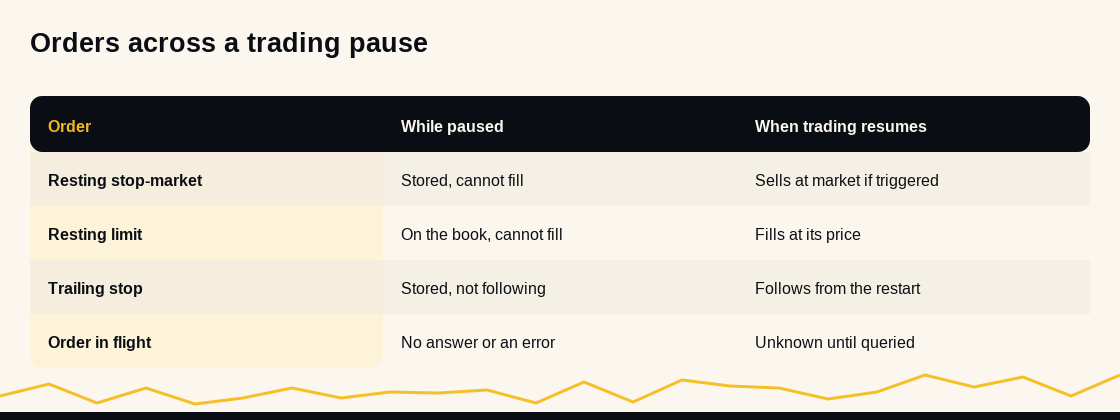
Binance publishes no rule for this. The table is how each order type works by its own definition, so read it as what to expect and not as a promise from the exchange.
| Order or state | While trading is paused | When trading resumes |
|---|---|---|
| Resting stop-market | Stays stored. Cannot fill | If the price is past the trigger, it triggers and sells at market, at whatever price the book offers |
| Resting stop-limit | Stays stored. Cannot fill | Triggers, then rests at its limit price; if the market is already beyond the limit it may not fill at all |
| Resting limit or take-profit | Stays on the book. Cannot fill | Fills when the market reaches its price |
| Trailing stop | Stays stored. Does not follow a price that is not trading | Follows the price again from where trading restarts |
| Order in flight | No answer, or an error | Unknown until you query it: it may have filled, or it may never have arrived |
| Position | Stays open | Liquidated if the Mark Price is at the liquidation price |
Two rows carry the risk.
A stop-market has no price limit. That is its job in normal trading, and it is its weakness after a pause. A stop at 0.0950 on a long that reopens at 0.0900 sells near 0.0900. On 10,000 coins the stop was meant to cost 50 USDT from an entry at 0.1000 and costs 100. Mark price vs last price explains which price a trigger watches.
Liquidation follows the Mark Price. Binance's liquidation FAQ (updated 4 January 2026): "Liquidation occurs when the Mark Price hits the liquidation price of a position." So yes, a position can be liquidated around a maintenance window if the price it reopens at is beyond its liquidation price. Binance's notices do not promise otherwise, and their advice to check collateral beforehand is aimed at this. Liquidated before the stop-loss covers the case where the stop sits further away than the liquidation price.
Orders sent during the outage: unknown, not failed
An order sent as things go wrong has three possible fates, and the answer you get tells you which. Binance's general API information:
| What comes back | Binance's meaning | What to do |
|---|---|---|
| HTTP 503, "Unknown error, please check your request or try again later." | "It is important to NOT treat this as a failure operation; the execution status is UNKNOWN and could have been a success" | Query the order before anything else |
| -1007, "Timeout waiting for response from backend server. Send status unknown; execution status unknown." | Same: it may have executed | Query the order |
| -1006, "An unexpected response was received from the message bus. Execution status unknown." | Same | Query the order |
| HTTP 503, "Service Unavailable." | "a failure API operation" | Retry later, with a growing pause |
| -1001, "Internal error; unable to process your request. Please try again." | A failure; "you can resend your request if you need" | Resend |
| -1008, "Request throttled by system-level protection." | The system is overloaded; a failure | Retry with a pause and fewer parallel requests |
| No answer at all | Nothing is known | Query the order |
The mistake that costs money is treating the first rows as failures and sending the order again. If the first one filled, you now hold twice the position.
Binance's handling note for the unknown case: "first verify via WebSocket updates or orderId queries to avoid duplicates." In practice you query by your own client order id, because you never received Binance's id. GET /fapi/v1/order with origClientOrderId answers either with the order and its status, or with -2013, "Order does not exist.", which means it never arrived and can be sent again.
HafizeBot's autotrader treats a timeout, an HTTP 5XX and the codes -1000, -1006 and -1007 on a market entry as neither an entry nor a refusal. It looks the order up by its client id first. A fill is booked as an entry, and only "Order does not exist" counts as never placed.
One line in the -1008 entry matters when you need to get out in a crowded moment: "Close-position, reduce-only, and cancel orders are exempt and will not receive this error."
What a bot should do when Binance comes back
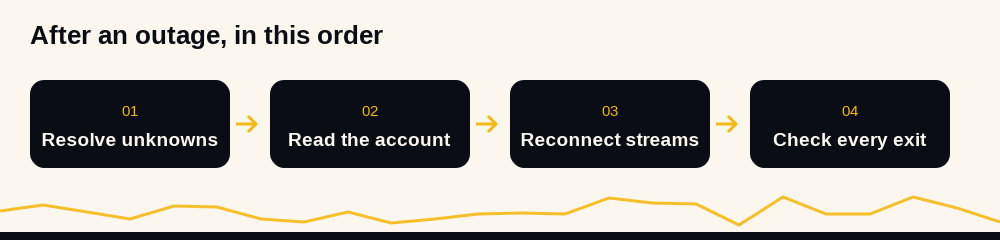
- Resolve every unknown order first, by client order id, before placing anything new.
- Read the account from Binance. Positions, open orders and open algo orders. The bot's memory is a guess after an outage.
- Reconnect the user data stream and read again. Events sent while the connection was down are gone. A
listenKeyis valid for 60 minutes without a keep-alive and one connection lasts at most 24 hours, so a long outage usually ends both. - Compare each position with its exits. A position with no stop gets one now, sized to what Binance reports.
- Only then take new entries.
Two habits make step 1 possible. Give every order a client order id that is built from what the order is for, so the order can be found by that id whatever happened to the answer. And never count "no answer" as "no order".
HafizeBot's engine reads every active member's positions and open orders from Binance when it starts, before it trades. When a member's stream reconnects, it reads that account again right after the connection is up, because events may have been missed in between. Binance API rate limits explains why those reads have to be spread out instead of sent all at once.
What you can do by hand
Before scheduled maintenance:
- Put the stop on Binance. Check it in Open Orders, under the Conditional tab.
- Check the margin behind each position. Lower the leverage or the size if the liquidation price is close.
- Cancel resting entry orders you would not want filled at an unexpected price when trading resumes.
- Decide whether to hold through it at all. Flat is the only state with no reopening risk.
During an outage:
- Do not send the same order again and again. Each one may be queued or already filled.
- Try the other door. The website, the app and the API do not always fail together.
- Write down what you sent and when. You will need it to match against order history.
After:
- Positions first, then Open Orders in both tabs, then Order History for the minutes around the outage.
- Look for a position that is larger than you intended, and for one that has lost its stop.
- Check Transaction History for a liquidation or a funding payment you did not see happen.
Frequently asked questions
What happens to my open positions during Binance Futures maintenance? They stay open. Trading on them is paused, so nothing can close them until it resumes. Check the margin behind each one before a scheduled window.
Does my stop-loss work if Binance is down? The order stays stored on Binance, but it cannot fill while trading is paused. When trading resumes, a stop-market whose trigger was passed sells at the market price of that moment.
Can I be liquidated during maintenance? Binance liquidates when the Mark Price reaches the liquidation price. Its maintenance notices do not say liquidations are paused; they tell holders to check their collateral before the upgrade starts.
I got a 503 or a timeout when placing an order. Did it go through? It may have. Binance marks a 503 "Unknown error" and the codes -1006 and -1007 as execution status unknown. Query the order by your client order id before sending another.
Are my limit orders cancelled during maintenance? The notices we read do not say so. The 2022 COIN-M notice gave users 15 minutes after the upgrade to cancel orders themselves before trading resumed.
How do I know when Binance Futures maintenance is planned? Binance posts system upgrade notices on its announcements page, and API changes in the derivatives change log. An outage is not announced in advance.
Stops on the exchange, look-ups before retries
The orders Binance already holds survive an outage. The ones in your head or in transit do not. Sources: Binance's USDⓈ-M Futures general API information, error list and user data stream documentation, its derivatives change log, the notices "Binance Futures System Upgrade Notice (2020/02/26)" and "Binance Coin-Margined Futures Trading System Upgrade Notice (2022-05-24)", and its FAQ "Binance Futures Liquidation Protocols", all read on 15 November 2026, and HafizeBot's own order code.
HafizeBot publishes its signals with their results on the performance page, and the stronger ones reach the free Telegram channel 20 minutes after VIP. None of this is investment advice. Futures positions can lose their whole margin; trade only what you can afford to lose.