An AI trading bot does five jobs for you: it reads market data, turns that data into a trade signal, sizes and places the order on your exchange account through an API key, manages the exit, and reports what it did. Only the second job is the "AI" part. The other four are ordinary software following rules you set, and those rules decide most of what happens to your money.
Below: each job in order, how signal bots, copy bots and autotraders split the work, and what no bot can do, with HafizeBot's autotrader as one worked example. For the broader map of bot categories (grid, DCA, arbitrage and the rest), read what a crypto bot is and how to judge one; this page stays on the AI-driven, signal-to-order kind.
What does an AI trading bot actually do, in one picture?
Every automated trading bot runs the same loop. The names vary; the jobs do not.
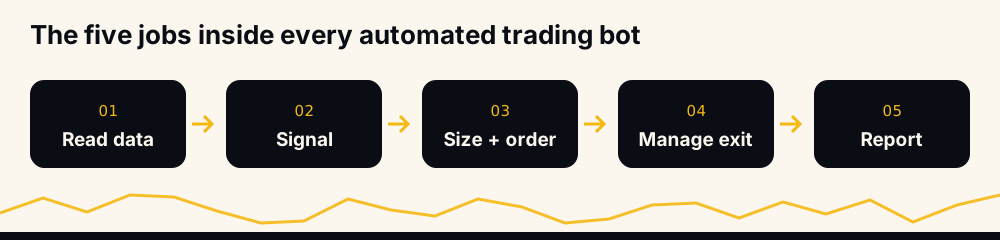
- Read market data. Prices, order books and trading activity for the pairs it covers, pulled from the exchange.
- Generate a signal. A model or a rule set decides that a pair is worth trading, in which direction, and where the target sits.
- Size and place the order. Your settings turn the signal into a quantity and a leverage, and the order goes to the exchange through your API key.
- Manage the exit. Take-profit and stop orders are placed, and the position is watched until one of them closes it, or you do.
- Report. You are told what was opened, what was closed, and what was skipped and why.
A product that cannot say which of these five it does for you has not explained itself yet.
Step 1: reading market data
The first job is mechanical. The bot connects to the exchange's public market data and keeps a current picture of every pair it watches. On Binance USDⓈ-M Futures that universe is large: HafizeBot's home page listed 523 pairs scanned when we checked it on 11 October 2026.
Two things matter here: coverage, because software can watch hundreds of pairs without tiring, and freshness, because late data makes late signals. Neither is intelligence; both are why automation exists.
Step 2: generating a signal, the part called AI
This is the step marketing pages mean by "AI". A model, or a set of hand-written rules, looks at the data and says: this pair, this direction, this entry, this target. Some products use machine-learning models; some call a fixed rule set "AI" because it sells better. From outside you usually cannot tell, and it matters less than whether the output holds up, which only a published record of every signal can show.
For HafizeBot the public description is exactly this: AI-generated signals from a model that evaluates 240+ indicators, formulas and components, with each signal rated by strength. We do not publish the recipe, and a provider that did would be giving its product away. What we publish instead is the outcome of every signal, which is the part you can check.
A signal is a forecast, not a fact. Any bot that talks about its signals as if they were certain is telling you something about itself.
Step 3: sizing the trade and placing the order
Here the signal becomes money. The bot takes your settings (how much margin per trade, what leverage, how many positions at once) and turns the signal into an order. It then sends that order to the exchange through an API key you created on your own account.
The key is the boundary between the bot and your funds. A key with trading switched on and withdrawals switched off lets a bot open and close positions but not move money out. That is the setup to insist on, and connecting a trading bot to Binance safely explains which boxes to tick and why. A trading key can still lose money by trading, so a key without withdrawal rights limits the damage; it does not remove the risk.
Sizing is where most of the risk actually lives. The same signal on the same margin is a very different bet at different leverage:
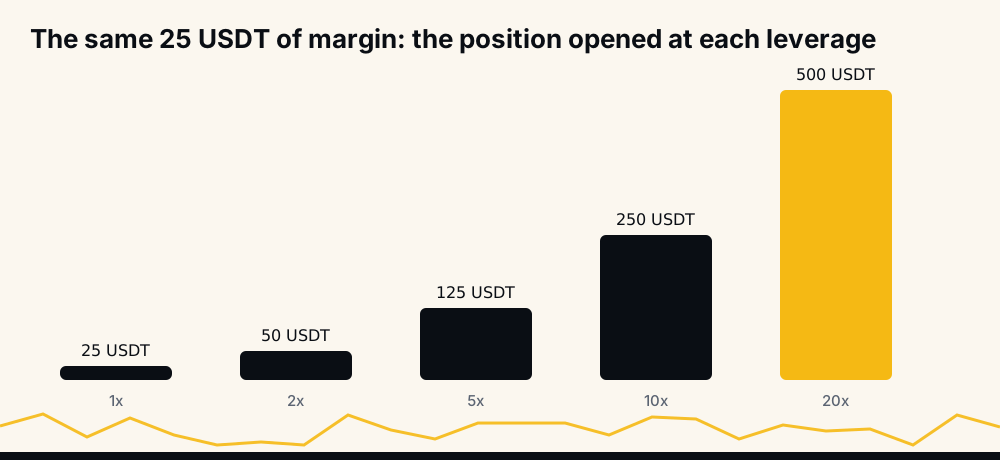
The arithmetic is margin times leverage, and the bot applies whatever you chose to every trade. That is the point of automation and also its danger.
Step 4: managing the exit
A bot that only enters and leaves you to close positions is a signal relay with extra steps. Proper exit management means placing the take-profit and, if you want one, the stop as real orders on the exchange right after the entry, so they work even if the bot itself goes offline.
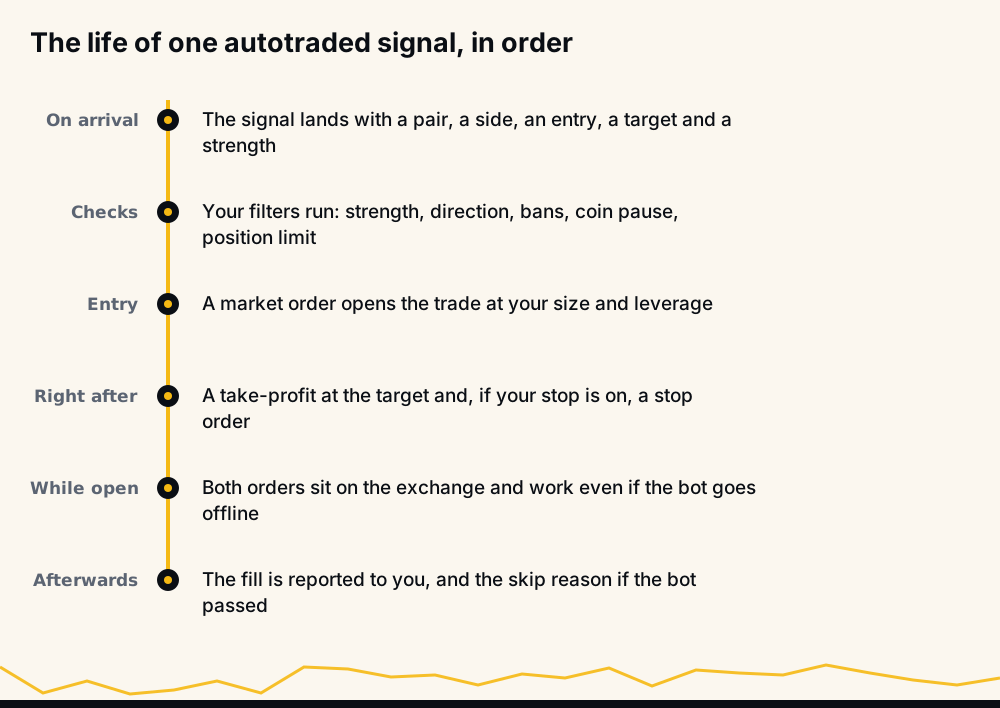
That last point is worth checking for any product. Orders that live on the exchange keep working through an outage; orders that exist only in the bot's memory do not. What happens to open positions if the bot stops covers the cases one by one.
Step 5: reporting what happened
The last job is telling you what was opened, what closed and how, and which signals the bot skipped and why. A bot that only reports wins is a marketing channel. A bot that explains a skip ("your minimum strength filtered this one", "your position limit was full") is something you can actually run.
Reporting has a second layer: the provider's public record. Your own fills show what happened on your account. The provider's record shows what happened to every signal, including the ones you did not take. You need both, because your results will differ from the provider's for reasons that are entirely about your settings.
Signal bots, copy bots and autotraders: who does which job?
The same five jobs get split differently depending on what you buy. This is the distinction that matters most, and it is mostly about who places the order and whose risk rules apply.
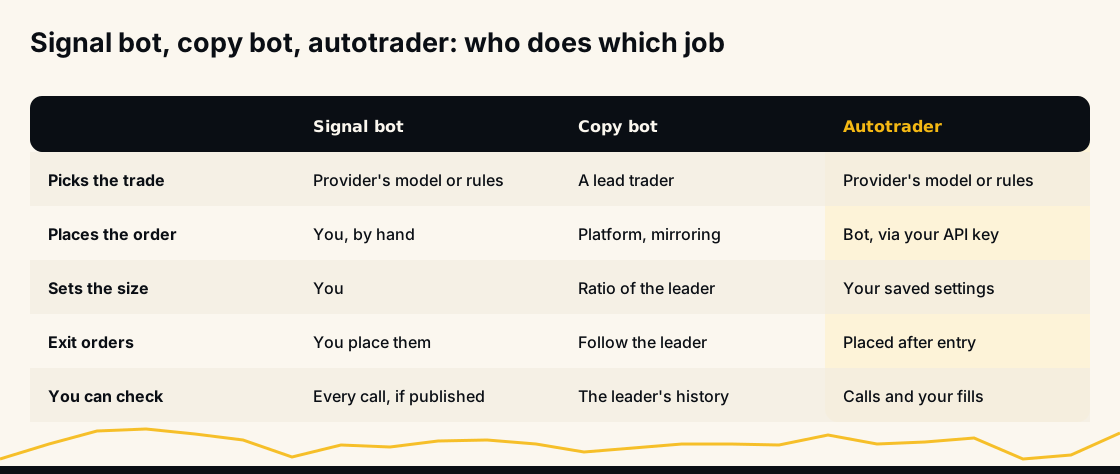
- Signal bots do steps 1 and 2 and hand you the result, usually in a Telegram channel. You place the trade, choose the size and set the exits yourself. Full control, and full workload.
- Copy bots mirror a lead trader's positions onto your account, usually at a ratio of their size. The leader's judgement and the leader's leverage habits become yours. Copy trading compared with signals goes through that trade-off in detail.
- Autotraders take a signal source and do steps 3 to 5 for you, inside limits you set in advance. The trade idea comes from the provider; the size, leverage, stop and position limit come from you.
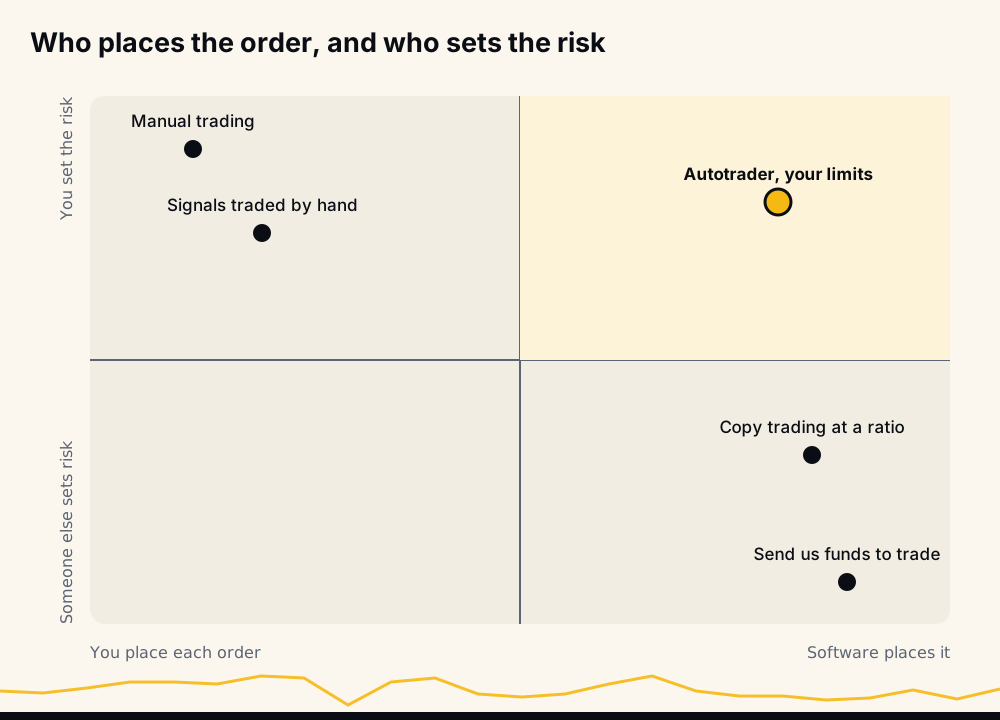
The arrangement to be most careful with sits in the bottom right of that map: software places the orders and someone else sets the risk. That includes any service that asks you to send it funds to trade on your behalf. A legitimate autotrader never needs your money in its own account; it trades on yours.
What AI trading bots cannot do
Automation solves specific problems. It does not solve the ones people most hope it will.
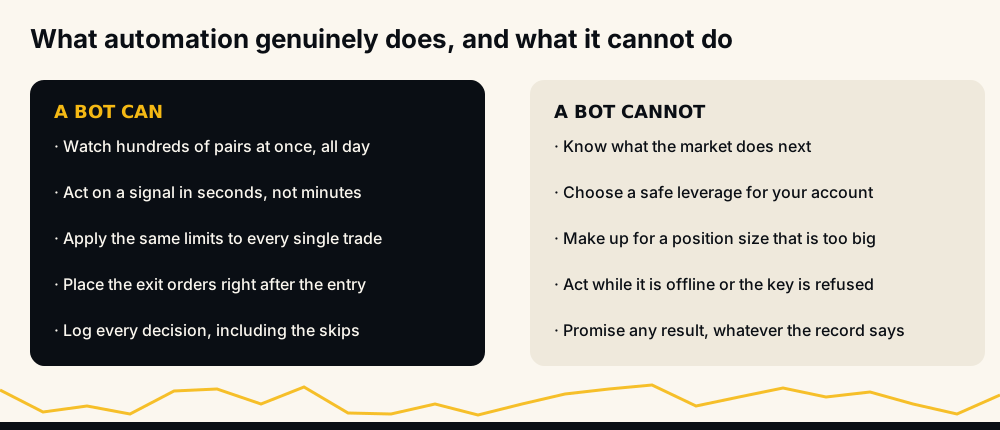
- It cannot see the future. A model that has done well on past data meets a market that has not happened yet. A bad week is always possible.
- It cannot pick a safe size for you. If your settings risk too much, the bot will risk too much, faithfully, on every trade.
- It cannot trade while it is down. If the bot is offline, your key is refused, or your futures wallet lacks margin, new trades do not happen. Exit orders already on the exchange keep working; new entries do not.
- It cannot turn a hit rate into account profit. A signal that reaches its target is not the same thing as money in your account, once leverage, stops, fees and the trades you did not take are counted.
- It cannot remove the need to check. "Set and forget" is a sales line.
Whether AI crypto bots actually work is a question about the record, and that page looks at ours in detail.
Where humans stay in control
A well-built autotrader leaves the decisions that carry the risk with you, and lets you change them at any time. On HafizeBot's autotrader those decisions are member settings, each with its own command in @hafizebot:
- Position size (margin per trade) and leverage, with a choice of isolated or cross margin.
- Position limit, the most positions open at once, counting every open position on the account.
- Minimum signal strength, to take fewer, stronger-rated signals.
- Direction: long only, short only, or both.
- Stop-loss distance and stop type, or no stop at all if you choose.
- Bans on single coins, and on Tier 2 and up, whole Binance sector groups or signal types.
New accounts start conservatively. These are the starting values for accounts set up from 14 October 2026, from the default-settings help page:
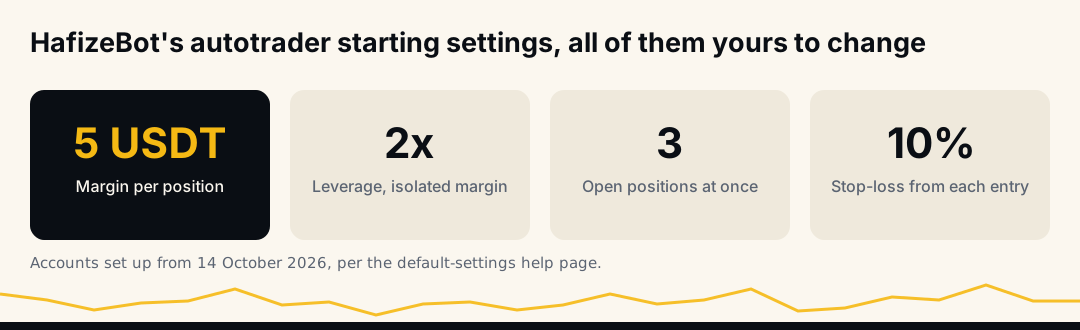
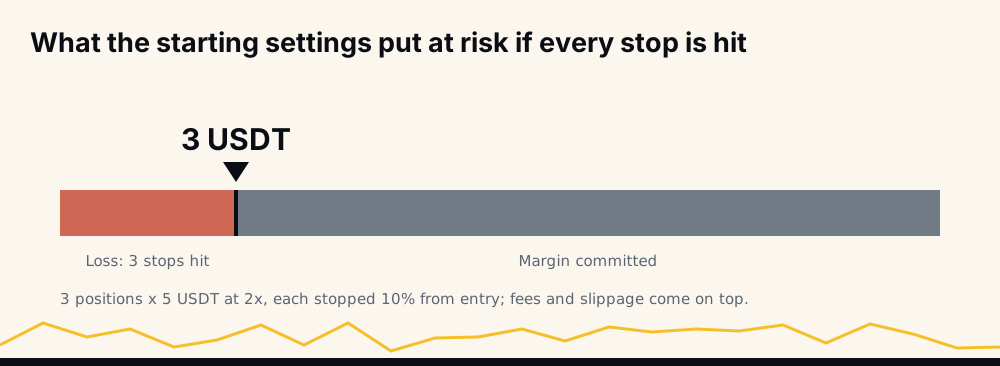
The same page puts those defaults into money. Three positions of 5 USDT margin at 2x is 15 USDT of margin; if every one reached its 10% stop, the loss would be about 3 USDT plus fees and slippage.
Beyond the settings, control is direct: /off stops new trades at once, you can close or change any position yourself on Binance at any time, and deleting the key on the website switches autotrading off. Positions already open stay as they are until you or their orders close them.
How HafizeBot's autotrader fits as one example
HafizeBot is an autotrader in the sense above: the signal comes from our model, and the bot places it on your own Binance USDⓈ-M Futures account, inside your settings, through a key that needs futures trading permission and never withdrawal permission. Your funds never leave your account. Binance USDⓈ-M Futures is the only venue; there is no spot trading and no other exchange.
When a signal passes your filters and you have room for another position, the bot opens it with a market order, places a take-profit limit order at the signal's target and, if your stop is on, a stop order at your distance. /lastsignals lists your recent signals with what the bot did and why it skipped any, and /myresults shows what the bot's own trades did on your account. The setup steps, the key and every setting are in how the HafizeBot autotrader works.
Autotrading is part of VIP. The free three-day trial includes it, capped at 10 USDT of margin per trade and 3 open positions, whatever your settings say. The free channel posts the stronger signals, strength 3 and up, 20 minutes after VIP, which is the cheapest way to watch the model before connecting anything.
How to evaluate an AI trading bot before you connect a key
You do not need to understand a model to judge a bot; check what it publishes and what it asks of you.
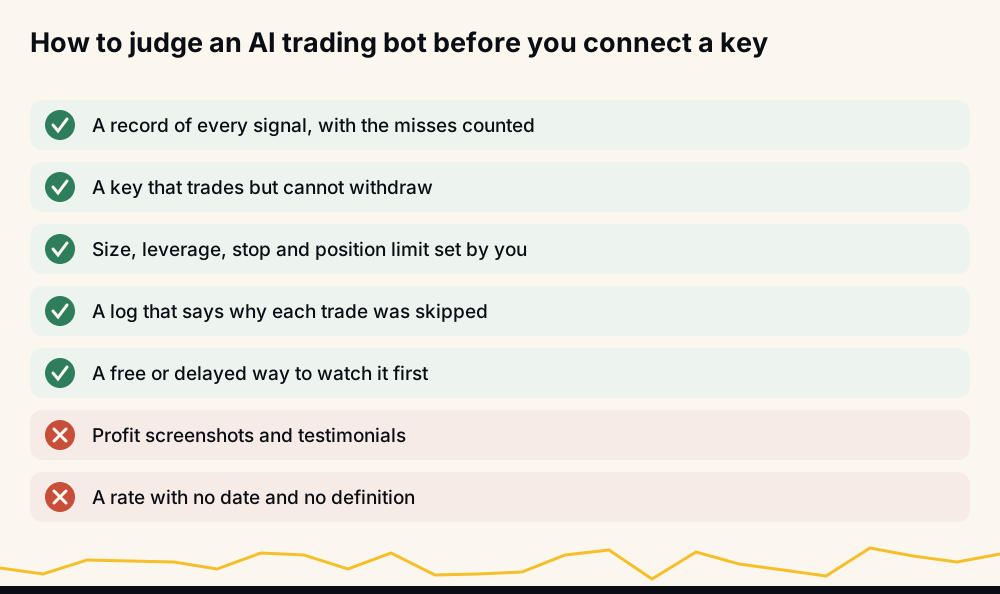
- Ask for the record, and read how it is counted. Every signal, dated, with the ones that failed counted against the rate. How to verify a crypto signal win rate shows how.
- Check what the key needs. Trading only, withdrawals off. A bot that needs more is a different risk.
- Check who sets the risk. Size, leverage, stop and position limit should be yours, visible and changeable.
- Check the reporting. A bot that explains its skips can be trusted with your settings; one that only shows wins cannot.
- Watch before you pay. A delayed free channel or a capped trial lets you see behaviour without risking much.
Two things to ignore entirely: profit screenshots, which are easy to fake and say nothing about the trades you did not see, and any accuracy figure with no date and no definition. An earlier version of this very page quoted "99%" for February 2022 without saying what was counted. That month's spreadsheet shows 430 of its 434 trades reaching their target (99.1%), but those sheets recorded a close only when a target was hit, so a signal that never got there sat as "open" rather than as a loss. A number is only as honest as its definition.
What our record shows, with its definition
On the live performance page, checked on 11 October 2026, August 2026 is the newest settled month: 97.3% of 5,262 broadcast signals reached their target, with 140 missed. A win reached its target; a missed signal did not reach it within the maximum hold. The rate is wins divided by wins plus missed, so every missed signal counts against it. Broadcast signals carry a target and a maximum hold, not a stop. September and October 2026 were still settling, so their rates read high until their newest signals have had their full time.
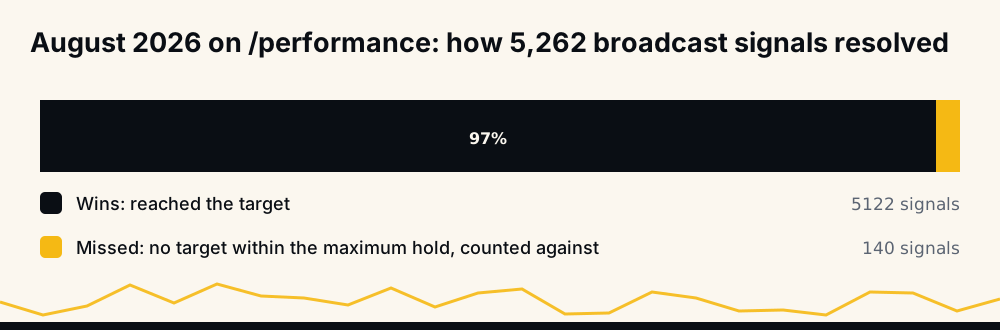
A target-hit rate is not account profit. On a member's account a missed signal is not closed when it misses; it can still reach the target later, or it can sit in loss until your stop or you close it (what happens when a crypto signal expires explains this). For the years before the live page, the 33 monthly spreadsheets from June 2021 to February 2024 are on the reports page, and all 33,694 signals are one download on the signal dataset page. We have no third-party audit of any of it; the raw files are there so you do not have to take our word.
FAQ
Can an AI trading bot trade for me automatically? Yes. An autotrader places orders on your exchange account through an API key, inside limits you set in advance. You still choose the size, leverage, stop and how many positions it may hold, and you can switch it off or close any trade yourself at any time.
Do AI trading bots make money? No bot can promise it. A published record shows how the signals did; your own result depends on your leverage, size, stop and which signals you took. Judge a bot on its dated, defined record, never on screenshots.
Is it safe to give a trading bot my API key? It is safer when the key can trade but cannot withdraw, and when it is restricted to the bot's server address. That stops anyone using the key from moving money out. It does not stop losses from trading, so start small.
What is the difference between a signal bot and an autotrader? A signal bot tells you what to trade and you place the order by hand. An autotrader takes the same kind of signal and places, sizes and exits the trade for you within your settings. Many services, HafizeBot included, offer both: free or delayed signals, and optional autotrading.
Are AI trading bots good for beginners? They remove the work of watching charts, not the need to understand leverage and position size. Start with a free or delayed channel, then a small capped trial at low leverage with a stop on.
Before you switch one on
An AI trading bot is a pipeline: data, signal, order, exit, report. The model sits behind the signal; the size and the exit decide what you can lose, and those should stay in your hands. Watch the free signal channel for a couple of weeks, read the live record with its misses counted, and only then try the autotrader at small size in @hafizebot.
Nothing on this page is investment advice. Leveraged futures carry a high risk of loss, past results do not promise future ones, and you should only trade money you can afford to lose.