Are auto-trading bots safe? A bot that trades through a futures-only API key with withdrawals switched off cannot take money out of your Binance account, but it can lose money inside it: losing streaks happen, a position with no stop-loss can be liquidated, and a bot can go down. Below are the eight worries people raise before connecting HafizeBot, with straight answers, including the ones where the answer is "yes, that can happen".
HafizeBot sends AI-generated signals for Binance USDⓈ-M Futures over Telegram, and VIP members can let it place those signals as orders on their own Binance account. Everything below was checked on 11 October 2026 against our help pages, our terms and the live performance page. Where something depends on your settings, we say which setting.
The quick answer, worry by worry
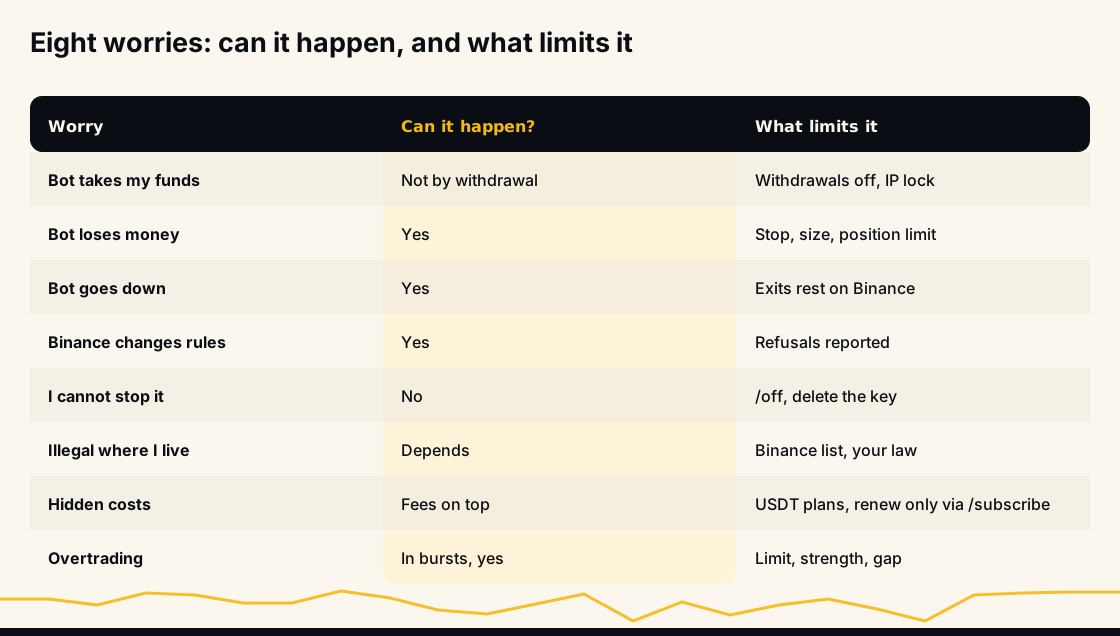
Three of the eight are a clear "no" or "not in the way you fear": the bot never withdraws or transfers your funds, you can always stop it, and nothing renews or charges you by surprise. Four are a "yes": it can lose money, it can go down, Binance can change the rules under it, and signals can arrive faster than your wallet should follow. One, whether it is legal where you live, depends on you and on Binance; we can't decide it. The sections below take them in order.
Can an auto-trading bot steal my money?
Not by withdrawing it, if the key is set up the way we ask. Your trading money stays in your own Binance futures wallet the whole time. The bot places and manages futures orders there through an API key you create, and it has no function that withdraws or transfers money out of your account.
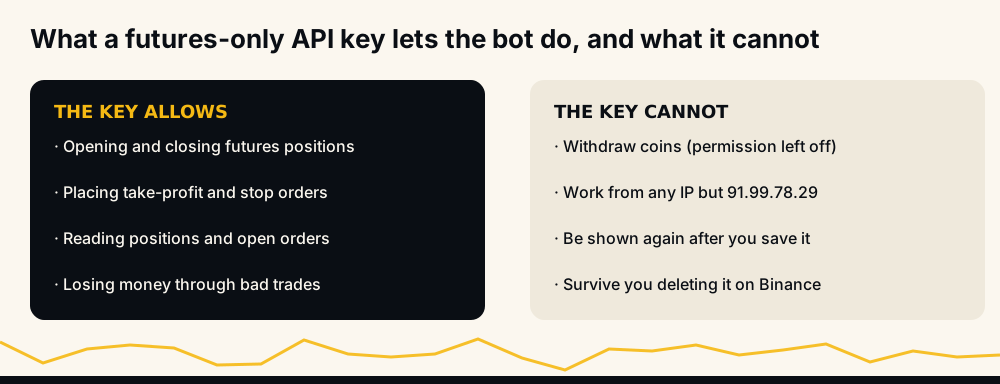
What protects you is in the key itself, on Binance's side:
- Enable Futures on, Enable Withdrawals off. HafizeBot never needs withdrawal permission and never asks for it. If you save a key that has it, the keys page and the bot both warn you.
- Restricted to our server IP, 91.99.78.29. The key then works from that server and nowhere else, even if it leaked.
- Pasted only at hafizebot.com/app/keys, after logging in with Telegram. The secret is encrypted before it is stored and is never shown again. We will never ask for your key or secret in a Telegram chat or by email; anyone who does is not us.
The honest part: a leaked key with withdrawals off cannot withdraw, but it could still lose money by trading badly, which is why the IP restriction matters as much as the withdrawal switch. The guide to connecting a trading bot to a Binance API key safely walks through every permission.
The one payment that does leave your hands is the USDT you pay for VIP. That is a purchase, not a deposit: plans are paid in advance and our terms say there are no refunds, including for unused time. Start with the free trial or the free channel if you are unsure.
Can the bot lose money? Yes
It can, and some days it will. A signal service that says otherwise is the first warning sign in our page on how to tell a legit Telegram trading bot from a scam.
Our public record scores signals. It doesn't score accounts. As of 11 October 2026, the performance page shows that in August 2026, 97.3% of the 5,262 signals broadcast that month reached their target, with the 140 that did not counted against the rate. That figure is a target-hit rate; account profit is a different number. A signal can move a long way against the position before it reaches its target, and what that does to your money depends on your leverage, your stop-loss and your position size, none of which the record knows.
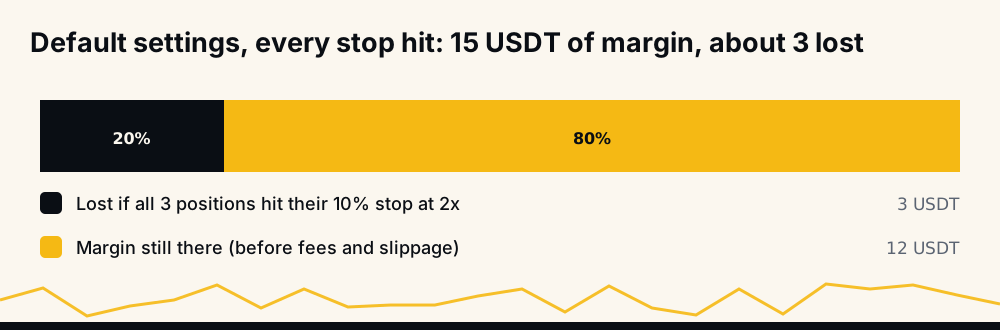
So it is worth knowing your worst case in money before you start. A new account trades 5 USDT of margin per position at 2x leverage, up to 3 positions, with a 10% stop-loss. If every one of those three positions hit its stop, the loss would be about 3 USDT plus fees and slippage. That is arithmetic on the defaults, not a forecast, but it is the number to be comfortable with. Losing streaks are the normal way that number gets approached: several stops in a row during a sharp market move.
What HafizeBot does about it is give you the controls and refuse settings that cannot work. It does not promise anything about the result, and nothing in this article does either.
Liquidation without a stop-loss is the one to fear
This is the honest "yes, that can happen" that matters most. With leverage and no stop, Binance closes the position once price moves past your liquidation distance, and you lose that position's margin.
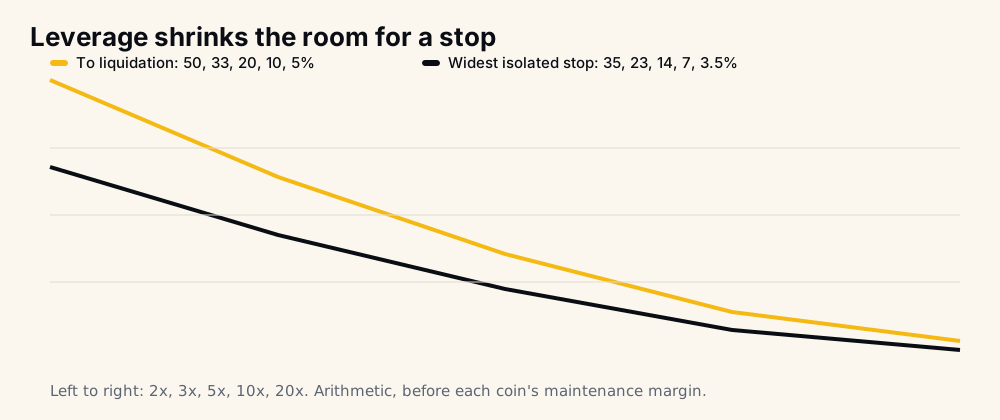
Without a stop, a trade the bot opened closes only at its target, by your hand, or by liquidation, unless you set a maximum hold (/setMaxHold) or a delisting close (/setDelistingClose). Nothing closes it when the signal's time runs out. A signal that moves 40% against before reaching its target counts as a win on the performance page and is a liquidation for a 5x position without a stop.
What the bot does about it:
- New accounts start with a stop. Since 14 October 2026 that is 10% from each entry, at 2x on isolated margin. Accounts opened before 3 October 2026 started with no stop and keep their settings unless changed;
/summaryin the bot shows yours. - It refuses a stop that can never trigger. On isolated margin it refuses a stop wider than about 70% of the liquidation distance: 35% at 2x, 14% at 5x, 7% at 10x. On cross margin a wider stop is saved with a warning.
- It checks the coin's real liquidation price when placing a stop on isolated margin, and places the stop inside it if yours sits beyond.
Turning the stop off remains your choice. Our guide to setting a stop-loss in crypto explains how to pick the distance, and the liquidation price calculator shows where a specific position would be liquidated.
What if the bot goes down?
It can, like any software. The good news is that your exits do not live in the bot. The take-profit and any stop are sent to Binance right after Binance accepts the entry, as reduce-only orders, and Binance fills them whether or not the bot is running.
What stops during an outage is everything that needs a running process: new entries, the Telegram messages about fills, and cleanup of a stop left behind after its take-profit filled. Signals missed during the outage are not replayed later. Our page on what happens to open positions if the bot stops goes through it minute by minute, including the leftover stop you should cancel by hand afterwards. The service status page shows whether the signal service is running and when the last signal was sent.
What if Binance changes its rules?
Yes, Binance sets rules the bot cannot overrule, and they change. Each coin has its own minimum order size. Some stock-style perpetuals need you to accept Binance's TradFi-Perps agreement before Binance takes orders on them. An account in Multi-Assets mode allows only cross margin. A wallet without enough free margin gets its orders refused.
What the bot does is tell you instead of failing silently:
- An entry below a coin's minimum is skipped, and
/lastsignalssays why. - After a refused order on a TradFi coin, the bot stops trying those coins on your account for about a day. New accounts start with TradFi coins banned.
- On a Multi-Assets account, the bot enters on cross margin and marks those entries.
- If Binance refuses an entry for lack of margin, the bot switches auto-trading off and tells you once, rather than collect a refusal on every signal in a burst.
- If Binance refuses a stop, you are told straight away with Binance's reason. The bot does not close the position for you.
There is a limit we cannot work around. HafizeBot trades Binance USDⓈ-M Futures only. If Binance stops offering futures to you, auto-trading stops for you too; there is no other exchange to fall back to.
Can I stop it whenever I want?
Yes, and you never need our permission. Manual intervention is allowed at any time, and settings changes apply straight away.
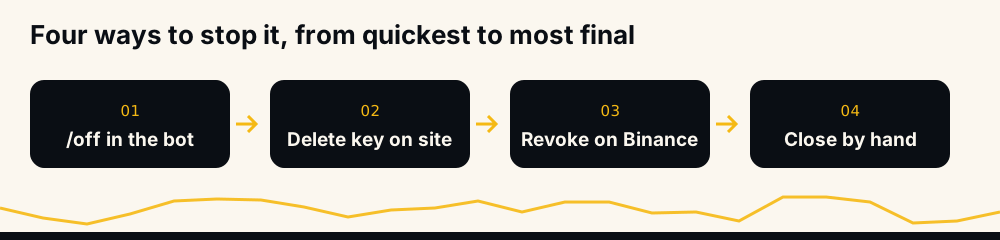
/offin @hafizebot stops new entries.- Delete the key on the keys page. You confirm on a second page, auto-trading is switched off, and the key and secret are wiped.
- Delete the key in Binance's API Management. From then on Binance refuses it, so nothing can trade with it.
- Close positions yourself in the Binance app, at any moment.
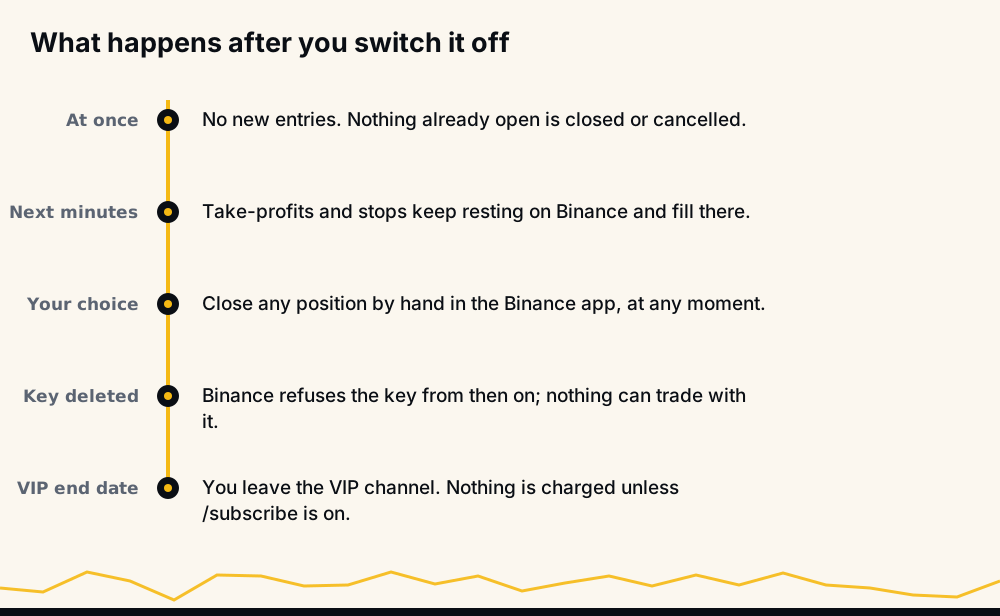
One thing surprises people: stopping the bot does not close anything. Positions already open stay open, with their take-profit and stop resting on Binance. If you want out of a position, close it on Binance.
Is auto-trading legal where I live?
That depends on where you live and on Binance, and we cannot answer it for you. HafizeBot is not an exchange or a broker and never holds your trading funds; the trading happens on your own Binance account.
Reading signals needs only Telegram. Auto-trading needs a Binance USDⓈ-M Futures account in your own name, so it works only where Binance lets you open and use one lawfully. Binance publishes its own List of Prohibited Countries alongside its Terms of Use; read Binance's version, because it changes. Please do not get around a restriction with a VPN or someone else's account. Taxes and local rules on crypto derivatives are yours to check too. None of this is legal or tax advice.
What does it cost, all in?
Three VIP tiers, paid in USDT, no card:
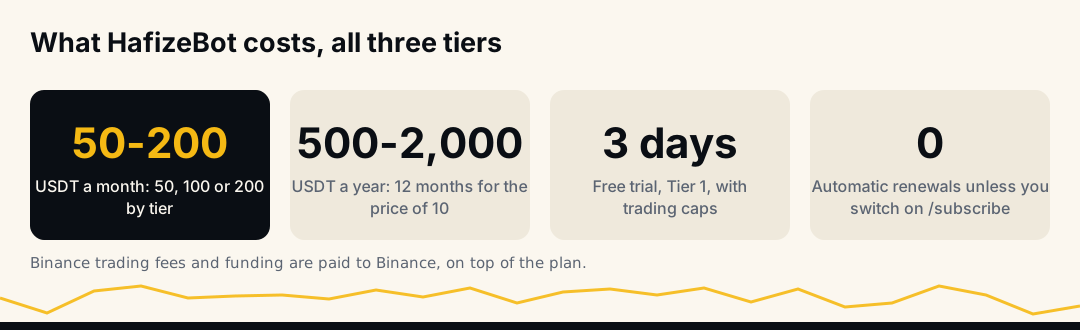
- Tier 1: 50 USDT a month or 500 USDT for 12 months.
- Tier 2: 100 USDT a month or 1,000 USDT for 12 months.
- Tier 3: 200 USDT a month or 2,000 USDT for 12 months.
Every tier gets the same signals at the same time. The tiers differ in auto-trading limits (position size up to 50, 10,000 or 50,000 USDT, and up to 10, 100 or 500 open positions), in filters, and in support. Nothing renews unless you switch on /subscribe, and there are no refunds. On top of the plan you pay Binance's own trading fees and funding, to Binance. The full pricing breakdown helps pick a tier by the size you intend to trade.
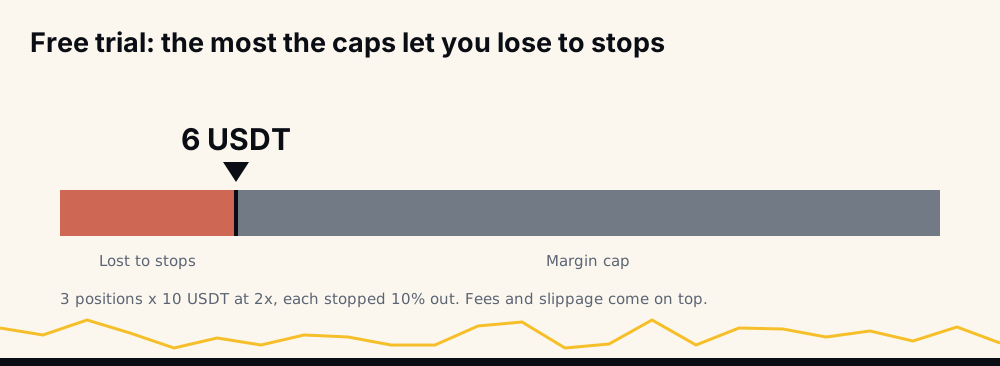
The free three-day trial is Tier 1 with auto-trading included, capped at 10 USDT of margin per trade and 3 open positions. With the default stop and leverage, the most those caps let you lose to stops is about 6 USDT plus fees. Nothing is charged when it ends.
Will it overtrade?
It can trade a lot if you let it. Signal frequency is not fixed: there are more in volatile markets, and they arrive in bursts.
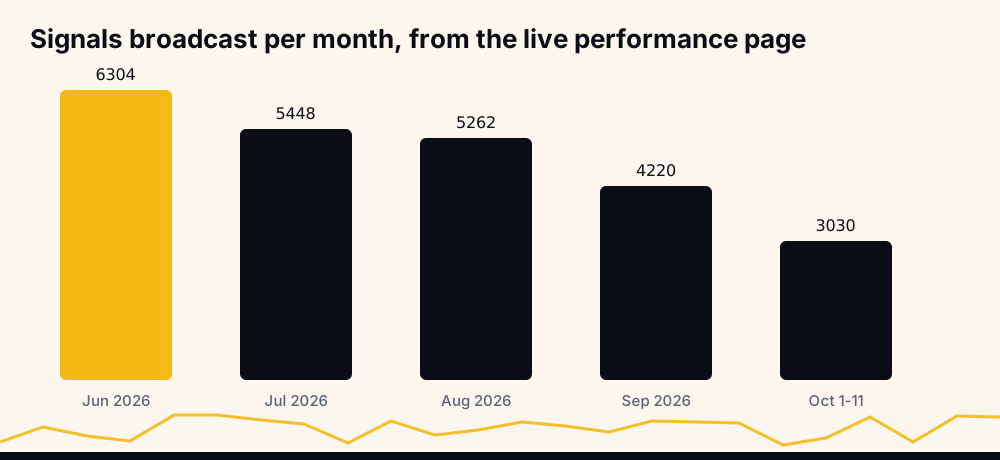
The performance page lists 6,304 signals broadcast in June 2026 and 3,030 in the first days of October. No account should follow all of them, and the bot does not try to. It enters only what passes your own limits:
- Position limit (
/setPositionLimit, 3 by default). It counts every open position on the account, including ones you opened by hand. - Minimum signal strength (
/setMinStrength, 5 by default). Higher means fewer signals. - Same-coin gap (
/setSameCoinGap, 3%). Price has to move that far past your last entry before the bot adds to a coin you hold, and you can block adding altogether. - Coin pause (
/setCoinPause) waits after a position closes before entering that coin again. - Bans for coins on any plan, and for signal types and Binance sector groups on Tier 2 and up.
The test that matters: position size times position limit should fit in your futures wallet. If it does not, Binance refuses entries for lack of margin, and the bot switches itself off and tells you.
Which risks are yours, and which are ours
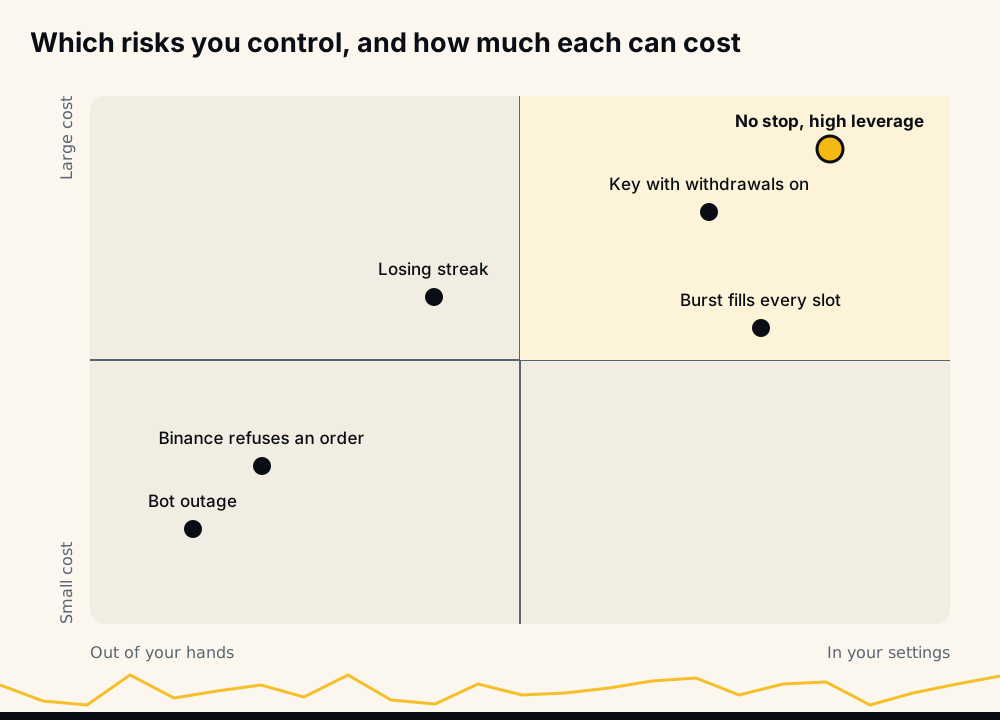
Read the eight answers together and a pattern shows. The risks that cost the most, trading with no stop at high leverage, a key with withdrawals on, a burst that fills every slot, all sit in settings you choose. The ones outside your hands, an outage or a refused order, tend to cost a missed entry rather than your margin. Our terms say it directly: you choose your settings and you are responsible for the trades placed under them.
A five-minute check before you switch it on
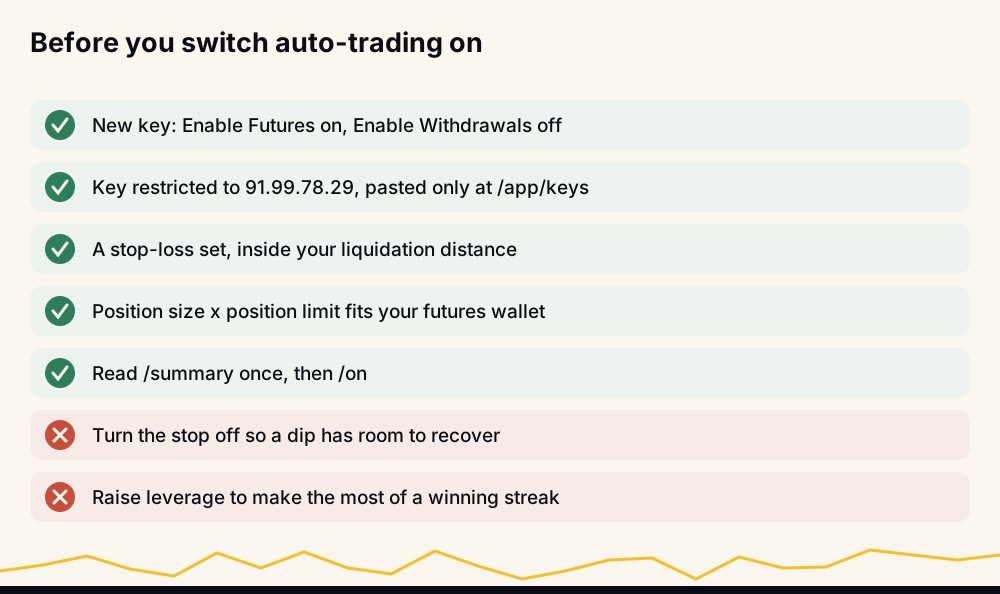
- Create a new key with Enable Futures on and Enable Withdrawals off, restricted to 91.99.78.29.
- Paste it only at the keys page, after logging in with Telegram.
- Keep a stop-loss inside your liquidation distance.
- Multiply position size by position limit and compare it with your futures wallet.
- Read
/summary, then send/on. Before switching on,/onasks Binance whether your key works and tells you if it does not.
How to check us without trusting us
You should not take this page on faith. Every broadcast signal since June 2026 is on the live performance page, with missed signals counted against the rate. The 2021 to 2024 archive is a free download at /data. The free signals channel posts the stronger signals, strength 3 and up, 20 minutes after VIP, so you can watch for weeks before paying. Once you trade, Binance's own trade history has every fill, and /myresults shows what the bot's orders did on your account over the last 30 days. Our page asking is HafizeBot legit also lists what we do not have yet, such as a third-party audit.
Frequently asked questions
Can HafizeBot withdraw money from my Binance account? No. It never withdraws or transfers money out of your account and never needs withdrawal permission. Create the key with withdrawals off; if a saved key allows them, the keys page and the bot warn you.
Is it safe to give a trading bot my Binance API key? It is as safe as the key's permissions. A key with futures trading only, withdrawals off and access restricted to one IP cannot move money out and works nowhere else. It can still trade, so delete it in Binance the moment you think it leaked.
Can I lose more than I put into the bot? On isolated margin, a single position cannot lose more than its own margin. On cross margin, a losing position can draw on your whole futures balance. New accounts start on isolated margin.
What happens to my open trades if I cancel or my VIP ends? Nothing is closed. The bot stops opening new positions, and the take-profits and stops already on Binance stay in place until they fill or you close them.
Are trading bots good for beginners? Only with small sizes and a stop-loss, and only after watching the signals for a while. The free channel and the capped three-day trial exist so a beginner can see how it behaves before risking real size.
Where that leaves you
HafizeBot never needs withdrawal permission and never calls a withdrawal or transfer, and you can stop it at any time. It can still lose money, it can go quiet for a while, and leverage without a stop can turn one bad move into a liquidation. The settings that decide how much you can lose are yours. Nothing here is investment advice; crypto futures carry a high risk of loss, so trade only with money you can afford to lose.